A Product Research Spreadsheet is the fastest way to turn scattered ideas into a clear, data-backed shortlist. This guide is for Amazon FBA sellers who are choosing their next product and want a repeatable method to compare product ideas side by side using demand, competition, and revenue signals. You will learn a simple two-layer framework (Product Type to Specific Product), the key columns to track, and a step-by-step workflow to fill the sheet with SellerSprite data. It works across Amazon US, UK, DE, and JP, but examples assume Amazon.com and USD.
Key takeaways
- A two-level spreadsheet helps you compare broad markets and specific product angles in one view.
- Short-tail keywords define the market ceiling, long-tail keywords reveal easier entry points you can actually win.
- Use SellerSprite to pull search demand, competitor signals, and estimated sales faster than manual browsing.
- Score ideas with the same rules every time, then validate the top 1 to 3 with reviews and profit math.
- Keep the spreadsheet alive after launch to build a pipeline of next products and expansion niches.
Table of contents
- Why a product research spreadsheet matters
- Understand Product Types vs Specific Products
- How to set up your product research spreadsheet
- Step-by-step: using the spreadsheet with SellerSprite
- Real example: from idea to shortlist
- Download the template and next steps
- FAQ
- About the author
- References
Why a product research spreadsheet matters
A good spreadsheet turns product research into a decision process, not a guessing game. Instead of opening 50 tabs and forgetting what looked promising, you collect the same metrics for every idea and compare them in one place.
- Speed: you can scan 20 ideas in minutes once the sheet is filled.
- Consistency: every idea is judged by the same inputs, not mood or hype.
- Clarity: demand, competition, and revenue signals sit next to each other.
- Repeatability: keep the sheet and reuse it for your next launch and expansion niches.
Pro Tip
Do not start with one product you love. Start with 10 to 30 product types, then let the spreadsheet tell you where the opportunity actually is.
Common mistake
Researching only the broad category keyword. You might find a huge market, but miss the specific long-tail niches where a new seller can realistically rank and convert.
Understand Product Types vs Specific Products
This spreadsheet is designed around a two-layer product research framework. Layer 1 is the market. Layer 2 is the niche you can win first.
Short-tail "Product Type" keywords
A product type is a broad short-tail keyword (often 1 to 2 words) that describes the overall market you are evaluating. Think "travel mug" or "pet carrier". This layer helps you estimate the market ceiling and understand whether the category is worth your time.
Long-tail "Specific Product" keywords
A specific product is a long-tail keyword (often 3 to 5 words) that describes a narrower angle inside the product type. It usually includes an audience, feature, size, material, use case, or style. Examples: "travel mug for kids" or "pet carrier airline approved".
How the two levels work together
Product Type tells you how big the opportunity could be if you become a top seller. Specific Product tells you where you can enter and win first. Many successful launches start by owning one long-tail niche, then expanding variants and keywords until the brand competes in the broader category.
Boost your Amazon keyword strategy
Discover SellerSprite to analyze keywords, track competitors, and uncover profitable growth opportunities. Start optimizing your listings with data-driven insights today.
How to set up your product research spreadsheet
Build your sheet in two sections: Product Type (market-level) and Specific Product (niche-level). Each row should answer the same question: is this idea worth testing compared to the others?
Core columns for Product Type (market-level data)
Use these columns to quickly compare broad markets:
- Short-tail keyword: the product type you are evaluating.
- Amazon search volume: demand inside Amazon for the category term.
- Google search volume: broader interest outside Amazon (optional but useful).
- Top seller monthly revenue (average of top listings): a rough ceiling signal.
- Competition snapshot: number of relevant page 1 products or top competitors.
- Notes: constraints like seasonality, fragile, hazmat risk, oversized, or heavy PPC.
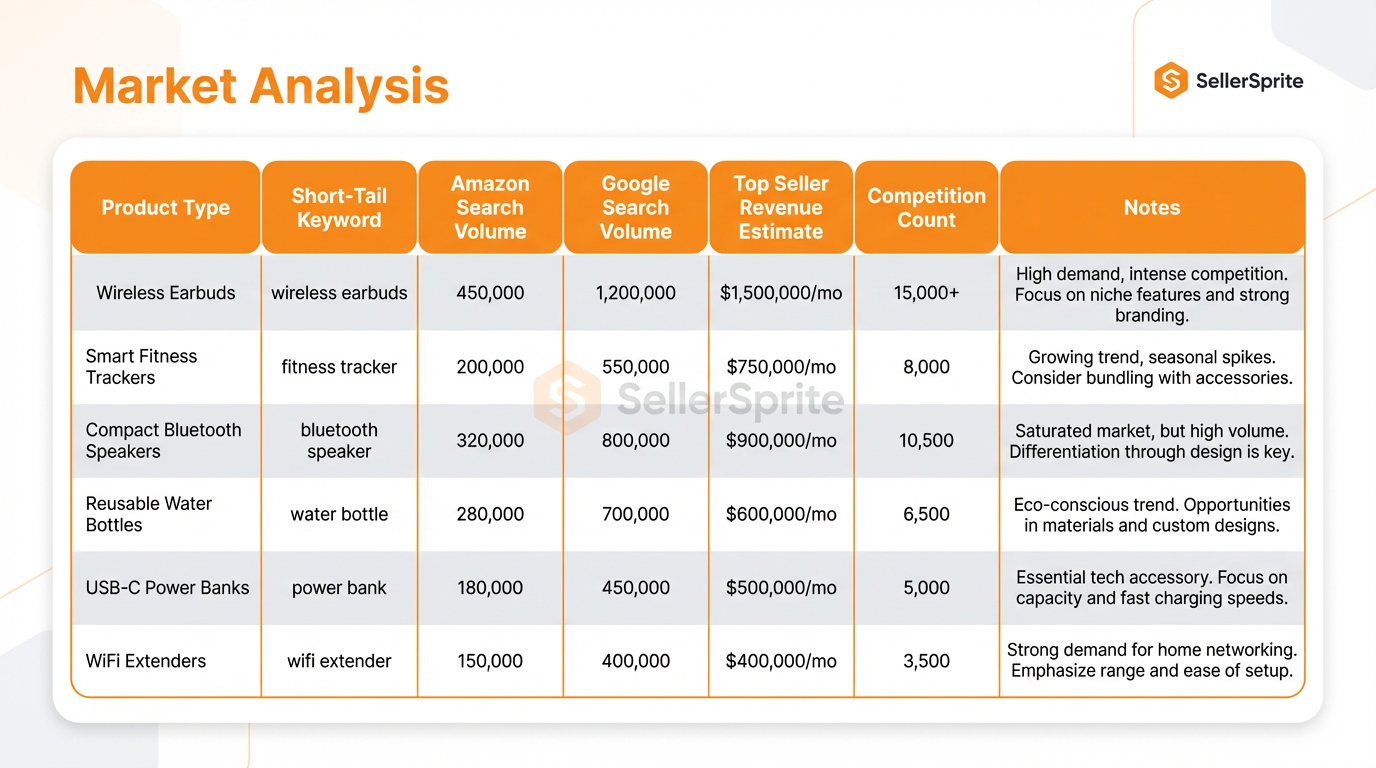
Figure 1. Product Type section layout for market-level comparison.
Core columns for Specific Products (niche-level data)
For each product type, list 5 to 10 long-tail variations you could realistically enter with a differentiated offer.
- Long-tail keyword: the specific niche angle.
- Amazon search volume: niche demand for that exact phrase.
- #1 seller monthly revenue: the prize for winning the niche.
- Page 1 competition count: how crowded the niche looks at a glance.
- Top ASINs: paste 3 to 10 representative competitors for deeper review.
- Review pain points: recurring complaints you can fix in your version.
- Differentiation idea: a short note like "bigger size", "better material", "clearer markings", "bundle", "gift-ready packaging".
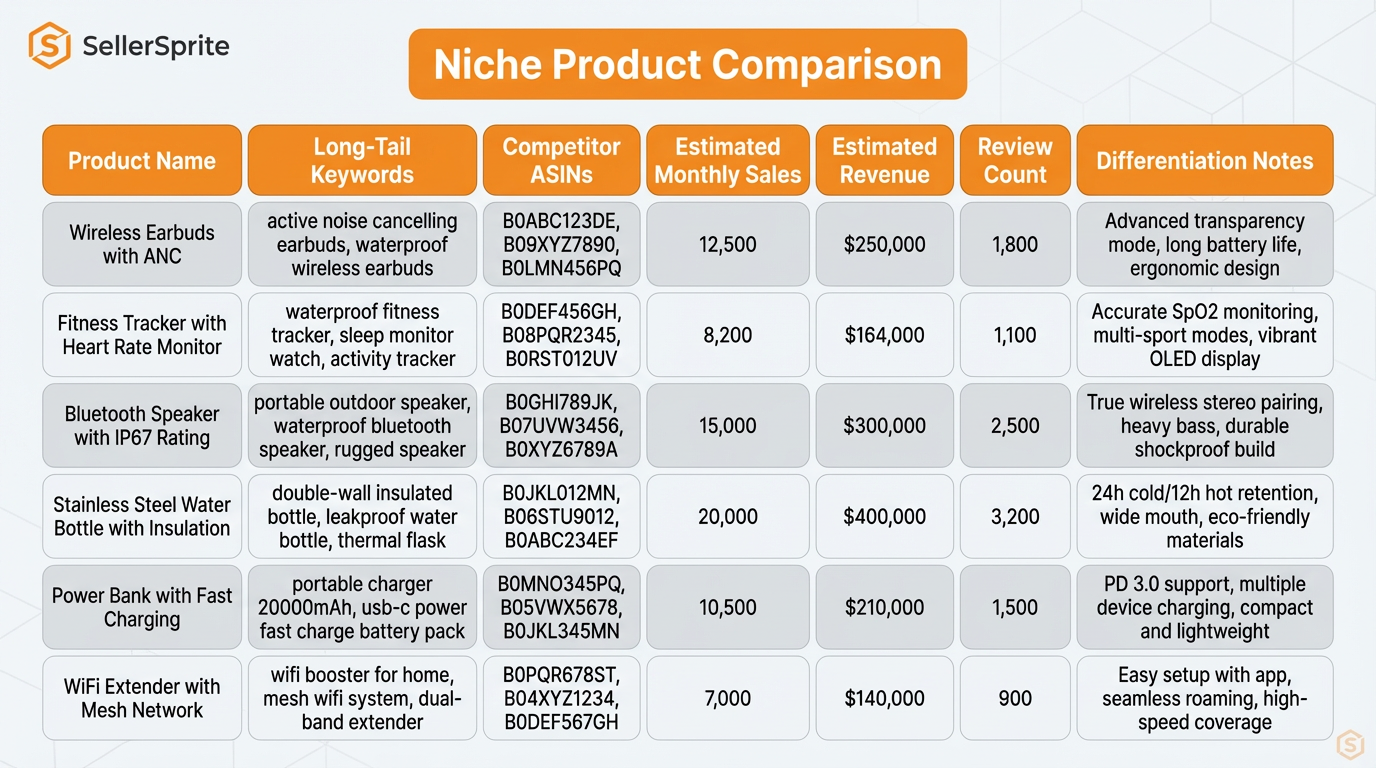
Figure 2. Specific Product section layout for niche-level comparison.
Optional advanced fields (profit, review analysis, trend data)
- Price band and fees: estimate margin by price range before you source.
- Review count and rating: helps gauge how hard it is to compete on social proof.
- Seasonality and trend notes: flag products that spike only during holidays.
- Marketplace and currency: record US, UK, DE, JP separately; default prices to USD unless noted.
Key columns for your product research spreadsheet
| Level | Column | SellerSprite data source | Why it matters |
|---|---|---|---|
| Product Type | Amazon search volume | Keyword Research | Measures Amazon-native demand for the market. |
| Product Type | Top competitors snapshot | SellerSprite Product Research and extension data | Shows how many strong listings already dominate the market. |
| Specific Product | Long-tail keyword ideas | Keyword Research and ABA Research | Finds niche entry points and buyer intent variations. |
| Specific Product | Competitor ASIN list | Product Research | Let's compare what the market actually sells and how listings are positioned. |
| Specific Product | Review pain points | Customer Review Analysis | Turns complaints into differentiation requirements. |
| Both | Profit estimate | Calculate Profit Margins | Prevents "great demand, bad margin" mistakes before you buy inventory. |
| After launch | Tracking shortlist performance | Product tracking | Confirms whether your chosen niche behaves as your research predicted. |
Step-by-step: using the spreadsheet with SellerSprite
Use this workflow every time you research a new product. It is designed to keep you moving from ideas to evidence to action.
1) Collect data for each Product Type
- Brainstorm 10 to 30 product types. Add one row per short-tail keyword.
- Open Keyword Research and record Amazon search volume for each product type.
- Use SellerSprite Product Research signals (or extension quick view) to capture a competition snapshot and estimated revenue benchmarks for leading listings.
- Add one sentence notes: seasonality, fragile, heavy, compliance risk, or obvious red flags.
2) Expand each Product Type into Specific Products
Create 5 to 10 long-tail keywords under each product type using one of these patterns:
- Audience or use case: for kids, for twins, for the office, for travel, for small dogs.
- Feature: insulated, leakproof, waterproof, BPA-free, foldable.
- Style: floral, minimalist, boho, vintage.
- Size or compatibility: 20 oz, airline approved, fits cup holder.
Then use Keyword Research and ABA research to confirm which long-tail phrases have real demand in your target marketplace.
3) Pull competitor ASINs and estimate the "prize."
- Search the long-tail keyword on Amazon and list the top relevant products.
- Open Product Research and copy 3 to 10 competitor ASINs into your sheet.
- Record the estimated monthly revenue for the top listing that truly matches the keyword intent.
- Record a competition snapshot, such as page 1 of relevant products. Fewer relevant options usually mean easier differentiation.
4) Add qualitative notes using reviews
Numbers tell you where to look. Reviews tell you how to win.
- Open Customer Review Analysis for your top competitor ASINs.
- Add 3 to 5 recurring complaints into your spreadsheet as “pain points.”
- Write one concrete improvement per pain point (materials, durability, sizing clarity, packaging, instructions, bundle).
5) Score and shortlist product ideas
Use a simple scoring sheet so your shortlist is defensible. Here is one practical model (adjust thresholds to your category):
| Score area | How to score (example) | Weight |
|---|---|---|
| Demand | Amazon search volume and top listing revenue for the long-tail keyword | 40% |
| Competition | Page 1 saturation, review barriers, brand dominance | 30% |
| Differentiation | Clear improvement path based on review pain points | 20% |
| Profitability | The fee and cost estimate shows a viable gross margin | 10% |
When you are down to 1 to 3 finalists, sanity-check profitability before you source. Use Calculate Profit Margins to model FBA fees and landed cost scenarios.
Ready to analyze keywords smarter and grow your Amazon business faster?
Real example: from idea to shortlist
Here is a mini case you can replicate. Numbers below are anonymized and simplified to show the decision logic, not to promise results.
Mini case: new seller shortlists one niche and validates it
- Input: 30 product types brainstormed, 180 long-tail specific products generated.
- Filter 1 (market screen): kept 8 product types with clear Amazon demand and no obvious compliance or logistics red flags.
- Filter 2 (niche screen): kept 3 long-tail niches where demand was measurable, and page 1 looked less crowded.
- Validation: used review analysis to identify 4 recurring complaints and designed fixes around materials, sizing clarity, and packaging.
- Outcome example: after 90 days, the product stabilized in the 300 to 500 units per month range with roughly 25% to 35% gross margin, then expanded into two adjacent long-tail keywords.
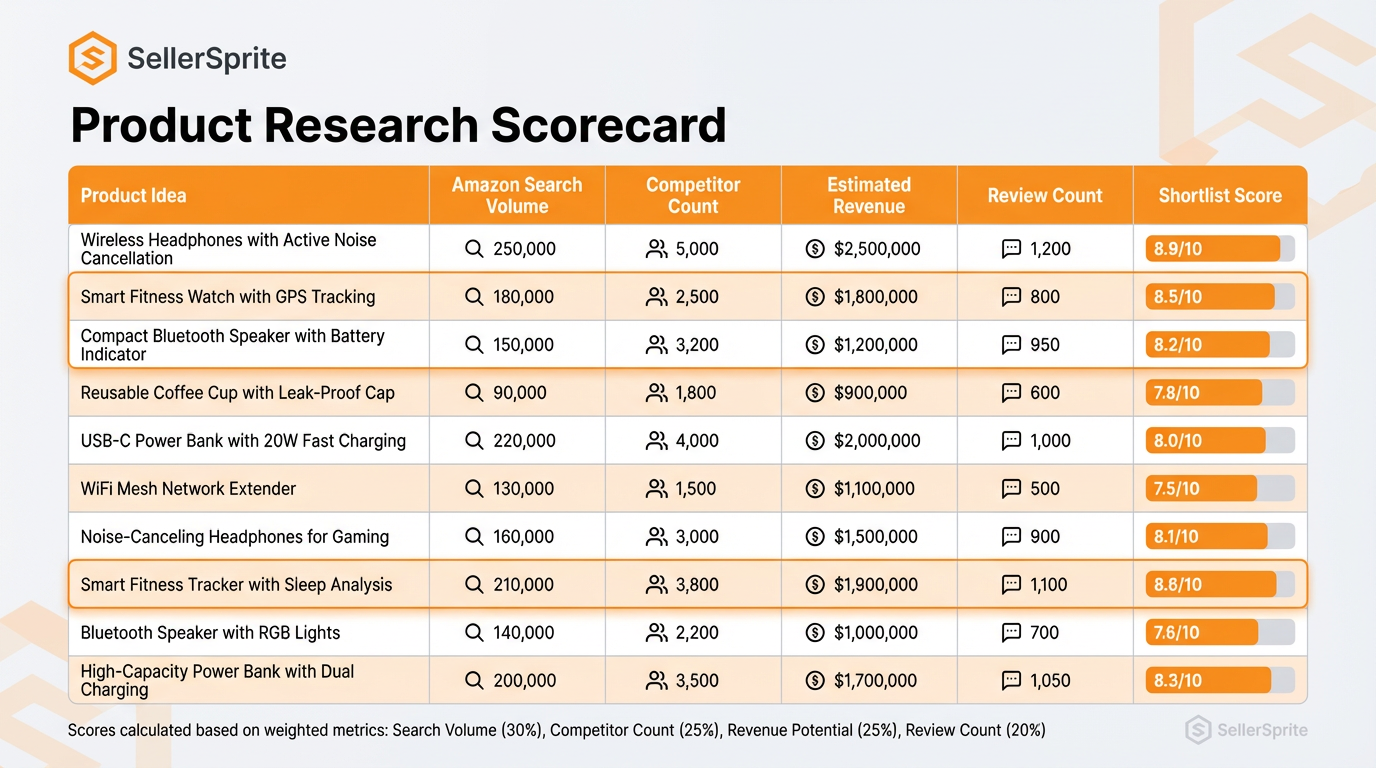
Figure 3. Example rows with masked values to illustrate how a shortlist is formed.
Sample excerpt (simplified)
| Level | Keyword | Amazon search volume | #1 monthly revenue (est.) | Page 1 relevant products | Notes |
|---|---|---|---|---|---|
| Product Type | Travel mug | High | High | High | Heavy brand dominance needs strong differentiation |
| Specific Product | Travel mug for kids | Medium | Medium | Lower | Fix leaks, improve lid durability, and add a travel pouch |
| Specific Product | Travel mug leakproof for school | Medium | Medium to high | Medium | Stronger intent, clear pain points in reviews |
Download the template and next steps
Want to download and use the product research template mentioned in this article? Get access here: Click to open the Product Research template
Use SellerSprite with this spreadsheet
- Use Keyword Research to fill demand columns for both short-tail and long-tail keywords.
- Use Product Research to capture competitor ASINs and benchmark estimated revenue signals faster.
- Use Customer Review Analysis to turn complaints into your differentiation checklist.
- Use Calculate Profit Margins to confirm the numbers work before you order inventory.
- After launch, monitor your shortlist and expansion ideas in Product tracking.
Common mistake
Downloading the template and filling it out once. The spreadsheet becomes powerful when you keep updating it and reuse it as your product pipeline.
Next step checklist
Add 20 product types today, expand each into 5 long-tail niches, and shortlist 1 to 3 finalists with a score you can defend.
Share Your Sourcing Journey With SellerSprite Community
Join the SellerSprite community on the Facebook Group to share your sourcing journey, ask questions, and get support from fellow Amazon sellers.
View The SellerSprite Course Directory
Ready for the next step? Open the SellerSprite Academy course directory to continue building your Amazon FBA skills chapter by chapter.
FAQ
How many product ideas should I add before deciding?
A practical minimum is 50 specific product entries. If you can, aim for 80 to 120. The goal is to cast a wide net, then let the spreadsheet narrow it down with consistent rules.
Which marketplace should I use if I plan to sell in multiple countries?
Start with the marketplace you will launch first. If you plan US and EU, create separate columns (or separate tabs) for each marketplace because search volume, price bands, and competitors can differ significantly.
How often should I update the data?
Update your finalists right before you source and again right before launch. For your longer idea list, a monthly refresh is usually enough. Markets move, and the sheet is most valuable when your shortlist reflects current signals.
What is a "good" competition level for a new seller?
There is no universal number, but you generally want a long-tail niche where page 1 is not packed with near-identical listings and where review barriers are not extreme. Use the spreadsheet to compare relative difficulty across your own options.
Can I rely on estimates for revenue and demand?
Treat them as directional signals, not guarantees. Use estimates to rank ideas, then validate the top picks with deeper competitor review, cost modeling, and a cautious inventory plan.
About the author
SellerSprite Team
Amazon Product Research Strategists, SellerSprite
We help Amazon sellers turn market signals into launch decisions using repeatable frameworks and spreadsheet-driven workflows. Our methodology in this guide is the 2-layer product research framework (Product Type to Specific Product) combined with a spreadsheet-driven decision process.
Reviewed by: SellerSprite Product Research Lead
References
- Amazon Brand Analytics overview (PDF): Amazon Brand Analytics one-pager
- Amazon Seller University video: Brand Analytics: Top Search Terms report
- Seller Central forum announcement: Updates to the Brand Analytics Search Terms Report
- SellerSprite help guide: Product Research feature overview (extension guide)
The Previous: Discovering High-Potential Products with Product Research
The Next: Turn Your Passions into Profitable Amazon FBA Products