





本篇目录
如何使用卖家精灵【选产品】功能?新手入门教程
下载PDF2026/09/02 阅读数 (205,575) 评论数 (22)
💡选产品-功能入口:点击这里
一、【选产品】功能是什么?它适合解决什么问题?
卖家精灵【选产品】是一款用于筛选具体亚马逊产品和 ASIN 的选品工具。它可以根据月销量、月销量增长率、评论数量、评分、价格、上架时间、配送方式等条件,帮助卖家快速发现近期增长产品、潜力新品、可改进产品和适合进一步分析的候选产品。
如果说【选市场】偏向宏观选品,主要用于判断类目和市场是否值得进入;那么【选产品】偏向微观选品,主要用于从具体产品维度判断某个 ASIN 是否值得研究。
实际选品时,建议将两个功能结合使用。先用【选市场】确定方向,再用【选产品】筛选具体 ASIN;或者先用【选产品】发现机会产品,再回到【选市场】验证该产品所在市场是否值得进入。
【选产品】适合在没有明确选品方向,或已经有大致方向但需要筛选具体产品时使用。
您可以用它解决以下问题:
1、不知道选什么产品,想先从系统推荐模式中寻找机会;
2、想发现短期销量增长较快的产品;
3、想寻找销量不高但正在增长、上架时间较短的潜力新品;
4、想找到销量不错但评分较低、存在改进空间的产品;
5、想筛选以 FBM 自发货为主、库存压力相对较低的产品;
6、想观察卖家数量较多、市场需求较明显的产品;
7、想根据自己的预算和经验,自定义筛选条件;
8、想对筛选出的产品继续进行历史数据查看、市场分析、产品对比、产品监控或批量导出。
二、【选产品】的推荐选品模式怎么用?
推荐选品模式是卖家精灵为不同选品场景预设的筛选条件。点击对应模式后,系统会自动填充过滤条件,您可以直接查看筛选结果,也可以在此基础上继续修改参数。
对于新手卖家,建议优先使用系统内置的推荐选品模式。熟悉功能后,您也可以根据自己的资金预算、供应链能力和选品方向,继续调整或细化筛选条件。

1、销量飙升榜:如何发现短期需求快速增长的产品?
【销量飙升榜】用于筛选近期月销量增长较快的产品。短期销量飙升通常说明该产品近期需求明显增加,可能与季节、节日、热点事件或新品增长有关。
点击【销量飙升榜】后,系统会自动填充以下条件:月销量 > 300;月销量增长率 > 10%。

【销量飙升榜】适合想快速发现增长产品的卖家,尤其适合用于捕捉短期需求变化。
例如:
- 季节性产品在旺季前后销量上升;
- 节日性产品在特定节日前需求增长;
- 热点事件带动某类产品销量突然上涨;
- 某些潜力产品从平稳期进入快速增长期。
筛选出销量飙升产品后,不建议只看当前销量增长,还需要查看历史销量趋势。
如果某个产品每年都在相同时间段销量飙升,通常说明它更偏季节性或节日性产品,需要提前规划备货和推广节奏。
如果某个产品过去销量较平稳,近期突然出现明显增长,则可以进一步判断它是否属于潜力产品或新需求产品。

2、潜力市场:如何筛选增长中的新品机会?
【潜力市场】用于筛选月销量不算特别高,但正在增长且上架时间较短的产品。这类产品可能还没有进入激烈竞争阶段,适合进一步观察是否存在切入机会。
点击【潜力市场】后,系统会自动填充以下条件:月销量 < 600;月销量增长率 > 10%;上架日期为近半年。

【潜力市场】比较适合贸易型中小卖家。
这类产品的特点是:当前月销量不算特别高,但处于增长趋势;上架时间较短,说明新品也有机会在短时间内打入市场。
如果您希望控制资金投入,也可以继续添加价格筛选条件,例如将价格设置为 20-40 美金,用来寻找投入成本相对可控、同时具备一定利润空间的产品。
使用【潜力市场】时,可以重点关注以下指标:
- 产品是否为近 6 个月上架;
- 月销量是否持续增长;
- 评论数量是否还没有形成较高壁垒;
- 价格是否处于可接受区间;
- 同类产品是否已经出现明显竞争;
- 产品是否有供应链跟进或差异化优化空间。
潜力市场的判断重点不是“现在卖得最多”,而是“是否正在增长,并且还有进入空间”。
3、未被满足的市场:如何寻找可改进产品?
【未被满足的市场】用于筛选销量不错但评分较低的产品。销量不错说明市场有需求,评分较低说明买家体验可能存在问题,因此这类产品往往存在改进空间。
点击【未被满足的市场】后,系统会自动填充以下条件:月销量 > 300;评分值 < 3.7。

【未被满足的市场】更适合有产品改造能力的工厂型卖家。
如果一个产品已经有一定销量,但评分较差,说明用户需求存在,但当前产品没有完全满足买家预期。此时可以进一步分析评论内容,找到产品质量、材质、功能、包装、尺寸、配件或使用体验上的问题,再判断是否有机会通过产品升级切入市场。

如何用这个模式做产品升级?
建议按照以下步骤分析:
第 1 步,筛选出月销量较高、评分较低的产品。
第 2 步,查看产品评论,重点分析差评和中评。
第 3 步,总结买家集中反馈的问题。
第 4 步,判断这些问题是否可以通过产品改造解决。
第 5 步,结合供应链能力,评估是否值得开发升级款。
4、不压库存的市场:如何筛选 FBM 自发货产品?
【不压库存的市场】用于筛选月销量不错、配送方式为 FBM 的产品。这类产品适合想降低库存压力、初步练手或测试零库存转卖模式的卖家参考。
点击【不压库存的市场】后,系统会自动填充以下条件:月销量 > 300;上架时间为近半年;配送方式为 FBM。
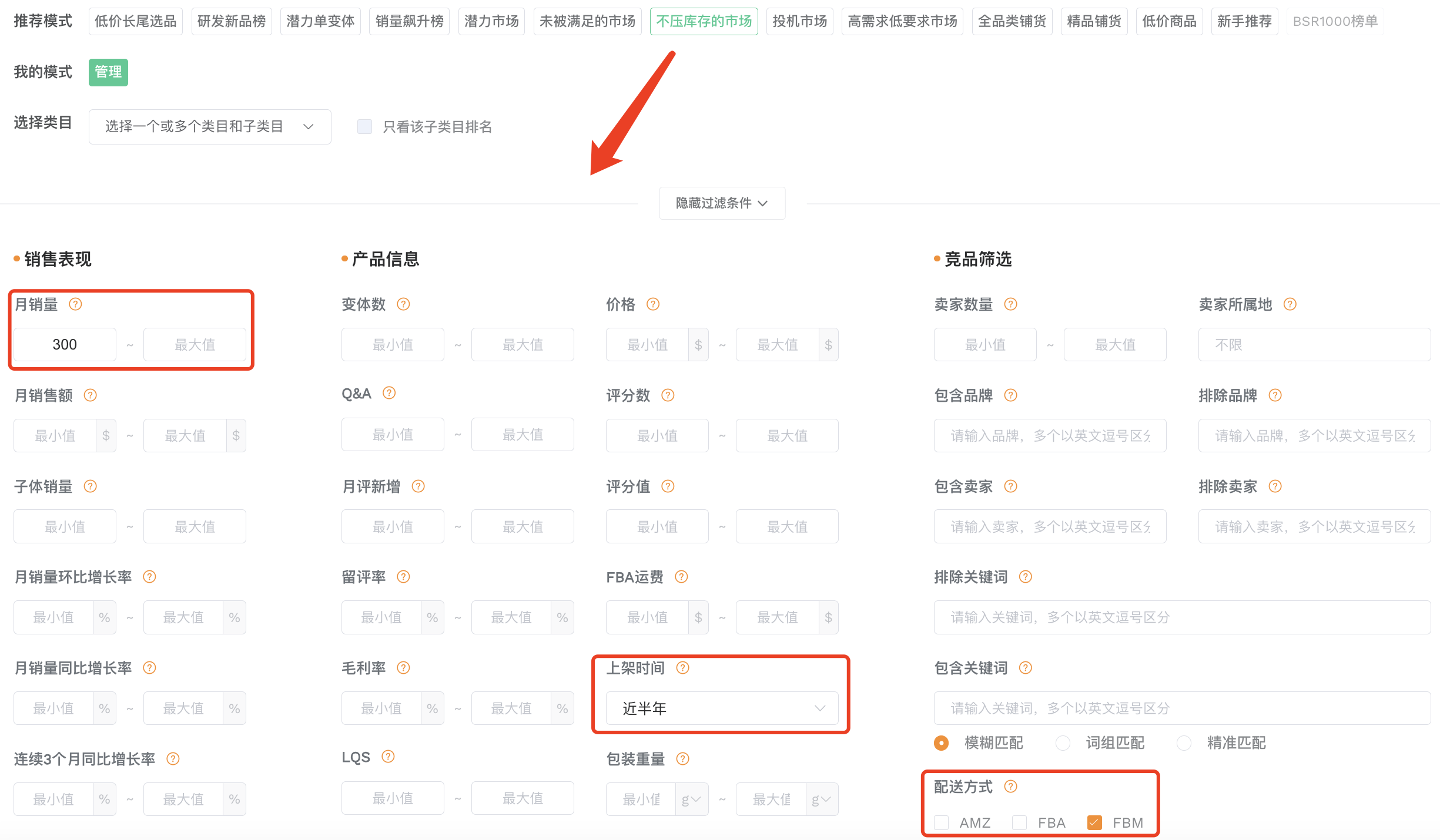
如果您刚进入亚马逊,想先练习选品和销售流程,或者想尝试库存压力相对较低的销售方式,可以关注某些类目下销量不错但以自发货为主的产品。
FBM 产品不代表完全没有风险,但可以作为判断产品履约方式和库存压力的一个参考维度。
如何寻找同款货源?
在筛选结果中,点击产品下方的【1688找货源】【Alibaba】按钮,可以跳转到阿里巴巴和 1688 寻找同款货源。
查找货源时,建议继续核对:
- 产品外观是否一致;
- 材质、尺寸、规格是否匹配;
- 采购价格是否有利润空间;
- 物流成本和交付周期是否可控;
- 是否存在品牌、专利或版权风险。

5、投机市场:如何观察卖家数量较多的产品?
【投机市场】用于筛选月销量较高、卖家数量较多的产品。这类产品通常说明市场需求较明显,但竞争和合规风险也需要重点评估。
点击【投机市场】后,系统会自动填充以下条件:月销量 > 600;卖家数量 > 3。

当一个产品销量较高,并且存在多个卖家时,说明该产品可能有较大的市场需求,也可能存在跟卖情况。
对于新店铺来说,这类产品可以作为观察流量分布、市场需求和产品通用性的参考,但不建议盲目跟卖。

使用【投机市场】时,建议重点判断以下问题:
- 产品是否为通用款;
- 是否存在品牌、商标、专利或版权风险;
- 跟卖卖家数量是否过多;
- 价格竞争是否激烈;
- 是否还有差异化开发空间。
尤其需要注意:不要跟卖专利产品和品牌产品,避免产生侵权和账号风险。
6、新手推荐:新手卖家如何快速筛选产品?
【新手推荐】是为新手卖家设置的推荐模式,用于筛选有一定销量、价格相对适中,并且通过排除关键词过滤掉部分竞争激烈产品的结果。
点击【新手推荐】后,系统会自动填充以下条件:月销量 > 300;月销量增长率 > 3%;价格范围为 15-60 美金;上架时间为近1年;配送方式为 FBA。

【新手推荐】适合刚开始学习亚马逊选品的卖家。
新手卖家通常需要避免一开始就进入竞争过于激烈的红海市场。该模式通过销量、增长率、价格、配送方式等条件,帮助新手先筛出相对适中的产品结果,再进行下一步判断。
使用【新手推荐】后,建议继续查看:
- 产品评论数量是否过高;
- 评分是否稳定;
- 价格是否有利润空间;
- 上架时间是否过久;
- BSR 排名是否稳定;
- 历史销量趋势是否健康;
- 同类产品竞争是否过于集中。
推荐模式可以帮助您快速开始,但最终是否值得做,还需要结合产品数据、供应链和市场竞争综合判断。
7、自定义选品:如何根据自己的思路设置筛选条件?
当您熟悉【选产品】中的各项数据指标,或者已经有大致选品方向后,可以使用自定义筛选条件。
自定义选品适合根据自己的资金预算、供应链能力、运营经验和目标市场,组合多个条件筛选产品。
自定义选品示例
如果您是中小型卖家,资金预算不高,希望寻找一款有一定销量、价格适中,并且短期内有机会做起来的产品,可以参考以下条件:月销量 > 500;月销量增长率 > 10.0%;评论数量 < 50;价格区间为 10-30 美金;上架日期为近半年。
这组条件可以帮助您筛选出已有一定销量基础、近期增长较明显、评论壁垒相对较低、价格适中的产品。
或者如果您已经有自己的选品思路,并填写好了过滤条件,可以点击【保存当前模式】,将当前输入的筛选条件保存为自己的模式。
保存后,下次可以直接在【我的模式】中点击使用,无需重复填写相同条件。

如何组合不同筛选思路?
您也可以将【潜力市场】和【未被满足的市场】的筛选思路结合起来,寻找刚起步但仍有改进空间的产品。
例如,可以重点关注:
- 上架时间较短;
- 月销量正在增长;
- 评论数量不高;
- 评分不理想;
- 产品存在明显可优化点。
这类产品可能仍处于新品萌芽阶段,如果能更早发现问题并推出优化版本,就有机会提前切入市场。
三、【选产品】其它使用技巧
除了基础查询外,【选产品】还提供多种辅助功能,帮助您更深入地分析产品和市场。
1、列表模式与大图模式
选产品结果支持【列表模式】和【大图模式】两种浏览方式。
列表模式适合看数据:
如果您需要快速对比产品的销量、价格、排名、评论等指标,可以使用列表模式。
大图模式适合看外观:
如果您更关注产品外观、款式、颜色、设计和使用场景,可以切换到大图模式。大图模式能更直观地展示产品图片,适合做款式调研和视觉对比。

2、查看 ASIN 历史数据
在产品结果列表中,点击右侧历史趋势图标,可以查看相关 ASIN 最近 2 年的数据变化趋势。
可查看的历史趋势包括:销量趋势、子体销量趋势、历史趋势、留评率、核心关键词趋势。

历史数据适合用于判断产品表现是否稳定。
例如:
- 如果产品销量长期稳定,说明该产品可能有持续需求;
- 如果销量只在某几个月突然升高,可能存在季节性或短期活动影响;
- 如果价格长期下降,可能说明竞争加剧;
- 如果评论持续增长,说明产品可能仍在稳定出单;
- 如果 BSR 排名波动较大,需要进一步结合销量趋势判断真实表现。
3、自定义品类与市场分析
如果您对某个产品感兴趣,可以直接点击产品下方的【市场分析】按钮,跳转到卖家精灵选市场功能,对该产品所在类目进行市场分析。
您也可以勾选产品,将其加入【自定义品类】,用于后续集中分析。

适用场景:自定义品类适合在以下场景使用
- 想把多个候选产品放在一起比较;
- 想分析某个细分市场的整体表现;
- 想观察同类产品的价格、销量和竞争情况;
- 想为新品开发建立一个参考样本池。
4、产品对比、流量词对比与拓展流量词
当您需要横向比较多个竞品时,可以使用对比功能。
产品对比
勾选需要对比的产品后,点击【产品对比】按钮,即可对这些 ASIN 的销量、价格、BSR 排名等数据进行横向对比。
产品对比最少选择 2 个产品,最多可选择 5 个产品。
流量词对比
流量词对比可以帮助您比较多个竞品的关键词覆盖情况,了解不同竞品之间的流量来源差异。
拓展流量词
拓展流量词对比适合用于发现更多相关关键词,帮助您补充关键词库,为 Listing 优化、广告投放和新品调研提供参考。

5、产品监控
如果您想持续跟踪某个竞品,可以点击产品右侧的关注按钮,将该产品添加至【产品监控】。
添加后,您可以在【产品监控】中查看该产品的后续数据变化。
产品监控会每 24 小时更新一次数据,支持监控的信息包括:BSR 排名、价格、评论数、其他产品表现变化。

适用场景:产品监控适合用于
- 跟踪核心竞品价格变化;
- 观察竞品评论增长速度;
- 判断竞品排名是否稳定;
- 监控新品或潜力产品的后续表现;
- 及时发现竞争对手的运营动作。
6、批量导出数据
选产品支持批量导出数据,方便您进行离线分析、团队协作或长期存档。

四、常见问题
Q1:选产品和选市场应该先用哪个?
A:两种方式都可以。如果您已经有目标类目,可以先用【选市场】判断市场,再用【选产品】筛选具体产品。如果您没有明确方向,也可以先用【选产品】发现感兴趣的 ASIN,再用【选市场】分析该产品所在类目。
Q2:销量飙升的产品一定值得做吗?
A:不一定。销量飙升可能来自季节性、节日性、短期热点或突发需求。判断是否值得做,需要结合历史销量趋势、价格变化、评论增长、供应链能力和竞争情况综合分析。
Q3:未被满足的市场应该重点看什么?
A:未被满足的市场应重点查看评论内容,尤其是差评和中评。销量不错但评分较低,说明产品有需求,但买家体验没有被充分满足。如果卖家具备产品改造能力,可以通过评论分析找到升级方向。
Q4:不压库存的市场是不是没有库存风险?
A:不是。不压库存的市场主要指以 FBM 自发货为主的产品,库存压力可能相对较低,但仍需要评估采购成本、物流成本、交付时效、售后风险和平台规则。
Q5:投机市场可以直接跟卖吗?
A:不建议盲目跟卖。投机市场可以用于观察需求较大、卖家数量较多的产品,但跟进前必须确认是否存在品牌、专利、商标、版权或平台规则风险。
Q6:自定义选品条件怎么设置更合理?
A:自定义选品条件应结合资金预算、供应链能力和运营目标设置。预算有限的卖家可以关注价格适中、评论数量较低、销量有增长、上架时间较短的产品;有产品改造能力的卖家可以关注销量不错但评分较低的产品。

真诚点赞,手留余香
网友评论
全部评论 (22) / 我的评论 (22)
最新 (22) / 最热 (22)
- 1
- 2