TL;DR: Mastering your Amazon business finances requires knowing your true numbers. An Amazon revenue calculator helps you estimate gross sales, but a comprehensive Amazon profit calculator factoring in FBA fees, COGS, and advertising is essential for determining actual ROI and margins. Read on to learn how to calculate net profit and compare FBA vs. FBM models.
Key Takeaways
- Distinguishing between revenue (total sales) and profit (net earnings) is critical for sustainability.
- FBA fees vary significantly based on product size and weight tiers; accurate classification prevents margin erosion.
- Sellers must account for hidden costs like returns, storage, and PPC spending to get a realistic ROI.
- Using an automated tool like the SellerSprite Profit Calculator minimizes human error in complex calculations.
Table of Contents
- What Does an Amazon Revenue Calculator Do?
- Key Takeaways for Amazon Sellers
- What to Enter Into an Amazon Revenue Calculator
- How to Calculate Amazon Revenue, Net Profit and ROI
- FBA vs. FBM Revenue Calculation
- Step-by-Step SellerSprite Profit Calculator Workflow
- Revenue Calculator Scenarios
- Common Mistakes When Estimating Amazon Revenue
- FAQ
- References
Note on marketplaces: This guide is specifically optimized for the US market.
Succeeding on Amazon is not just about moving units; it is about arithmetic. Many new sellers launch products believing they are profitable, only to realize months later that their Amazon FBA revenue calculator estimates were overly optimistic. To build a scalable business, you must move beyond gross revenue and understand the intricate web of fulfillment costs, referral fees, and advertising expenses. This guide provides a comprehensive breakdown of how to use an Amazon revenue calculator effectively, differentiate between FBA and FBM fulfillment models, and calculate the true ROI of your inventory.
What Does an Amazon Revenue Calculator Do?
An Amazon revenue calculator is a specialized tool designed to help sellers project the financial performance of their products. While basic calculators might only show gross sales based on price and volume, advanced tools like the SellerSprite Profit Calculator integrate Amazon's complex fee structures to provide precise net profit estimates. It allows sellers to input variables such as product dimensions, manufacturing costs, and marketing spend to visualize their bottom line before investing in inventory. By simulating different scenarios, sellers can identify the optimal price point that balances competitiveness with profitability.
Revenue vs. profit vs. cash flow
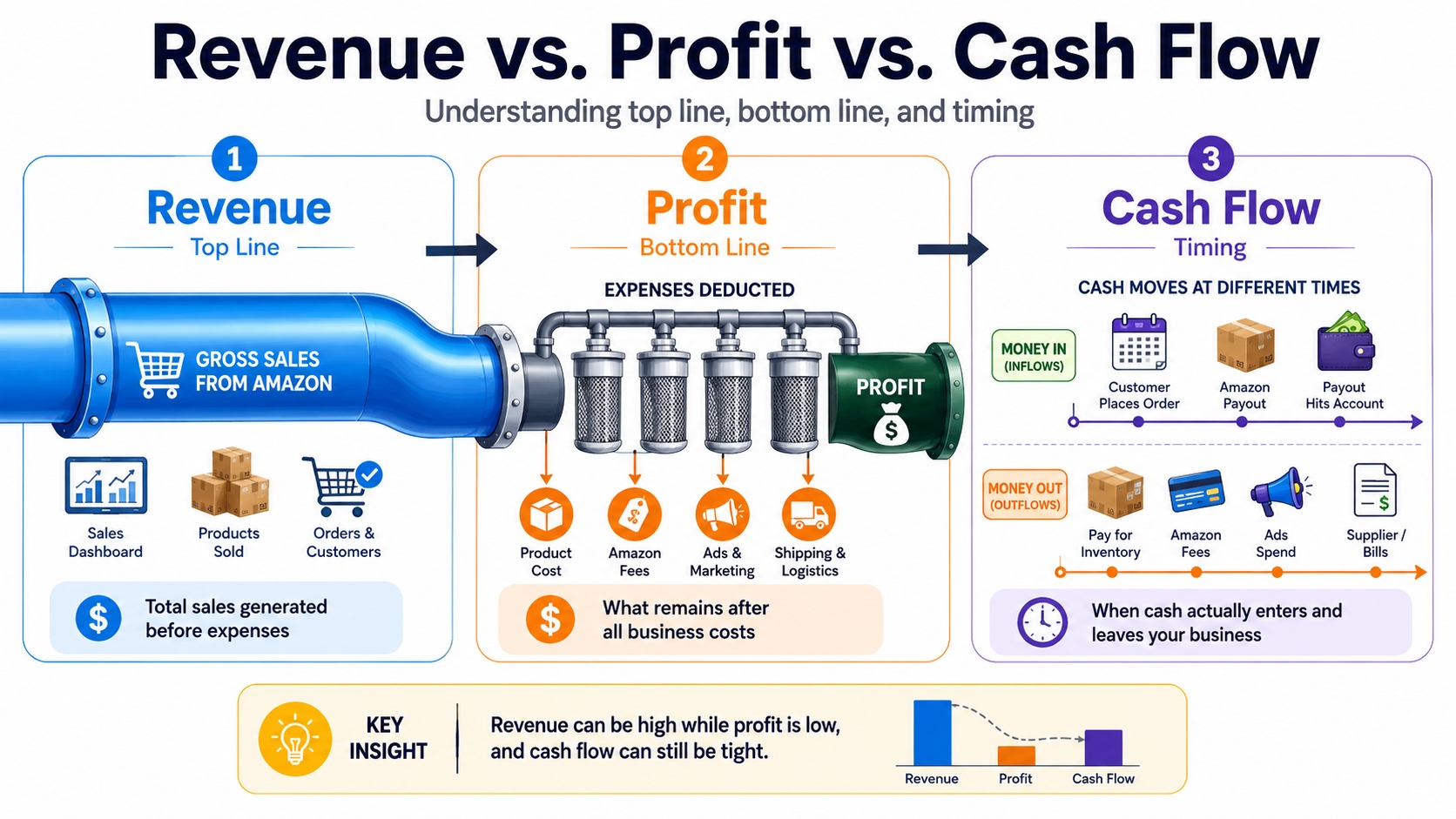
Before diving into calculations, it is vital to distinguish the three pillars of financial health. Revenue represents the total amount of money generated from sales before any expenses are deducted. It is often referred to as the "top line" and can be deceivingly high. Profit, or net income, is what remains after all costs including COGS, shipping, Amazon fees, and taxes that are subtracted from revenue. Cash flow, on the other hand, refers to the timing of when money actually enters and leaves your bank account, which is critical for managing inventory replenishment cycles. A common mistake is confusing high revenue with high profit; a product with $100,000 in monthly revenue but $105,000 in costs is a losing venture.
Definition Check: Financial Metrics
- Revenue: Total Sales Price x Quantity Sold.
- Profit: Revenue - (COGS + Fulfillment Fees + Referral Fees + Advertising + Other Expenses).
- Cash Flow: Net cash generated (Revenue) minus Cash paid out (Inventory purchases, Fees paid to Amazon).
Key Takeaways for Amazon Sellers
Understanding the mechanics of an Amazon profit margin calculator is the difference between a stagnant hobby and a thriving enterprise. Many sellers focus solely on the selling price, overlooking the variable costs that eat into their margins. By focusing on the inputs that drive your profitability, you can make data-driven decisions regarding product sourcing and pricing strategies.
Inputs that change your margin most
Certain variables have a disproportionate impact on your net profit margin. The most significant input is usually the Cost of Goods Sold (COGS), which includes manufacturing and packaging. A small 10% increase in COGS can wipe out the entire profit margin of a low-margin product. Second is the Fulfillment Fee, which is dictated by the product's size tier. Misclassifying a product as "Standard Size" when it is actually "Oversize" can lead to unexpected fee spikes. Finally, PPC (Pay-Per-Click) Spend is a volatile input; during launches, advertising can consume 30-50% of revenue, drastically altering the profit landscape. Sensitivity analysis on these inputs within your calculator is recommended.
Why FBA and FBM must be compared separately
The economics of Fulfillment by Amazon (FBA) and Fulfillment by Merchant (FBM) differ fundamentally. An FBA vs. FBM calculator is essential because FBA bundles pick, pack, ship, storage, and customer service into a fee (plus a weight handling fee), while FBM requires you to calculate individual shipping rates via carriers (UPS, FedEx) and account for your own warehousing labor. FBA generally commands higher conversion rates and Prime eligibility but comes with higher storage risks and long-term storage fees. Conversely, FBM offers lower direct fulfillment costs for heavy or bulky items but requires significant operational overhead.
What to Enter Into an Amazon Revenue Calculator
To get an accurate output from an Amazon ROI calculator, you must feed it precise data. Garbage in, garbage out. The accuracy of your financial projection depends entirely on the specificity of the data you input regarding costs, fees, and pricing.
Product price
This is your planned selling price on Amazon. It is often helpful to enter the price of your top competitors to see their potential margin structure, then adjust your price to see how a slight decrease affects your net profit. Remember that your price must cover all costs plus your desired profit margin.
Referral fee category
Amazon charges a referral fee (usually 15% for most categories) on the total sales price, including shipping. However, categories like Electronics (8%) or Amazon Device Accessories (45%) vary significantly. Ensure your calculator allows you to select the correct category, as a wrong percentage here can throw off your entire feasibility study.
FBA or FBM fulfillment cost
If using FBA, this is the automated fee based on the dimensional weight or actual weight, whichever is greater. If using FBM, you must estimate the per-unit shipping cost based on carrier zones. This section is critical for an FBA fees calculator to function correctly, as fees can range from $3.00 for small standard items to over $100 for heavy/bulky items.
Product cost and inbound shipping
Enter the total manufacturing cost per unit. Do not forget to amortize the cost of molds, tooling, or samples into the per-unit cost. Inbound shipping refers to the cost to air or ocean freight the product from the factory to the Amazon fulfillment center (or your warehouse), divided by the number of units in the shipment.
PPC and promotion costs
Marketing costs should be factored on a per-unit basis. Calculate your total ad spend and divide it by the number of units sold to determine the ad cost per sale. Additionally, if you plan to offer coupons or lightning deals, input the discount amount here as it directly reduces your effective revenue.
Optional costs that beginners forget
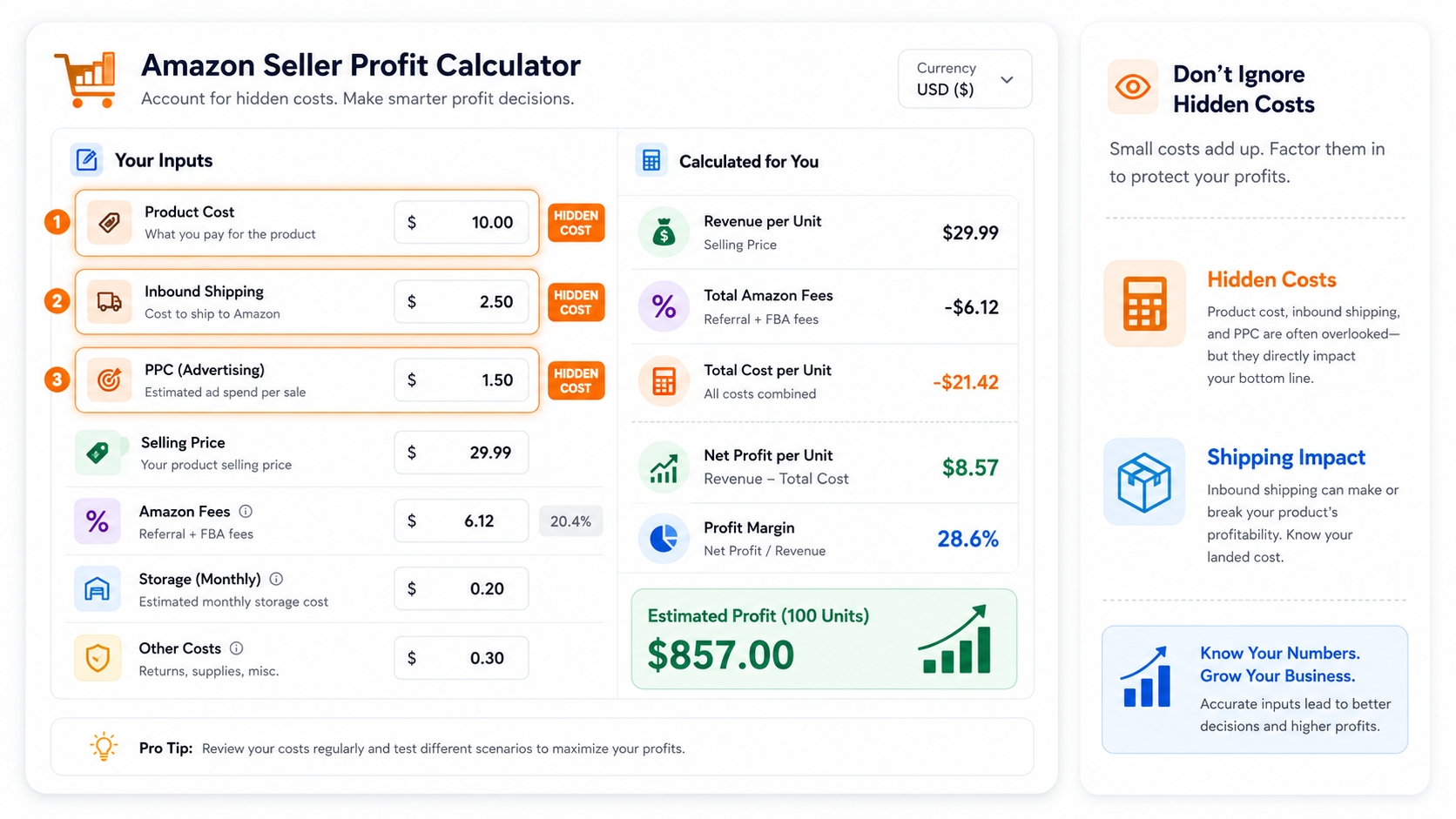
Beyond the obvious costs, several hidden expenses can erode margins. These include returns processing costs (fees charged by Amazon even when an item is returned), prepaid label refunds, packaging supplies (poly bags, bubble wrap), and FBA removal or disposal orders if inventory becomes stale. Advanced calculators allow you to enter a "returns rate" percentage to automatically deduct these potential losses from your projected revenue.
How to Calculate Amazon Revenue, Net Profit and ROI
While tools automate this process, understanding the underlying math empowers you to troubleshoot issues and optimize your business manually. Below are the core formulas every Amazon seller should memorize.
Gross revenue formula
Gross revenue is the simplest calculation. It is simply the price at which the item is sold multiplied by the quantity sold.
Net profit formula
Net profit requires subtracting all variable and fixed costs from your gross revenue. This is the true indicator of business health.
ROI formula
Return on Investment (ROI) measures the efficiency of your capital expenditure. A high ROI means your inventory investment is generating good returns relative to its cost.
Total Cost of Investment includes COGS + Inbound Shipping + Prep/Labeling costs.
Profit margin formula
Profit margin is the percentage of revenue that turns into profit. It helps you compare profitability across different products regardless of price.
Example calculation table
To illustrate these formulas, consider a product sold for $25.00 on Amazon FBA.
| Metric | Value ($) |
|---|---|
| Selling Price | 25.00 |
| COGS + Shipping | 5.00 |
| Amazon Referral Fee (15%) | 3.75 |
| FBA Fulfillment Fee | 3.22 |
| PPC / Ad Spend | 5.00 |
| Net Profit | 8.03 |
| ROI | 80.3% |
FBA vs. FBM Revenue Calculation
Choosing between FBA and FBM is not just a logistical decision; it is a financial one. Your choice determines the fee structure and, consequently, your revenue calculation model. Using an FBA fees calculator versus a standard spreadsheet for FBM requires different focus areas.
Amazon fulfillment cost
Under FBA, Amazon handles the heavy lifting but charges a premium. The fee is determined by the product's size tier (Small Standard, Large Standard, Small Oversize, etc.) and weight. The calculator must utilize the latest Amazon fee schedule to reflect order handling, pick and pack, weight handling, and storage components. Generally, lighter, smaller items have a lower FBA fee percentage, making them ideal for FBA.
Seller-fulfilled shipping cost
For FBM, the math shifts to carrier rates. You must calculate the cost to ship a package from your warehouse to the customer's location. This involves dimensional weight pricing used by UPS/FedEx/USPS. While FBM saves you the Amazon FBA fee, you incur costs for warehouse labor, packing materials, and handling returns yourself. A FBM calculator often shows higher margins for heavy, oversized items where Amazon's oversize fees are exorbitant.
Returns and customer service assumptions
FBA returns are generally customer-friendly and free for the buyer in many categories, but the seller often loses the cost of the item and the original shipping fee. FBM gives you more control over returns; you can inspect items before refunding. When calculating revenue, assume a conservative return rate (e.g., 5-10%) and deduct the cost of the unsellable returned inventory. Additionally, factor in the value of your time spent on customer service for FBM, which is technically an opportunity cost.
Step-by-Step SellerSprite Profit Calculator Workflow
To simplify these complex calculations, SellerSprite offers a robust tool designed for accuracy. Here is how to leverage our Amazon FBA revenue calculator for your analysis.
Select calculator and marketplace
Start by selecting the specific marketplace (e.g., Amazon.com) and choosing between FBA or FBM. This ensures the tool pulls the correct referral fee percentages and fulfillment fee structures for that region.
Actionable Step:
Always double-check the currency setting. If you are sourcing in China but selling in the US, you may want the calculator to display currency conversion effects if supported, or ensure your COGS is converted to USD before inputting.
Enter product size and weight
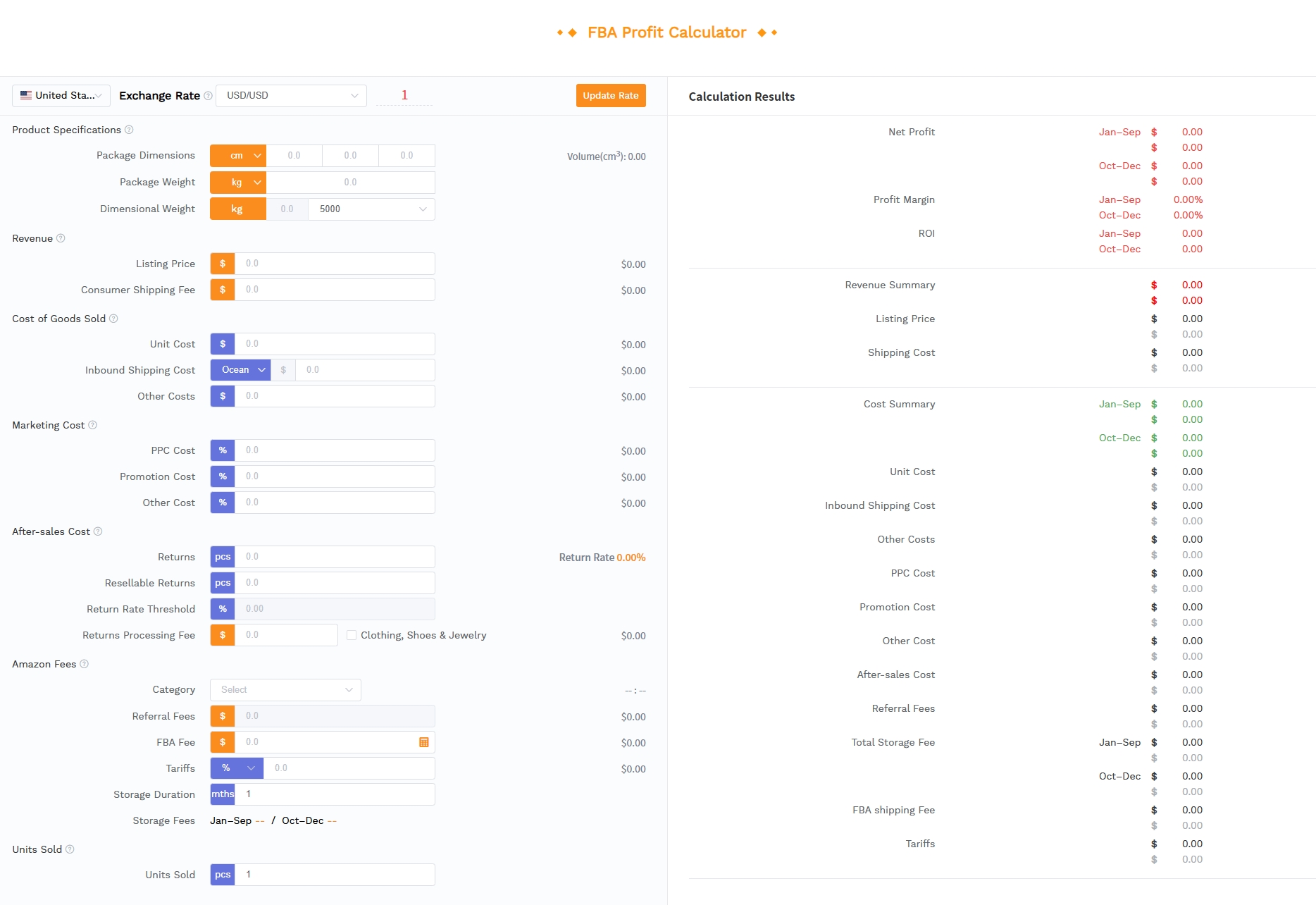
Input the product's dimensions (Length, Width, Height) and weight (Unit weight and Dim weight). The calculator will automatically classify the item into the correct Amazon size tier, which is crucial for determining the fulfillment fee.
Fill cost and revenue data
Enter your planned sale price, manufacturing costs, shipping costs, and estimated PPC spend. The more honest and precise you are with these numbers, the more reliable your Amazon profit margin calculator results will be.
Review profit, margin, ROI and cost breakdown
Once the data is entered, review the generated dashboard. Look specifically at the ROI percentage (is it above your minimum threshold?) and the Margin percentage (is it sufficient to sustain growth?). The breakdown will show you exactly which fees are taking the biggest bite out of your revenue, allowing you to target them for reduction.
Save calculation history for sourcing decisions
Do not just calculate once and forget. Save your calculations. As you negotiate better supplier rates or shipping prices, update the calculator to see how your margin improves. Creating a history of calculations allows you to compare different product ideas side-by-side to make the best sourcing decision for your capital.
Revenue Calculator Scenarios
Adaptability is key in e-commerce. A static calculation is rarely accurate forever. You should run scenarios to see how your finances hold up under different conditions.
New product sourcing
Before placing a PO (Purchase Order), use the calculator with the worst-case scenario costs. If the ROI is still positive even when ad spend is high or fees increase slightly, the product is a viable candidate for sourcing. This is the "stress test" phase for the Amazon ROI calculator.
Launch discount
Many sellers use coupons or percentage-off promotions to launch. Input your sale price minus the coupon value into the calculator. This will show you your loss per unit or reduced margin during the launch phase, helping you budget exactly how much you can afford to spend on customer acquisition.
PPC-heavy launch
During an aggressive launch, your ACoS (Advertising Cost of Sales) might be 50% or higher. Adjust the PPC field in the calculator to reflect this. You might find that while the product is profitable long term, the launch phase requires significant capital reserves. This scenario planning prevents "cash crunch" surprises.
Repricing existing ASINs
If a competitor lowers their price, should you follow? Use the calculator to lower your "Product Price" input and see the immediate impact on ROI. This helps you determine the floor price, which means the lowest price you can accept before you start losing money.
Common Mistakes When Estimating Amazon Revenue
Even seasoned sellers can slip up on their numbers. Being aware of these common pitfalls will help you maintain accuracy in your financial reporting.
Ignoring returns
Calculating revenue assuming a 0% return rate is dangerous. Returns cost you the referral fee (which you might recover partially) but you almost never recover the FBA fulfillment fee, and you lose the product value. Always account for returns based on category benchmarks (e.g., Clothing has higher returns than Home Goods).
Using wrong category fees
Defaulting to the 15% referral fee for every item is a common error. Some categories charge minimum referral fees, others have high closing fees (like Media). Always verify the specific fee schedule for your product's category in Seller Central or via an accurate calculator.
Forgetting storage and placement costs
FBA inventory storage is charged monthly. If your product moves slowly, these fees accumulate. Additionally, Placement Fees apply to standard-sized items sent to Amazon. These must be included in your cost basis for accurate margin calculation.
Confusing revenue with profit
The biggest strategic mistake is celebrating high revenue while profits are negative. A business with high turnover but no profit is just working for free. Always prioritize Net Profit Margin over Gross Revenue growth.
FAQ
What is an Amazon revenue calculator?
An Amazon revenue calculator is a tool used by sellers to estimate the potential earnings from selling products on Amazon. It factors in the selling price and order volume to project gross sales, but advanced versions also deduct FBA fees, referral fees, and costs to estimate net profit and ROI.
Is Amazon revenue the same as Amazon profit?
No, Amazon revenue is the total amount of money brought in from sales before any expenses are paid (top line). Amazon profit is the amount of money remaining after all costs, such as manufacturing, shipping, Amazon fees, and advertising, are subtracted from the revenue (bottom line).
What information do I need to use an Amazon revenue calculator?
You need the product's selling price, category (for referral fees), dimensions and weight (for fulfillment fees), cost of goods sold (COGS), inbound shipping costs, and estimated advertising or promotion costs per unit.
How to calculate Amazon net profit?
Amazon Net Profit is calculated by taking your Gross Revenue and subtracting all expenses: Net Profit = Revenue - (Product Cost + Shipping + Amazon Fees + Advertising + Other Expenses).
How to calculate Amazon ROI?
Amazon ROI (Return on Investment) is calculated by dividing the Net Profit by the Total Investment Cost and multiplying by 100. The formula is: ROI = (Net Profit / Total Investment Cost) x 100.
Next Steps
- Calculate Your Margins: Use the free tool SellerSprite Amazon FBA Profit Calculator to analyze your current or potential products.
- Audit Your Fees: Check your recent Amazon statements to see if your actual fees match your calculator's estimates.
- Optimize Costs: If your margin is low, use the calculator to see the impact of reducing supplier costs or optimizing packaging to lower FBA size tiers.
References
- Amazon Seller Central - Fee Schedules and Pricing
- SellerSprite Blog - Ultimate Guide to Amazon Profit Calculation
By SellerSprite Success Team
The SellerSprite Success Team is dedicated to empowering Amazon sellers with data-driven insights and tools. With deep expertise in Amazon SEO, product research, and financial analysis, our team provides actionable strategies to help sellers navigate the complexities of e-commerce and maximize their profitability on a global scale.