TL;DR: Amazon FBA fees typically consume 30%–35% of your product's selling price, covering referral commissions, order fulfillment (pick & pack), and monthly inventory storage. Accurately inputting these variables into your revenue calculator is the only way to determine true profitability.
Key Takeaways
- Fee Structure: FBA fees are a combination of selling plan fees (individual/pro), referral fees (percentage of sale), fulfillment fees (based on size/weight), and storage fees (based on volume & duration).
- Margin Impact: Ignoring specific inputs like dimensional weight or long-term storage fees can erode your margin by 5-10% unexpectedly.
- Optimization: Using a precise Amazon FBA fee calculator allows you to model different packaging scenarios to lower costs before you buy inventory.
Table of Contents
Note on marketplaces: This guide is specifically optimized for the US market.
Quick Answer
For most Amazon sellers, FBA fees are not a single flat charge but a composite of several distinct costs taken out of your final payout. While the exact amount varies by product, a healthy rule of thumb is to budget roughly one-third of your retail price for Amazon FBA fees. This includes the commission you pay Amazon for the sale and the cost for them to handle, pack, and ship the item to the customer. Understanding these categories is the foundational step in mastering your Amazon revenue calculator strategy.
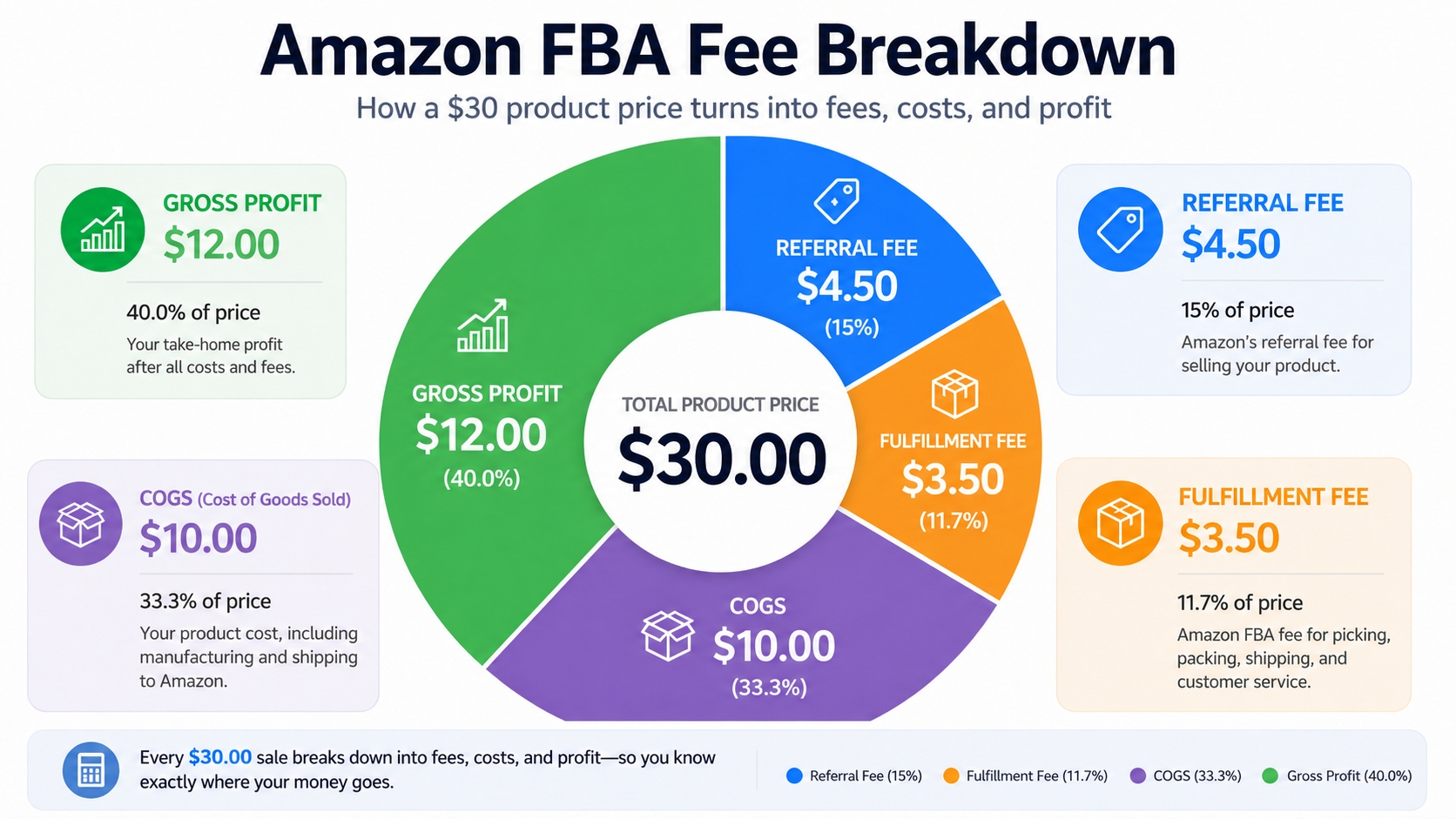
The fee categories that affect profit
To ensure your revenue calculator gives you an accurate net profit figure, you must account for all fee categories that impact your bottom line. These include the obvious costs like shipping and storage, but also less obvious ones such as return processing fees or aged inventory surcharges. Missing even one of these categories can turn a seemingly profitable product into a loss-maker. Therefore, categorizing your expenses accurately is critical before you input a single number into any profit margin calculation tool.
The Amazon FBA Fee Stack
The "Fee Stack" refers to the layered costs Amazon applies to every FBA order. Think of this as a funnel where your gross revenue enters at the top, and fees are deducted at specific stages before the remainder reaches your bank account. We will dissect this stack layer by layer, starting with the mandatory selling fees and moving through to storage and optional services.
Referral fees
The Referral Fee is the commission Amazon charges for the privilege of using their marketplace. This fee is a percentage of the total sales price (including the item price and any shipping charged to the customer), minus any tax. For most categories, this percentage is 15%, but it can vary. For example, Amazon Device Accessories are 45%, while specific categories like Jewelry might have a minimum referral fee per item. It is imperative that you select the correct category in your revenue calculator, as a 5% difference here can make or break your business model.
Fulfillment fees
Fulfillment by Amazon (FBA) fees are charged per unit and cover the cost of picking, packing, shipping, and customer service. These fees are strictly determined by the product's size tier (Small Standard, Large Standard, etc.) and weight. Amazon often updates these fees, typically in January and sometimes in the summer. Sellers often mistakenly calculate this based solely on the actual weight of the item, failing to account for the dimensions which push the product into a higher price tier.
💡 Size Tier Checklist
Use this checklist when measuring your product to avoid accidental "Tier Upgrades" that increase fulfillment fees:
- Measure with packaging: Measure the fully boxed item, not just the loose product.
- Check Diagonals: Standard size requires a diagonal measurement under a specific limit; large oversize often ignores diagonal.
- Weigh to the nearest ounce: Amazon rounds up.
Storage fees
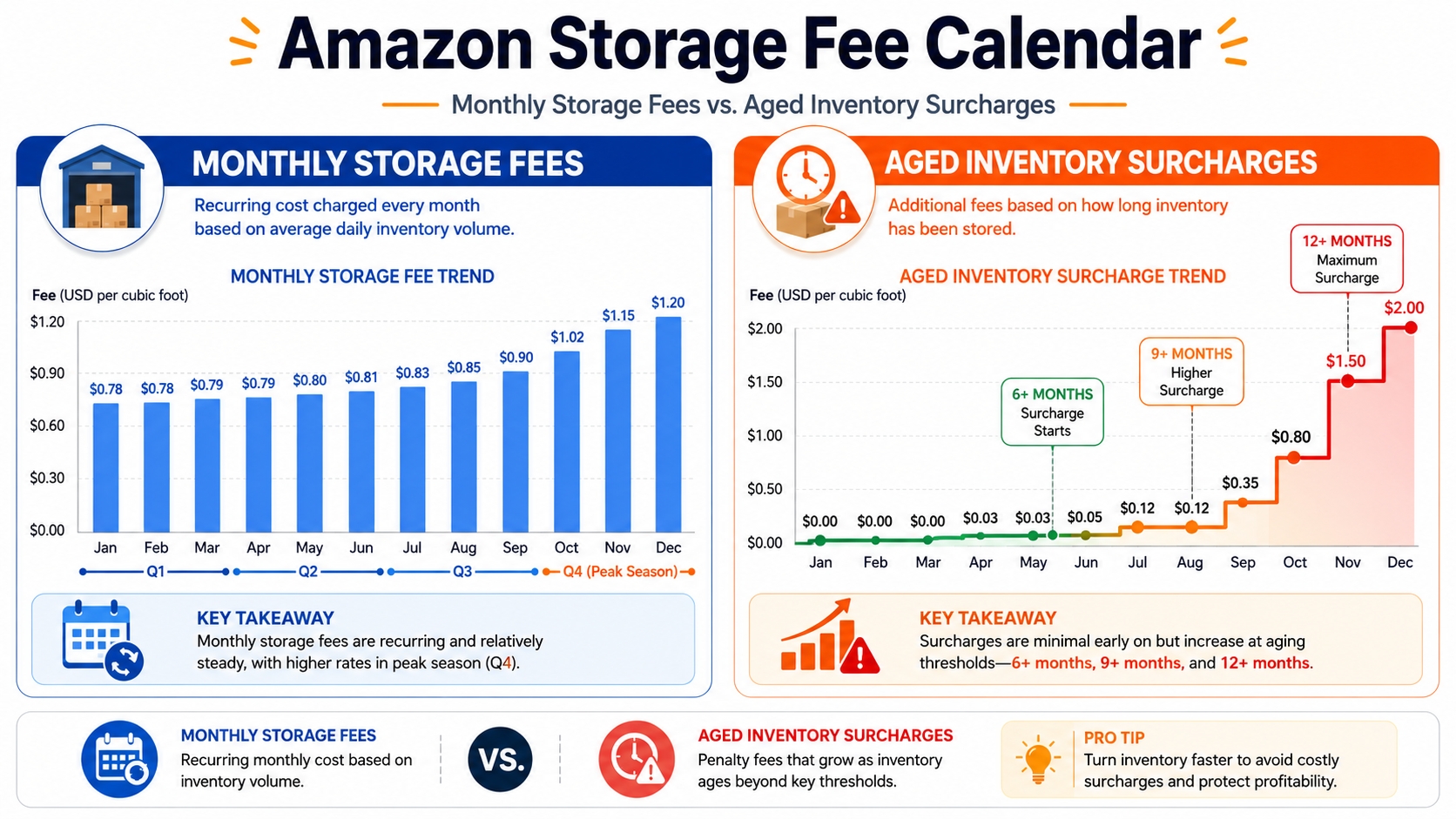
Inventory sitting in an Amazon fulfillment center isn't free. You are charged monthly storage fees based on the average volume of inventory stored. These fees are generally higher during Q4 (October-December) due to peak demand. Slow-moving inventory incurs additional penalties, such as the Aged Inventory Surcharge (previously Long-Term Storage Fees) for items that have been in the warehouse for 271–365 days. Accurate demand forecasting is essential to minimize these costs.
Returns and optional services
While returns are sometimes unavoidable, they come with costs. For most categories, Amazon refunds the referral fee but you still lose the outbound fulfillment fee. However, for categories like Apparel and Accessories, Amazon charges a Return Processing Fee to cover the cost of inspecting and restocking the item. Additionally, optional services, such as FBA Labeling Service (if you don't apply the barcode yourself), Prep Service, or Removal Orders (shipping unsold inventory back to you), add to the total cost of fulfillment.
Marketplace-specific fee updates
It is worth noting that while this guide focuses on the US market, fee structures differ globally. For instance, European marketplaces include VAT complexities, and referral fees in Japan might differ slightly. Always verify the specific fee schedule for the marketplace you are targeting, as Amazon does not standardize fees across all regions. Always cross-reference the latest Amazon Seller Central fee pages to ensure you are working with the most current data.
Calculator Inputs for FBA Fees
Now that we understand the types of fees, we need to translate them into the correct data points for your calculator. The accuracy of your FBA fee calculator outputs is entirely dependent on the precision of your inputs. Mistakes happen when sellers guess these numbers rather than measuring them precisely.
Product category
As mentioned earlier, the referral fee is category-dependent. A calculator cannot compute your costs accurately if it defaults to "Electronics" when you are actually selling "Home & Kitchen." Ensure you select the exact node Amazon uses for your item. Some categories also have closing fees for media items (Books, DVDs), which replaces the standard fulfillment fee, adding another layer of nuance to your selection.
Dimensions and weight
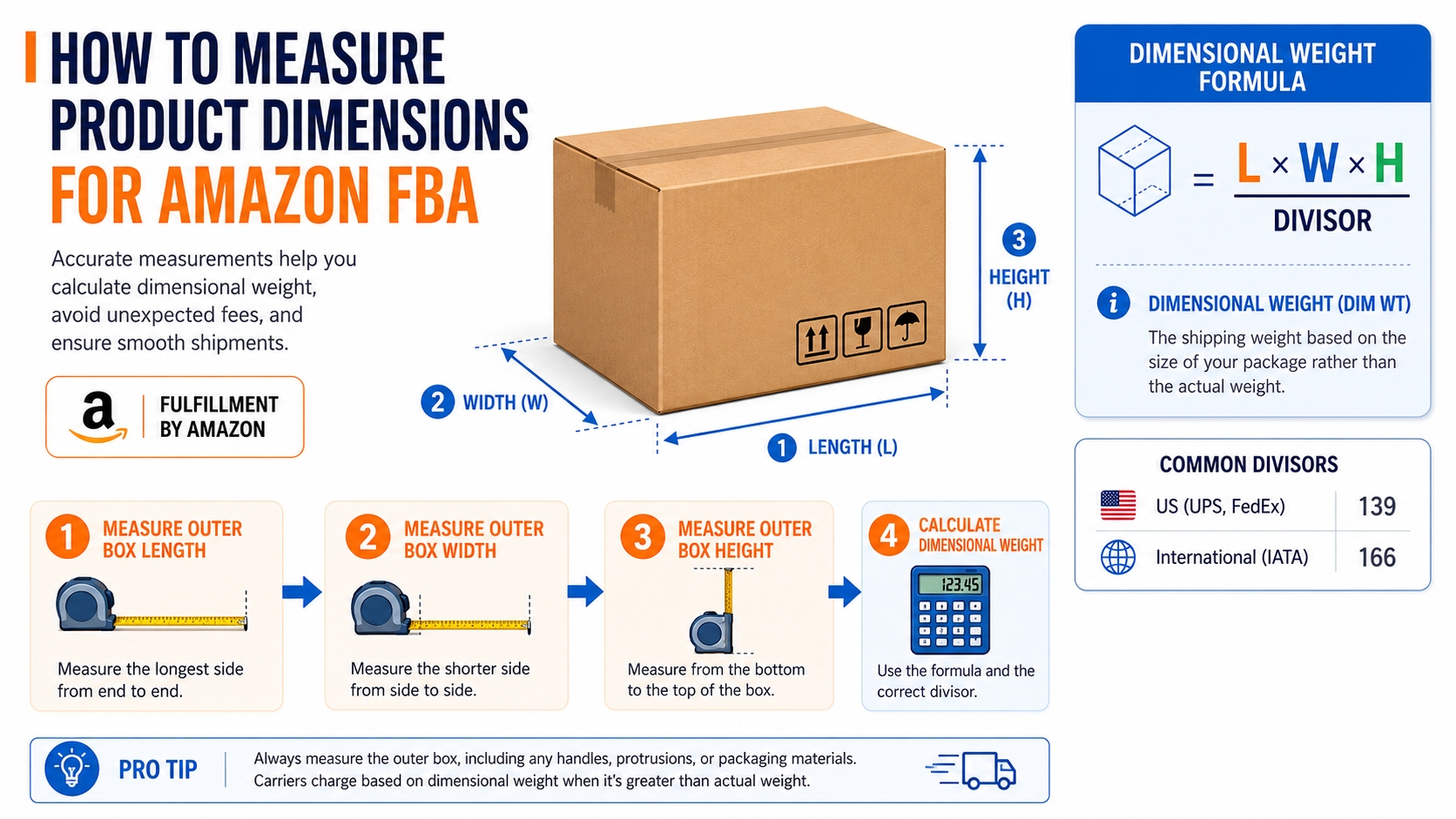
This is the most critical section. You must input the weight in ounces or pounds and dimensions in inches (Length x Width x Height). Be precise: 10.1 inches rounds up differently than 9.9 inches in the Amazon fulfillment system. The calculator uses these inputs to categorize your product into a specific size tier (e.g., Small Standard vs. Large Standard), which dictates the fulfillment fee bracket.
Price and shipping assumptions
Your Retail Price (Selling Price) determines the absolute dollar amount of the referral fee. However, you also need to include your shipping plan assumptions. Are you selling Fulfilled by Amazon (where shipping is included in the price), or are you using FBA but the customer pays shipping? In FBA, the shipping fee is baked into the customer's price, but you must consider the inbound shipping cost (getting goods from China/mfg to Amazon) in your calculator's COGS section, even if it isn't a direct Amazon fee.
Cost of goods
While not a fee Amazon charges you, the COGS (Manufacturing Cost + Inbound Shipping + Tariffs) is a mandatory input for the calculator to show Net Profit. Without this, you are simply calculating Amazon's fee, not your actual margin. Always be conservative here, accounting for potential defect rates or price hikes from suppliers.
Dimensional weight notes
Amazon uses Dimensional (DIM) Weight to calculate fees for larger, lightweight items. The formula is (Length x Width x Height) / 139. If the DIM weight is higher than the actual unit weight, Amazon charges you based on the DIM weight. This is a common trap for sellers of lightweight but bulky toys or furniture. Always use the higher of the two weights in your calculator to avoid surprises.
| Input | Impact on Fee |
|---|---|
| Category | Determines Referral Fee % (e.g., 15% vs. 8%) |
| Size Tier | Determines Fulfillment Fee Bracket (e.g., $3.22 vs. $4.75) |
| Weight (Actual vs. DIM) | Amazon charges the higher of the two |
How to Avoid Wrong Fee Estimates
Even with the best tools, it is easy to end up with an incorrect fee estimate. Discrepancies usually arise from outdated data or manual errors in measurement. To safeguard your profit margins, you must adopt a rigorous approach to validation and testing.
Use current Amazon fee pages
Amazon updates their fee structure annually, and sometimes they make mid-year adjustments. If you are relying on a static spreadsheet from last year, your numbers are wrong. Always cross-check your calculator's baseline with the official Amazon FBA Fee Schedule on Seller Central. Ensure the calculator you use updates its algorithms in real-time to reflect these changes.
Test multiple package sizes
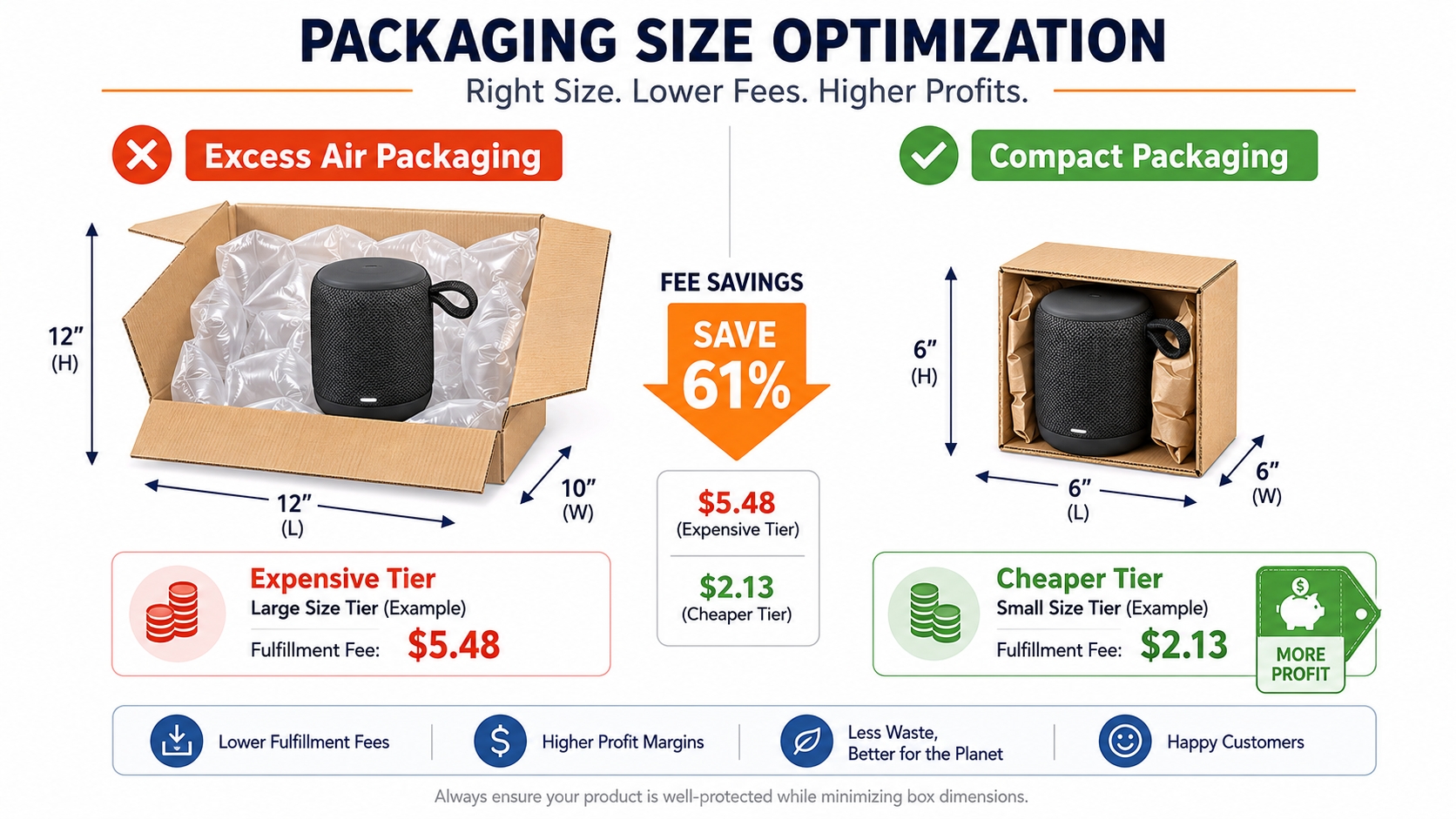
Product packaging is not set in stone during the research phase. A simple redesign like removing 0.5 inches of excess padding could drop your product from "Large Standard" to "Small Standard," saving you over a dollar per unit. Input your current packaging, and then run a second "what-if" scenario with compacted dimensions into the calculator. The difference in fulfillment fees over thousands of units is often staggering, making this a vital step in product research.
Recalculate after product changes
Never "set it and forget it." If you change your supplier, the packaging might shrink. If you add a component to your bundle, the weight increases. Any physical change to the inventory requires a fresh calculation. Furthermore, if you plan to expand to other marketplaces (e.g., Amazon Canada or Europe), you must recalculate using their specific size tier definitions and currency exchange rates.
SellerSprite Workflow
At SellerSprite, we have designed our tools to streamline the estimation process, moving you from vague guesses to actionable data rapidly. By integrating fee calculation directly into product research, you can validate profitability before you place a single order. Here is the recommended workflow using the SellerSprite FBA Calculator.
Input product size and weight
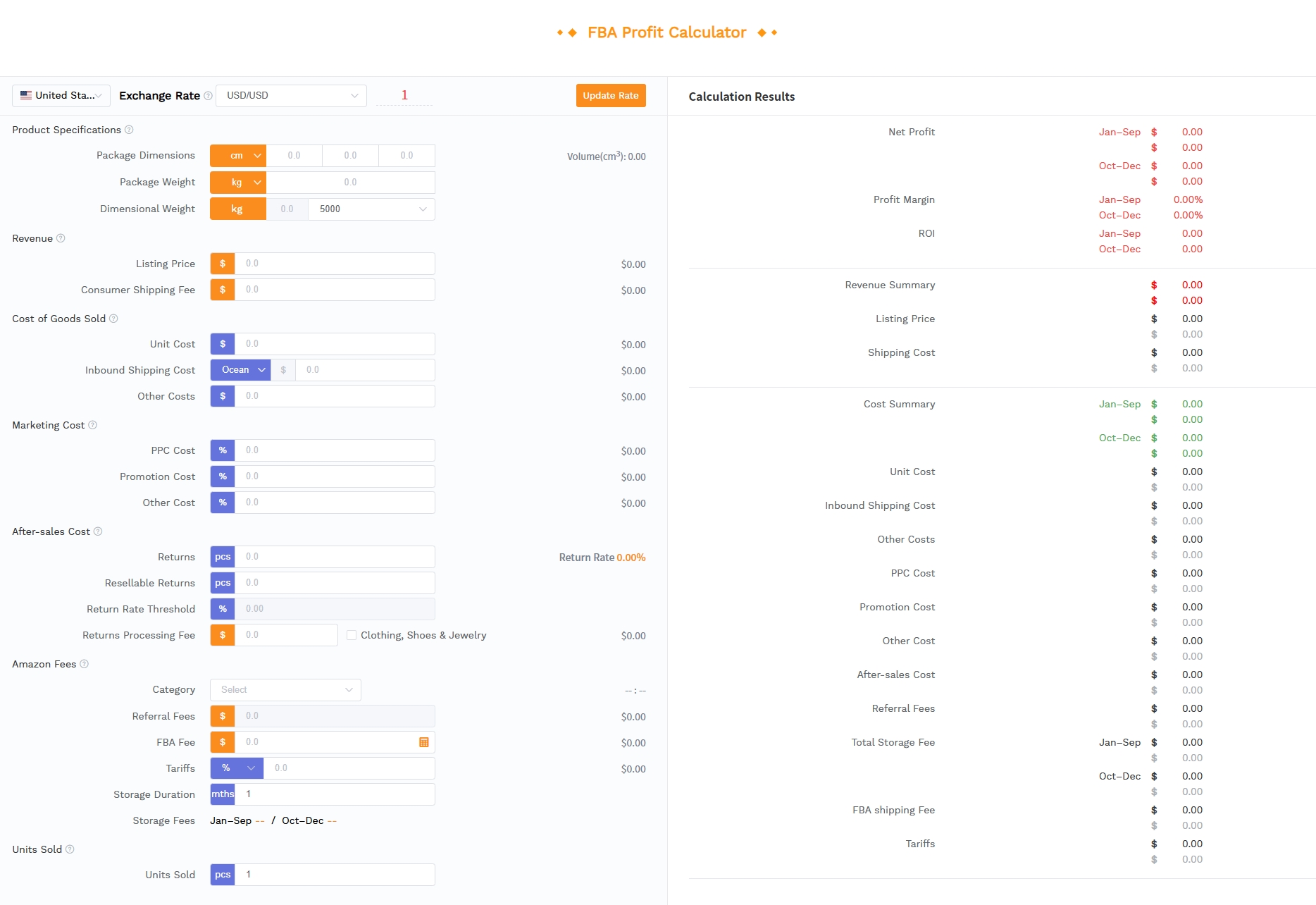
Navigate to the SellerSprite FBA Profit Calculator. Enter your product's dimensions and weight. You can input multiple size scenarios here to instantly see the impact of different packaging options. The tool automatically detects if your item falls into Small Standard, Large Standard, or Oversize categories, removing the guesswork from Amazon's complex size charts.
Review cost breakdown
Once the data is input, the tool generates a comprehensive cost breakdown. This line-item view displays the exact referral fee, fulfillment fee, and storage estimates. This transparency allows you to identify specific fees and see why you are being charged that amount, whether it's due to the per-unit minimum referral fee or a dimensional weight penalty.
Compare margin scenarios
Finally, manipulate the sale price and Cost of Goods Sold (COGS) inputs to simulate different business environments. What happens to your margin if you drop the price by 10% to drive sales? What is the ROI if your manufacturing cost rises by 5%? This scenario planning is crucial for deciding whether a product is worth launching. The goal is to find a scenario where you maintain a healthy margin (usually >30%) even under less-than-ideal conditions.
FAQ
How much are Amazon FBA fees?
On average, Amazon FBA fees amount to roughly 30% to 35% of the product's sale price. However, this varies significantly based on product size and category. High-margin items like jewelry may have a higher percentage fee (up to 45% in some accessory cases), while heavy or bulky items may see a large chunk taken by fulfillment fees due to dimensional weight.
What fees should I include in an Amazon FBA revenue calculator?
A robust FBA revenue calculator includes: 1) Selling Plan Fees (Pro subscription), 2) Referral Fees (percentage of price), 3) Fulfillment Fees (Pick & Pack based on size), 4) Storage Fees (monthly volume), 5) Inbound Shipping (COGS), and 6) Cost of Goods Sold (Manufacturing). You should also account for optional services like labeling and returns processing if applicable.
What is the difference between referral fees and FBA fulfillment fees?
The referral fee is the commission Amazon takes for allowing you to sell on their platform; it is strictly a percentage of the total sale price. The FBA fulfillment fee is the cost Amazon charges for the logistics service, including picking the item from the warehouse, packing it, shipping it to the customer, and handling customer service. This fee is based on the size and weight of the item.
Why are my actual FBA fees different from my estimate?
Discrepancies usually occur due to incorrect measurements or fee updates. If Amazon measures your product and finds it is slightly larger or heavier than what you set in the listing, they will reclassify it into a higher fee tier (e.g., from Standard to Oversize). Additionally, Amazon often implements fee changes in January, which can make old estimates obsolete if not updated.
What FBA fee mistakes do new Amazon sellers make most often?
The most common mistake is ignoring dimensional weight, leading to underestimating fulfillment fees for large but light items. Another frequent error is forgetting to calculate monthly storage fees or long-term storage surcharges for slow-moving inventory. Finally, sellers often fail to update their calculator inputs when they change their product packaging, leading to permanent margin erosion.
Next Steps
- Grab your product and a tape measure to get exact dimensions and weight.
- Input these figures into the SellerSprite FBA Calculator to model your specific costs.
- Run a "packaging reduction" scenario to see if you can manually lower your size tier and save on fees.
References
- Amazon Seller Central: FBA Fee Structure View
- Amazon FBA Fees & Profit Margin Calculation View
- Amazon Revenue Calculator Guide View
By SellerSprite Success Team
The SellerSprite Success Team is comprised of seasoned e-commerce analysts and Amazon strategic consultants dedicated to empowering sellers with data-driven insights. With over a decade of combined experience in the Amazon ecosystem, we specialize in breaking down complex fee structures and market dynamics to help you optimize your profitability and scale your brand.