TL;DR: Understand the full list of Amazon Merch product types and exact artwork specifications so you can upload designs that print perfectly and focus on the products that actually sell.
Key Takeaways
- Know all 20+ product types and their required design dimensions.
- Learn artwork specs: file format, DPI, safe zones, and color mode.
- Discover which products to launch first based on niche and design style.
- Use SellerSprite to research trends and competitor product mix before uploading.
Table of Contents
Note on marketplaces: This guide is specifically optimized for the US market.
Start with Products That Match Your Design and Audience
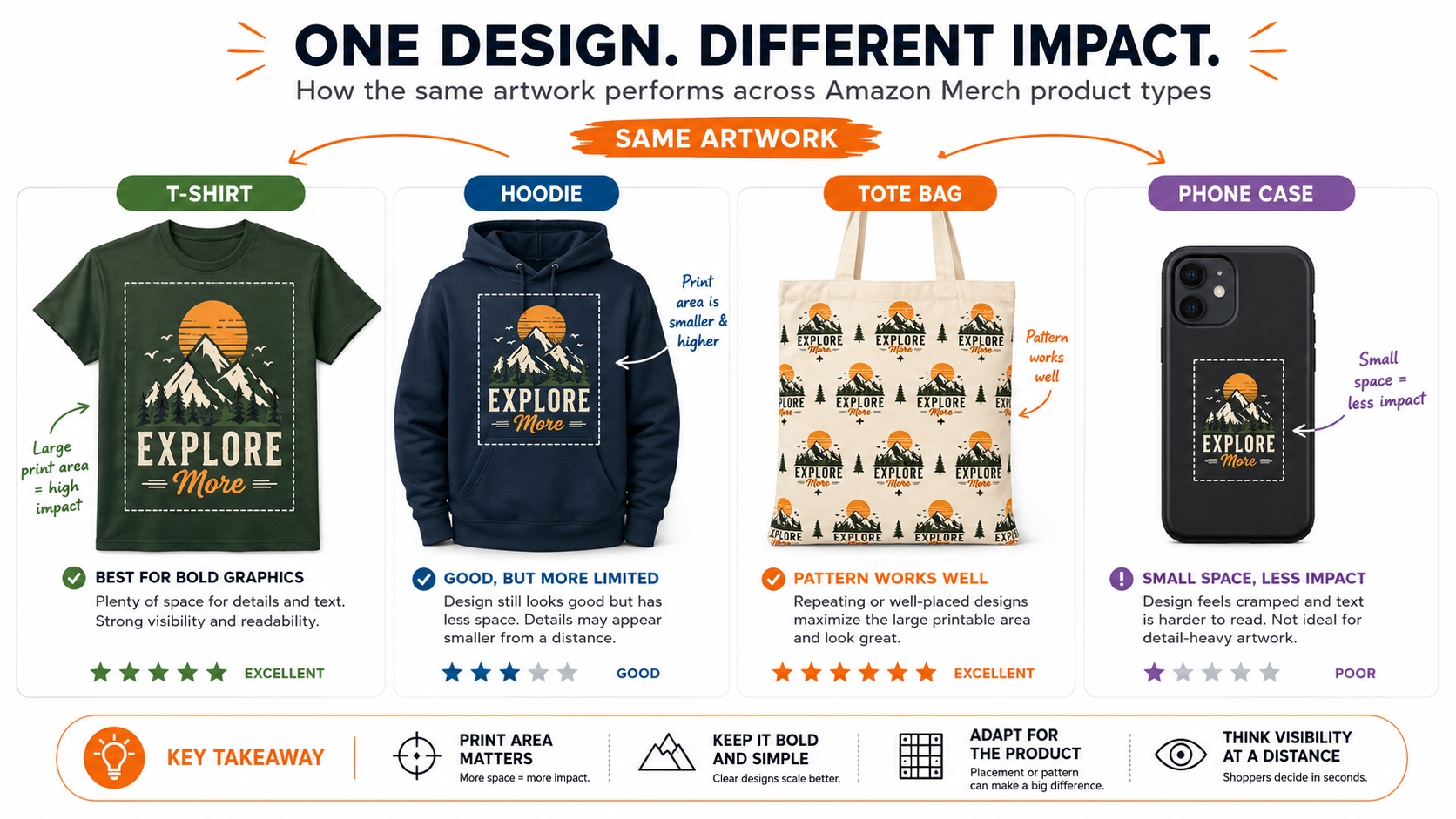
Not every design works on every product. A text‑based joke looks great on a t‑shirt but gets lost on a phone case. A seamless pattern shines on a tote bag but may be wasted on a hoodie that often gets covered by a jacket. The golden rule is to match the design's complexity, color palette, and focal point to the product's print area, typical placement, and target buyer. Before you even open your design tool, ask: "Would my ideal customer wear/hold/use this design on this product?" If the answer is yes, proceed. If not, pivot to a format that amplifies your artwork instead of fighting it.
Amazon Merch Product Type Overview
Amazon Merch on Demand offers over 40 product types, from classic apparel to accessories and home goods. While the catalog continues to expand, most successful sellers focus on a handful of high‑volume, high‑margin items. Understanding the physical characteristics and required artwork specs for each type is the first step toward uploads that sell, and avoiding rejections. The table below provides a quick reference for the most popular products, followed by a detailed breakdown. You can view the full list on Amazon Merch resource center.
| Product | Standard Print Area (pixels) | Best For | Key Tip |
|---|---|---|---|
| T‑shirt (standard) | 4500×5400 | Text, slogans, simple graphics | Keep vital elements within 12"×16" safe zone |
| Premium T‑shirt | 4500×5400 | Premium designs, higher price points | Expect a $4‑$5 higher royalty than standard |
| Hoodie | 4500×4050 | Large graphics, athletic themes | Designs may be cropped at bottom; keep focal point centered |
| iPhone cases | 1800×3200 | Patterns, abstract art, photographs | Leave room for camera cutout; check model‑specific template |
| Tote Bag & Throw Pillows | 2925×2925 | Large‑scale patterns, illustrations | 16"×16" or 18"×18" print area for throw pillows; use full canvas for best results |
| PopSockets grips | 485×485 | Small, bold icons or logos | Keep design simple; fine details will be lost |
T‑shirts
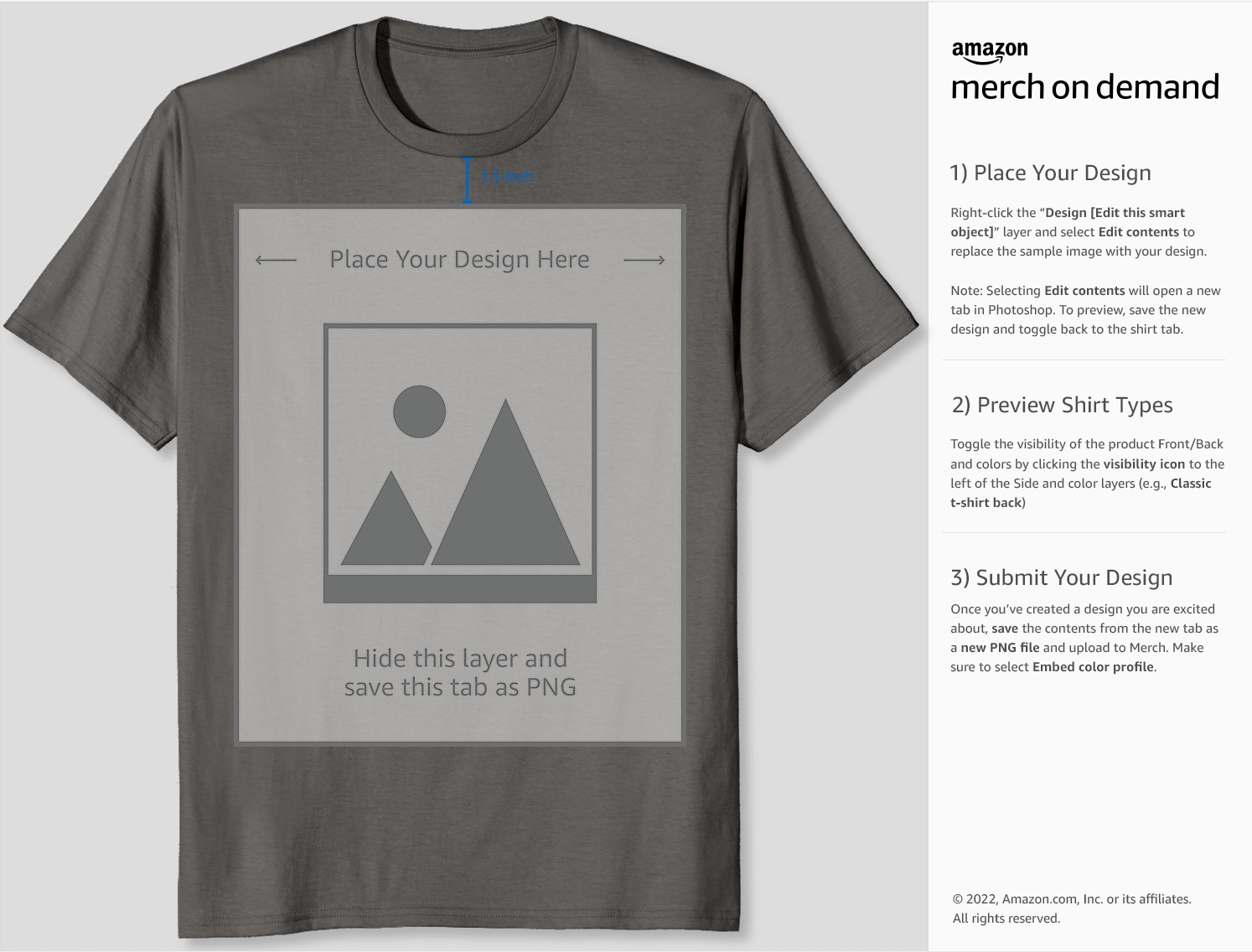
T‑shirts are the backbone of Amazon Merch. They see the highest sales volume, offer the lowest base price, and give you the most design flexibility. The standard print area is 4500×5400 pixels (15"×18" at 300 DPI), but Amazon recommends keeping critical content within a 12"×16" safe zone to prevent trimming on larger sizes. That means if your design has text near the edge, it could get cut off on an XXL shirt. Always preview your design using Amazon's templates. Because t‑shirts are the most competitive product type, focus on niche‑specific humor, professions, hobbies, and timely trends. A well‑researched t‑shirt listing can earn consistent monthly royalties, especially when paired with evergreen keywords.
Hoodies
Hoodies cater to a buyer group who values comfort and is willing to pay a higher price. Because the print area is slightly shorter than a t‑shirt, designs focused in the upper chest work best. Avoid placing important elements near the bottom hem, as it may be obscured when the wearer is sitting or if the hoodie is only partially visible in a thumbnail. These products shine in fall and winter niches (e.g., "Christmas Gamer Hoodie"), but also do well in year‑round categories like college pride or music genres. The royalty per sale is significantly higher, so even a handful of weekly sales can boost your overall revenue.
Phone Cases and Accessories
Phone cases offer a square print area of 1800×3200 pixels, making them ideal for all‑over patterns, abstract art, or photography‑based designs. The main challenge is the camera cutout: Amazon provides model‑specific templates that show exactly where the lens hole will be. Ignoring that template leads to awkward cut‑offs and poor reviews. Phone cases have a lower price point but can be an impulse buy. They perform especially well in giftable niches like "Birthday Phone Case for Sister." PopSockets grips (485×485 px) are even smaller; they require bold, recognizable designs because the final product is tiny. Think of them as digital stickers, where simple, high‑contrast icons work best.
Tote Bags and Other Formats
Tote bags have a generous 16"×16" print area (2925×2925 pixels), giving you a near‑perfect square canvas. This makes them fantastic for intricate mandalas, landscape illustrations, and typographic posters. They are also a favorite in eco‑conscious and teacher niches. However, tote bags have a lower sales velocity than t‑shirts, so they are better suited as add‑on listings rather than your primary focus. Other formats, like throw pillows (2925×2925 px), fill specific niches but often follow the same design rules. The key is to experiment: upload your best‑selling t‑shirt design onto a tote bag or pillow and see if the audience cross‑buys. You might be surprised by the results.
Product Fit vs. Design Style
Beyond dimensions, consider how the physical product interacts with your design. A t‑shirt is a "living canvas" that stretches, wrinkles, and is viewed from different angles. A phone case is stiff and always seen from one side. This affects font size, element placement, and overall composition. For example, a circular logo that looks balanced on a t‑shirt center might feel too high on a hoodie because of the hood's visual weight. Always test your design on a physical mockup, or at least mentally walk through how the customer will experience it in real life. This design‑product empathy separates top sellers from those who upload and forget.
Artwork Specs and Safe Zones
Meeting Amazon Merch artwork specs is non‑negotiable. A single misstep, such as wrong color mode, low resolution, design outside the safe zone, will result in an immediate rejection. Amazon demands consistency because it partners with third‑party printers who run automated checks on every file. Here's exactly what you need to know, broken down into the four critical areas.
File Dimensions
Every product has a fixed canvas size (see table above). You must submit a PNG that matches these exact pixel dimensions. Scaling up a smaller image will introduce blurriness; scaling down will waste print space. For t‑shirts and hoodies, 4500 pixels is your width and the height varies. Always start your new document at those exact numbers. When exporting from Photoshop, Illustrator, or Canva, disable any "resample" option that might alter the dimensions. A common mistake is uploading a slightly different size because the design software rounded the output. Triple‑check the final file properties before submission.
Print Area
The print area is smaller than the canvas size. For example, on a standard t‑shirt, the full canvas is 4500×5400 px, but the "safe" print area where no trimming occurs is roughly 3600×4800 px (12"×16"). Always download Amazon's latest templates from the Merch website; these contain a separate layer showing the safe zone. Place all text, logos, and critical graphics within that boundary. Background elements can extend to the edge if you want a "full‑bleed" look, but never put important content outside the safe zone. Some products, like phone cases, have irregular safe zones due to camera cutouts, so inspect each template carefully.
Color Mode
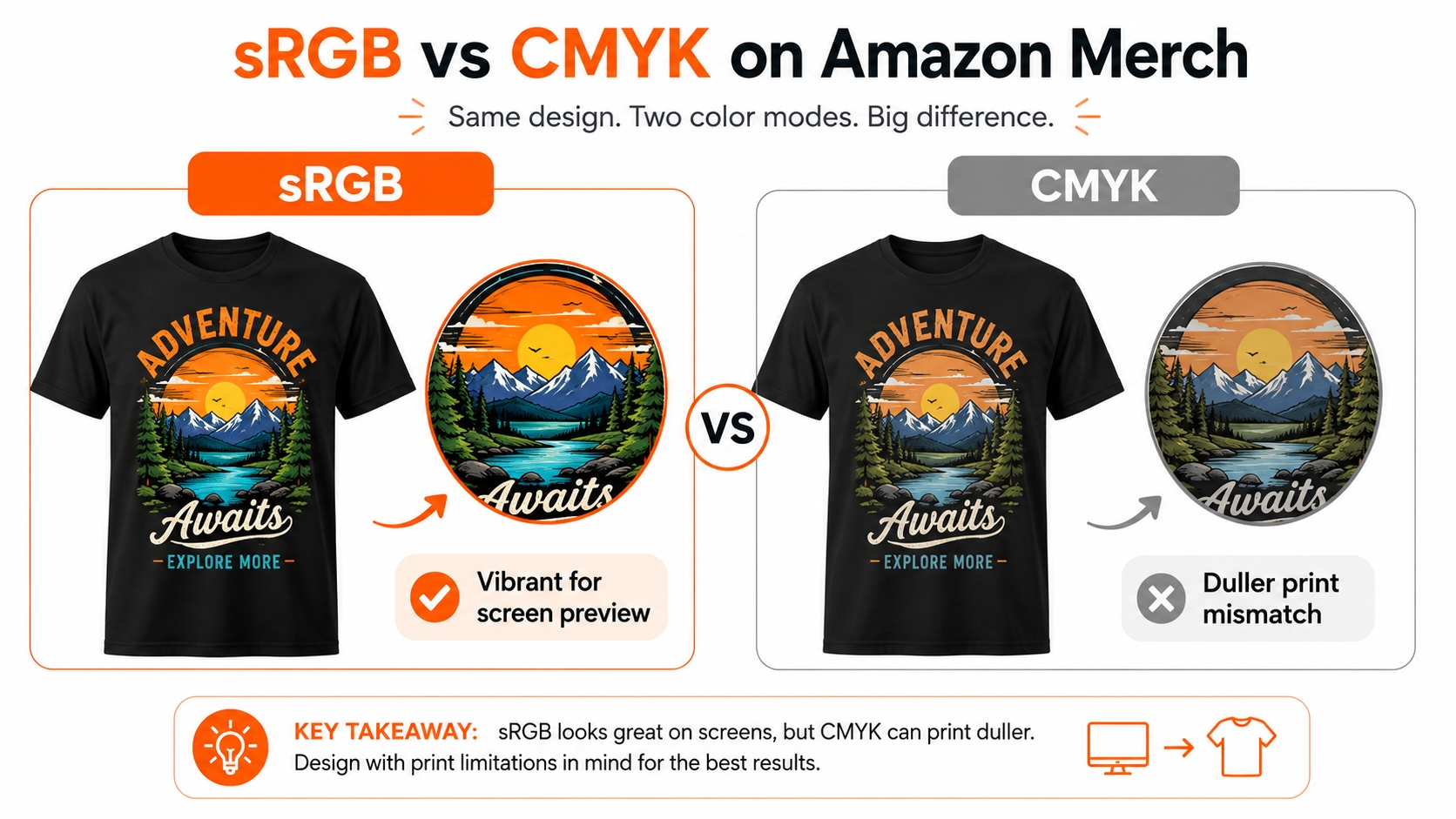
Amazon Merch uses digital printing (direct‑to‑garment and sublimation), which requires designs to be in the sRGB color space. If you submit a CMYK file (common for traditional offset printing), the colors will look dull and washed out after conversion. Always set your working color space to sRGB before creating the design. When exporting, ensure the "Convert to sRGB" option is checked and that color profile is embedded. Bright neon colors and pure black (#000000) print well, but extremely subtle gradients may not reproduce accurately due to fabric texture. For best results, use solid, vibrant colors and avoid extremely light pastels on dark garments.
Readability on Thumbnails
On Amazon, your design appears as a thumbnail search result before anyone clicks. If the text or focal image isn't clear at 200×200 pixels, click‑through rate plummets. To guarantee readability: (1) Use bold, sans‑serif fonts with thick strokes; thin script fonts dissolve at small sizes. (2) Keep headline text to 5–7 words max. (3) Ensure high contrast between text color and garment color—white text on a light heather shirt will vanish in search results. (4) Test by zooming your design down to 25% in your design tool; if you can't read it immediately, simplify. The best‑selling Merch designs often have one dominant graphic element and a short, punchy phrase.
Common Upload Mistakes
Even experienced sellers slip up occasionally. Avoid these top five errors that trigger rejections:
🚫 Top 5 Upload Mistakes to Avoid:
- Wrong image size – Submitting a file that doesn't match the required pixel dimensions (e.g., 4500×5400 for t‑shirts).
- Using CMYK instead of sRGB – Results in muted colors and automatic rejection by printer checks.
- Design outside safe zone – Placing text or logos too close to the edge where they may be trimmed.
- Low DPI – Requiring 300 DPI; downscaled images appear pixelated when printed at scale.
- JPEG instead of PNG with transparency – Only PNG‑24 with transparency is accepted; JPEGs leave a white background box around the design.
Which Product Types to Prioritize
You can't upload to all 20+ products at once, nor should you. Smart prioritization maximizes your upload slots (especially in lower‑tier Merch accounts) and aligns with your design strengths. The three pillars below—evergreen, seasonal, and giftable—provide a balanced portfolio that generates sales year‑round.
Evergreen Niches
Evergreen products sell consistently, not tied to a specific season or event. Classic t‑shirts with slogans like "Proud Grandma" or "World's Okayest Golfer" find buyers year‑round. Hoodies with niche hobby graphics (e.g., knitting, drone racing) also fall into this bucket. The advantage is steady passive income; once a design ranks for an evergreen keyword, it can produce royalties for years. Focus on designs that tap into timeless human interests, professions, and identities. Tools like SellerSprite's Keyword Research let you filter for keywords with stable monthly search volume, ensuring you're not chasing a fading trend.
Seasonal Niches
Seasonal designs explode for a few weeks and then taper off. Christmas sweaters, Halloween phone cases, and "Summer 2026" tank tops fall here. The key to seasonal success is timing: upload at least 4–6 weeks before the holiday peaks. For example, Christmas‑themed products should be live by late October to benefit from Amazon's early‑bird shoppers. Because competition is fierce, use SellerSprite to check which product types competitors are targeting in that niche. If everyone is flooding t‑shirts, consider hoodies or stocking‑stuffable PopSockets. And remember to remove or update them once the season ends to avoid clutter and potential IP issues (e.g., outdated year).
Giftable Products
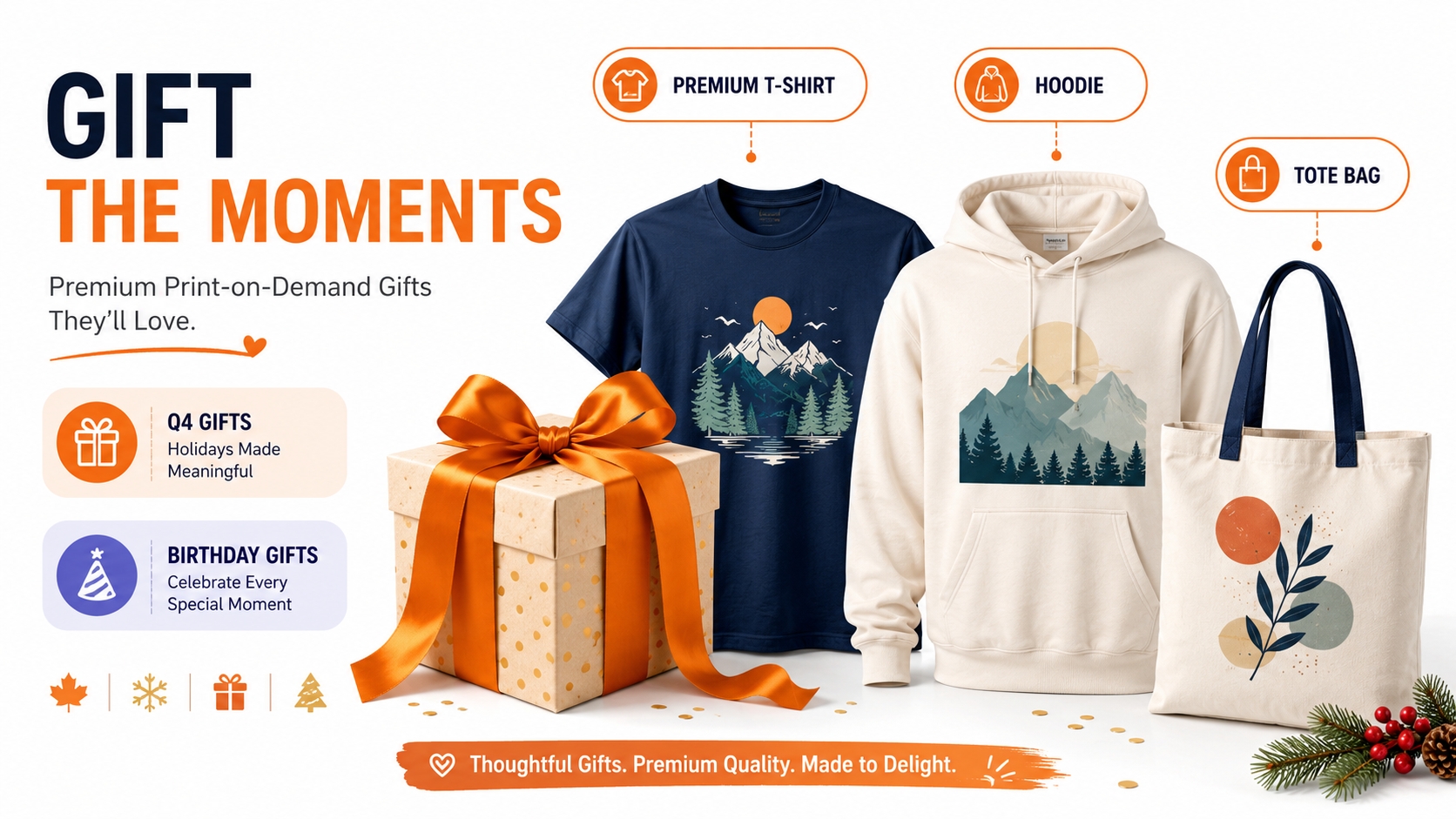
Products that people buy as gifts often have higher conversion rates, especially during Q4. Tote bags, pillows, and premium t‑shirts make excellent gifts. Keywords like "gift for her," "birthday gift," or "anniversary present" signal this intent. Giftable designs often feature personalization or a heartfelt message. On Amazon, you can't personalize per order, but you can design for gift‑giving occasions: "Best Dad Ever" t‑shirt, "Spa Day" tote bag. The higher price point of hoodies and pillows also means bigger royalties per sale, making them worth the upload slot.
✅ Before You Upload Checklist:
- Is this design relevant year‑round, or is it seasonal?
- Does it fit a specific trending niche or personal interest?
- Would someone buy it as a gift for a friend or family member?
- Have I checked the competition's product mix in this niche?
- Is the royalty + price competitive enough to win the Buy Box?
SellerSprite Research Before Uploading
Gut feelings don't move products; data does. Before you commit a precious upload slot, use SellerSprite to validate your product choice and pricing. This process takes just a few minutes and can be the difference between a listing that collects dust and one that brings daily sales.
Check Competitor Product Mix
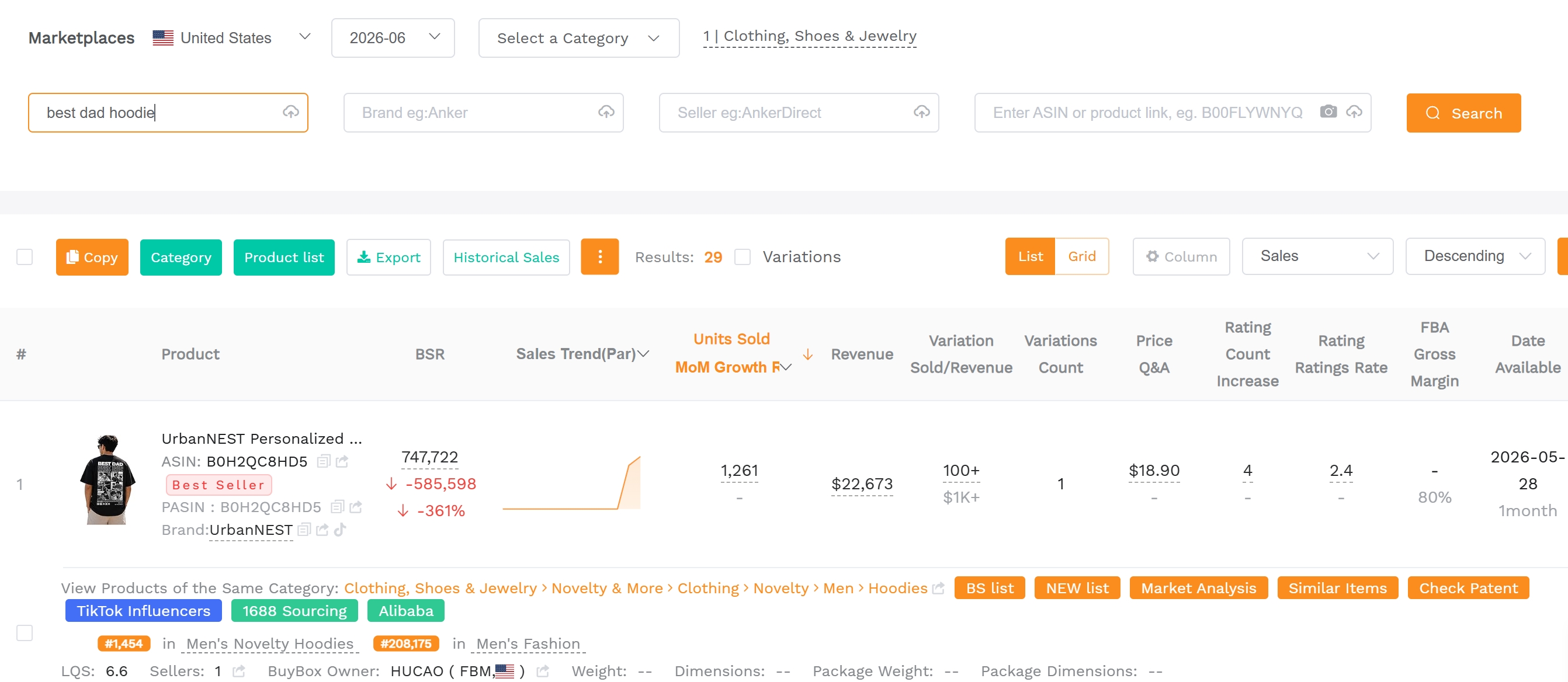
Head to SellerSprite's Competitor Research tool and enter a niche keyword (e.g., "funny nursing hoodie"). Filter by product type to see exactly what the top sellers are offering. You might discover that a keyword you thought was t‑shirt‑dominated actually has zero hoodie competition. That's your blue‑ocean opportunity. Also note the number of reviews on each product, which reveals how long they've been selling and whether the niche is overly saturated. If a product has thousands of reviews, it's going to be tough for a new listing to break in, regardless of product type.
Review Price Bands
Pricing varies dramatically by product type. T‑shirts typically list between $15.99 and $19.99, while premium t‑shirts can command $23.99+. SellerSprite's dashboard shows you the price distribution of competing products so you can price just below or at the sweet spot. Underpricing kills your royalty, but overpricing kills your conversion rate. For hoodies, a price point around $29.99–$34.99 tends to work well in the US market.
Track Seasonal Demand
Use SellerSprite's Keyword Research to plot search volume trends over the last 12–24 months. Does "Halloween tank top" spike in September? Does "bucket hat" trend up in June? Understanding these seasonal waves lets you time your uploads perfectly. For example, if you see that searches for "christmas shirt" peak in November, you'll want your designs live by early October. Additionally, you can identify whether a niche is truly seasonal or just having a temporary spike due to a social media trend. For a complete walkthrough, see our Amazon Merch on Demand guide. Also grab our ready‑to‑use toolkit to streamline your workflow.
FAQ
What product types are available on Amazon Merch on Demand?
As of 2026, Amazon Merch offers over 20 product types, including standard and premium t‑shirts, hoodies, sweatshirts, long‑sleeve shirts, tank tops, iPhone cases, PopSockets, tote bags, throw pillows, and more. The catalog expands periodically, so always check the official Amazon Merch Resources page for the latest updates. Each product has unique design templates and size requirements, so never assume one design fits all.
Which Amazon Merch product type should I upload first?
If you're just starting, t‑shirts are the safest bet. They have the largest customer base, simplest specs, and fastest sales velocity. Design a simple text‑based or graphic t‑shirt for a niche you know well. Once that sells, expand to hoodies and phone cases. Use SellerSprite's niche research tools to confirm demand before you spend time designing. Remember, your upload slots are limited (especially in lower tiers), so each listing should count.
Do t‑shirts, hoodies, and tote bags need different design layouts?
Yes, absolutely. T‑shirts use a vertical 4500×5400 px canvas; hoodies use a shorter 4500×4050 px canvas; and tote bags are square (2925×2925 px). That means a design that looks centered on a t‑shirt may be cut off at the bottom on a hoodie or show too much whitespace on a tote bag. Always create separate artboards for each product type and adjust the layout accordingly. You can often resize and reposition elements, but never just copy‑paste the same file.
Why do artwork specs matter for Amazon Merch?
Amazon Merch partners with third‑party printers who use automated checks. If your file doesn't meet the exact specs (PNG, 300 DPI, sRGB, correct dimensions, design within safe zone), the system will automatically reject it. Rejections waste your time and can even affect your account standing. Following specs ensures your designs print clearly, colors look vibrant, and customers receive a product that matches the listing image, ultimately reducing returns and negative reviews.
How do I make Merch designs readable in thumbnails?
Use bold, high‑contrast text, limit words to 5–7, and pick fonts that remain legible at 200 px wide. Avoid placing tiny elements near the edges. Test by shrinking your design to 25% in your design tool. Also, consider how the thumbnail appears against Amazon's white background, where dark t‑shirt colors like black, navy, and heather charcoal provide excellent contrast and pop in search results.
Next Steps
- Sign up for a free SellerSprite account at sellersprite.ai and start researching your next product niche.
- Download Amazon's official templates for your chosen product and create designs that adhere to the specs and safe zones outlined above.
References
- Amazon Merch on Demand Resource Hub – Official product templates and specs View
- SellerSprite Amazon Merch on Demand Toolkit View
By SellerSprite Success Team
The SellerSprite Success Team combines years of Amazon marketplace experience with data‑science expertise, helping sellers of all sizes dominate search results through proven operational strategies and cutting‑edge tooling.
Last updated: 2026-07-20