TL;DR: You can't directly see competitors' backend keywords on Amazon, but you can ethically infer high-value keyword themes using reverse ASIN analysis, Amazon Brand Analytics, and SERP validation to improve your own listings.
Key Takeaways
- You cannot directly access a competitor's backend keywords because Amazon keeps them private for security and fairness.
- "Spying" effectively means inferring high-performing keywords through reverse ASIN tools, Brand Analytics, and SERP analysis.
- Focus on building keyword themes (clusters) based on intent, not copying raw keyword lists.
- Always validate keyword relevance manually and avoid unethical scraping or access violations.
- Use inferred keywords strategically in your backend search terms, title, and bullet points without stuffing.
Table of Contents
- The Short Answer: Can You Actually "See" Competitors' Backend Keywords?
- What You Can Learn About Competitor Keywords (Without Seeing Backend Fields)
- What's Not Possible (or Not Reliable), and Why
- The Ethical Alternative: A Step-by-Step Workflow to Reverse-Engineer Backend Keyword Themes
- Legality & Platform Rules: What's Safe vs. Risky for Sellers
- How to Use "Inferred Backend Keywords" to Improve Your Listing
- Common Mistakes Sellers Make When Chasing Competitor Backend Keywords
- FAQ
- References
Note on marketplaces: This guide is specifically optimized for the US market.
The Short Answer: Can You Actually "See" Competitors' Backend Keywords?
No! you cannot directly view another seller's backend keywords on Amazon. These are stored in the Generic Keywords or Search Terms field within Seller Central and are completely hidden from public view. Amazon designed this system to protect seller intellectual property and prevent unfair advantage.
What backend keywords are (and where they live in Seller Central)
Backend keywords, also known as search terms, are non-visible keywords that sellers enter in the "Search Terms" section of their listing edit page in Seller Central. These help Amazon's algorithm understand what queries your product should appear for, even if those words aren't in your title, bullets, or description. They support discoverability but do not influence ranking as heavily as on-page content.
Why they're private by design (not visible to shoppers)
Amazon intentionally hides backend keywords from customers and competitors. This ensures fair competition and prevents keyword theft. Only the seller and Amazon's internal systems have access to this data. Even Amazon's public-facing tools like Brand Analytics aggregate and anonymize this information to protect individual seller data.
The reality: "spying" usually means inference, not access
When people talk about "spying" on competitor backend keywords, they're really referring to inferring which keywords drive traffic to a competitor's listing. Tools estimate this by analyzing ranking data, search volume trends, and ad placements. But no tool can pull the exact keywords a seller entered in their backend field: doing so would require unauthorized access to Seller Central, which is prohibited.
Myth vs. Fact: Can Tools See Backend Keywords?
- ❌ Myth: Some tools can show you the exact backend keywords your competitor entered in Seller Central.
- ✅ Fact: Tools infer high-traffic keywords by analyzing ranking positions, ad behavior, and search trends, not direct backend access.
What You Can Learn About Competitor Keywords (Without Seeing Backend Fields)
While you can't see the exact backend entries, you can gather powerful insights about the keywords driving your competitors' visibility. This includes organic rankings, paid ad targeting, and the language buyers use to find their products.
Keywords competitors rank for (organic visibility)
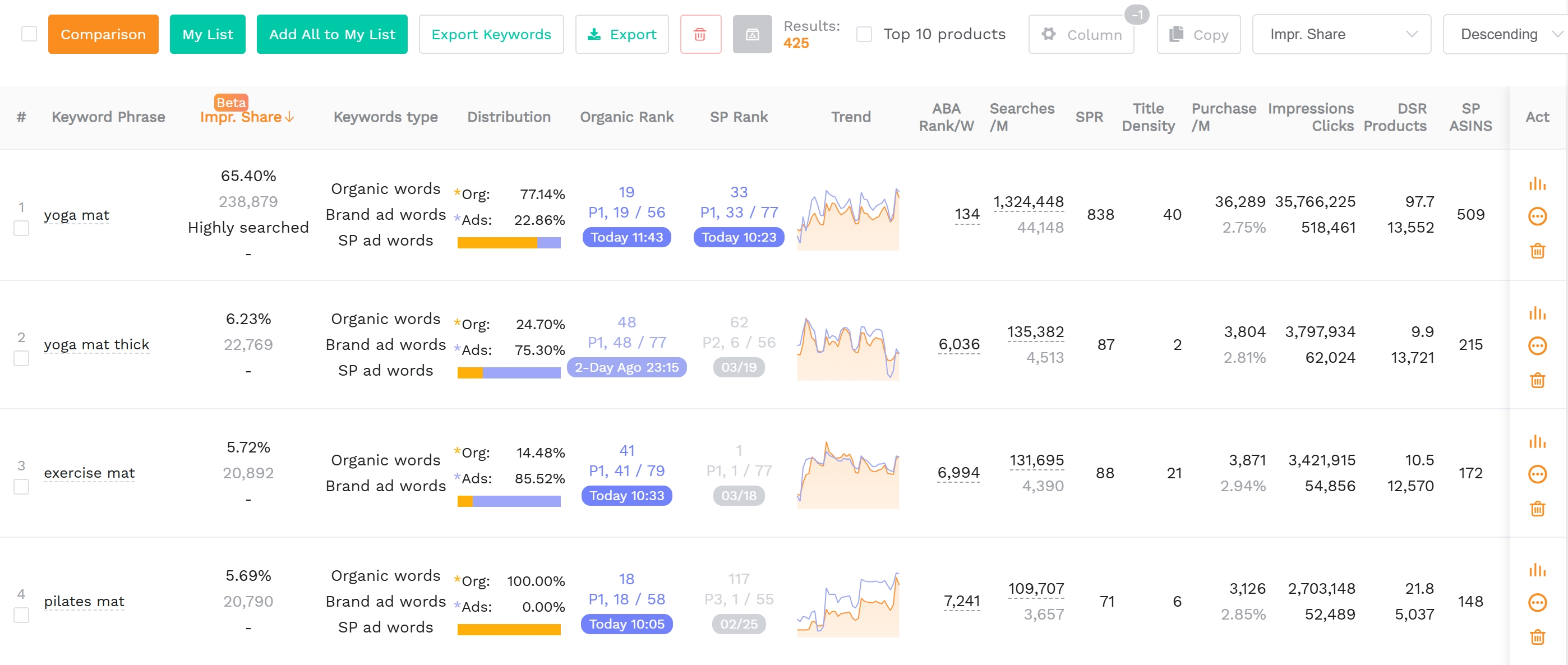
Using reverse ASIN tools like SellerSprite's Reverse ASIN, you can identify which search terms a competitor ranks for organically. These are strong indicators of keyword relevance and indexing success. For example, if a top-selling yoga mat ranks for "non-slip yoga mat for hardwood floors," that phrase likely appears in their backend or on-page content.
Keywords competitors bid on (sponsored visibility)
Sponsored ads reveal high-intent, high-value keywords. If a competitor consistently appears in the top ad spot for "best portable blender for smoothies," it signals they're bidding on that term, and likely see ROI from it. Tools that track ad placements help you uncover these paid keyword strategies.
Buyer language competitors attract (demand + intent signals)
By analyzing customer reviews, Q&A sections, and even competitor titles, you can identify the natural language buyers use. For instance, if multiple reviews mention "easy to clean," that's a strong signal to include cleaning-related keywords in your own backend. This reflects real buyer intent, not just algorithmic assumptions.
What's Not Possible (or Not Reliable), and Why
Many tools overpromise when it comes to competitor keyword data. Understanding the limitations helps you avoid wasting time on false leads or risky tactics.
"Exact backend keyword list" claims: why you should be skeptical
Any tool claiming to show you the "exact" backend keywords a seller entered is either misleading or using unethical methods. Amazon does not expose this data, even to third-party developers with API access. Be wary of services that promise this; they may be scraping inaccurately or violating Amazon's terms.
Data pitfalls: personalization, location, device, time windows
Keyword data can vary based on user location, device type, browsing history, and time of day. A keyword that ranks #1 for you might not appear at all for someone else. Always cross-validate findings across multiple sources and time periods to avoid basing decisions on skewed data.
Red flags: anything requiring login theft, exploits, or unauthorized access
Never use tools or methods that require accessing another seller's account, bypassing security, or exploiting vulnerabilities. Such actions violate Amazon's Prohibited Seller Activities policy and could lead to account suspension or legal consequences. Stick to public data and approved reports.
The Ethical Alternative: A Step-by-Step Workflow to Reverse-Engineer Backend Keyword Themes
Instead of chasing impossible access, follow this 5-step ethical workflow to build reliable keyword themes for your own listings.
✅ 5-Step Ethical Keyword Research Checklist
- Choose relevant competitor ASINs (same use case, price, format)
- Run reverse ASIN analysis to extract ranking keywords
- Cross-check with Amazon Brand Analytics (Search Terms report)
- Validate on SERP: search keywords and observe organic + ad placements
- Cluster keywords into themes and map to your listing
Step 1: Choose the "right-fit" competitor ASIN set
Selection rules: same use case, similar price band, same format/attributes
Focus on competitors offering similar products at similar price points. For example, if you sell a $25 stainless steel water bottle, analyze other $20-$30 bottles with similar features (insulated, leak-proof, etc.). This ensures keyword relevance.
Avoid distorted ASINs: category giants, bundles vs. singles, off-position variants
Don't analyze Amazon Basics or bulk packs if you sell single units. Their keyword strategies are skewed by brand dominance and volume pricing. Similarly, avoid variants (e.g., 6-pack vs. 1-pack) as their indexing behavior differs.
Step 2: Run a Reverse ASIN analysis (keyword inference, not backend extraction)
What to export: ranking keywords, volume/trend proxies, difficulty, etc.
Use a tool like SellerSprite's Reverse ASIN to extract the keywords a competitor ranks for. Export data including search volume estimates and ranking position to prioritize high-opportunity terms.
Step 3: Cross-check with Amazon Brand Analytics (where available)
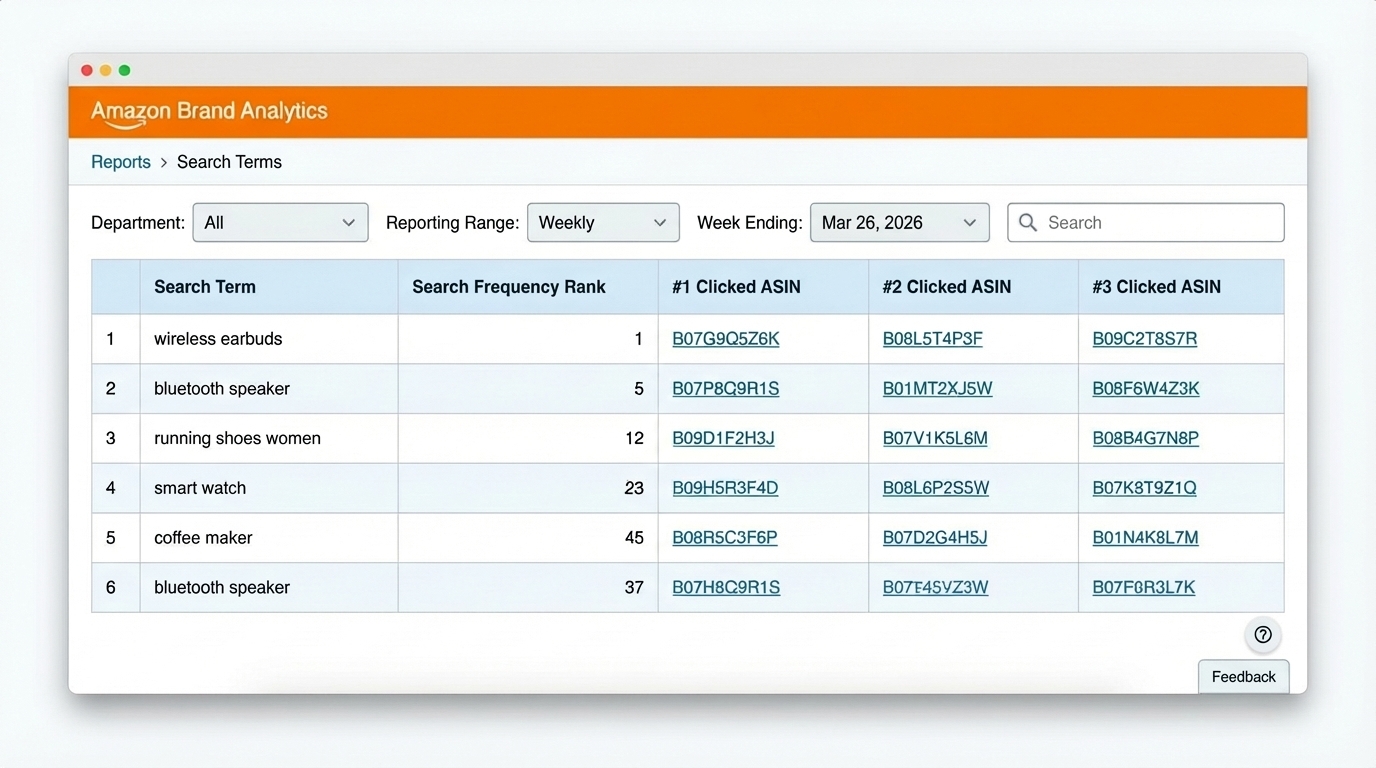
If you're brand-registered, use the Amazon Search Terms Report in Brand Analytics. It shows aggregate search terms, search frequency rank (SFR), and which products get clicked. If "insulated water bottle 32 oz" has high SFR and your competitor's ASIN is top-clicked, that's strong validation.
Step 4: Validate on the SERP (manual spot-check)
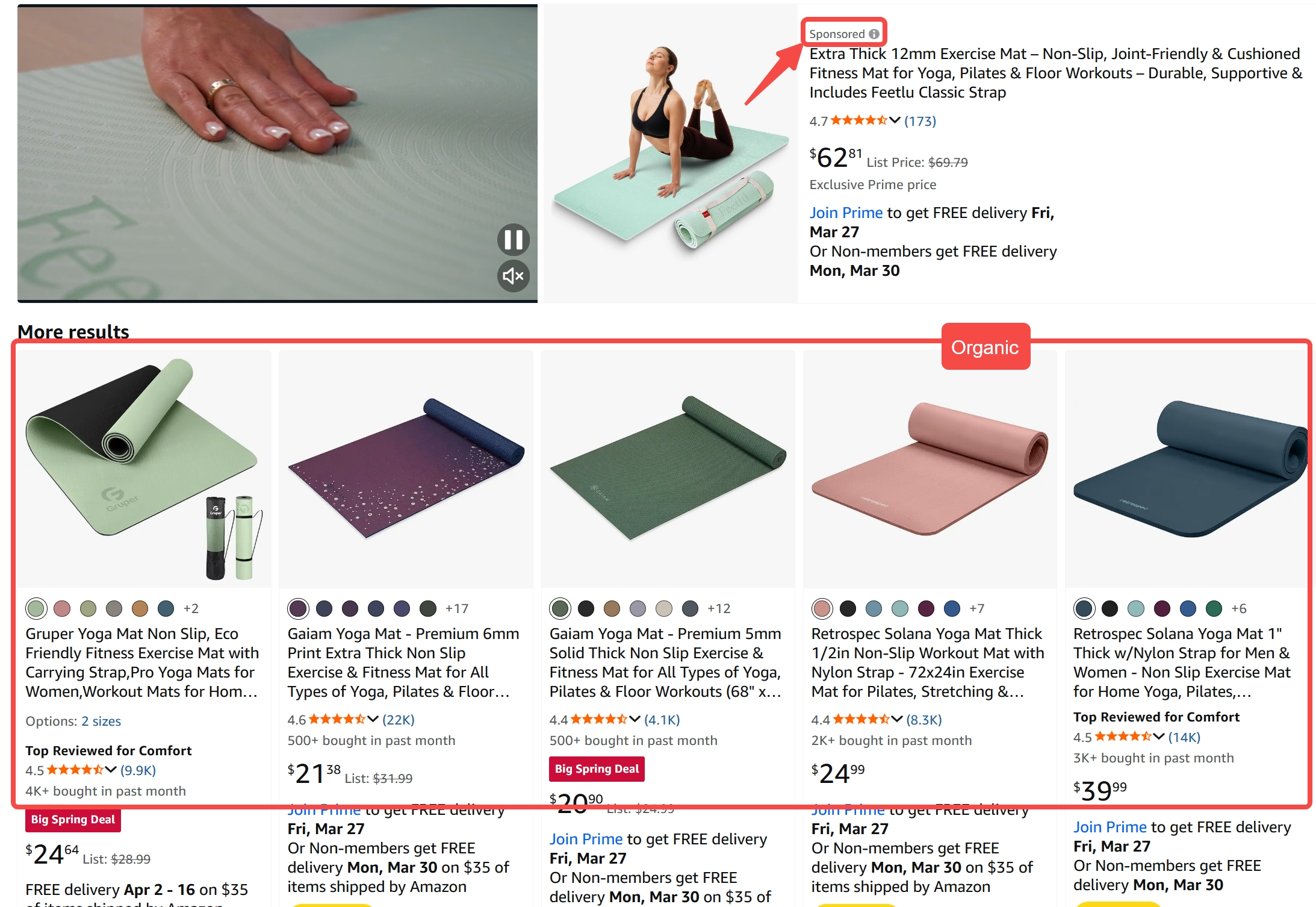
Search the keyword → record who appears in organic + sponsored
Manually search each high-potential keyword on Amazon. Note whether your competitor appears in organic results or as a sponsored ad. If they're consistently present, the keyword is likely part of their strategy.
Step 5: Build "backend keyword themes" (clusters) you can confidently use
Cluster types: attributes, use cases, compatibility, problem/solution, comparisons
Group keywords into themes like:
- Attributes: insulated, BPA-free, leak-proof
- Use Cases: gym, hiking, office
- Problem/Solution: keeps drinks cold 24 hours
Output: a "Keyword Theme Map" (not a fake "backend list")
Create a simple spreadsheet mapping each theme to evidence (e.g., reverse ASIN data, Brand Analytics) and where you'll use it (title, bullets, backend). This keeps your strategy organized and compliant.
Decision Tree: Should You Use This Keyword?
If relevant + high intent + winnable → Map it to your listing
If irrelevant or low intent → Discard
Legality & Platform Rules: What's Safe vs. Risky for Sellers
Staying compliant protects your account and builds long-term success.
Safe: public-page research + your own data + approved reports
Using reverse ASIN tools, analyzing public listings, and leveraging Brand Analytics are all permitted and encouraged. These methods rely on observable data and Amazon-approved access.
Risky: scraping aggressively, bypassing restrictions, unauthorized account access
Automated scraping at high volume, using proxies to bypass rate limits, or accessing another seller's account are high-risk behaviors. Amazon actively monitors and penalizes such actions.
Practical guideline: if a method requires breaking access controls, don't do it
When in doubt, ask: "Does this require me to access data Amazon didn't intend to share?" If yes, avoid it. Stick to ethical, transparent methods that align with Amazon's Data Use Policy.
How to Use "Inferred Backend Keywords" to Improve Your Listing (Without Keyword Stuffing)
Now that you've built keyword themes, use them strategically.
Where keywords should go: Title vs. Bullets vs. Backend Search Terms
Prioritize high-impact placements:
- Title: 1-2 core keywords (e.g., "Insulated Stainless Steel Water Bottle 32 oz")
- Bullets: Highlight benefits using keyword-rich phrases (e.g., "Leak-proof design ideal for gym and travel")
- Backend: Add synonyms, variants, and long-tail terms not used on-page
Backend best practices (synonyms, variants, no repetition)
Use all 249 bytes. Include plurals, misspellings, and related terms (e.g., "waterbottle," "H2O bottle"). Avoid repeating words from the title or bullets. Follow Amazon's guidelines for optimal use.
Quick indexing sanity checks (before/after updates)
After updating your backend, use a reverse ASIN tool to check if new keywords start appearing in your ranking profile within 1-2 weeks. This confirms indexing success.
Common Mistakes Sellers Make When Chasing Competitor Backend Keywords
Avoid these pitfalls to protect your conversion rate and account health.
Copying keywords that don't match your offer (CVR drop)
Just because a competitor ranks for "dishwasher-safe water bottle" doesn't mean you should if yours isn't. Misleading keywords hurt conversion and increase returns.
Over-trusting "one tool" outputs without validation
No single tool is perfect. Always cross-check with Brand Analytics and manual SERP validation to confirm keyword relevance.
Confusing search volume with buyer intent
High volume doesn't always mean high intent. "Water bottle" gets millions of searches, but "best insulated water bottle for hiking" signals stronger purchase intent.
Ignoring marketplace differences (US vs. UK wording)
Even within English, regional language varies. "Thermos" is more common in the UK, while "insulated bottle" dominates in the US. Tailor keywords to your target market.
FAQ
How can I find my competitor's backend keywords on Amazon?
You cannot see their exact backend keywords, but you can infer them using reverse ASIN tools, Amazon Brand Analytics, and SERP analysis. Focus on keywords they rank for organically or bid on in ads.
What tools can I use to spy on Amazon competitors' hidden keywords?
Tools like SellerSprite's Reverse ASIN help infer competitor keywords by analyzing ranking data. Combine with Amazon Brand Analytics for deeper insights.
Is it possible to see what backend search terms my competitors are using on Amazon?
No. Backend search terms are private to each seller. Any tool claiming to show them is either estimating or violating Amazon's policies.
How often should I refresh competitor keyword research?
Refresh every 4-6 weeks. Search trends, competitor strategies, and Amazon's algorithm change frequently. Regular updates keep your keyword strategy competitive.
Next Steps
- Start with our complete Reverse ASIN Strategy Guide to master competitor analysis.
- Try SellerSprite's Keyword Reverse tool to uncover high-opportunity keywords.
- Use our free Competitor Selection Checklist to pick the right ASINs.
References
- Reverse ASIN Strategy Guide View
- How to Perform Reverse ASIN Search View
- Choose the Right Competitors for Reverse ASIN View
By SellerSprite Success Team
The SellerSprite Success Team combines deep Amazon marketplace expertise with data science to help sellers grow profitably. With years of experience in e-commerce analytics, we focus on ethical, sustainable strategies that align with Amazon's evolving algorithms and policies. Our insights are trusted by thousands of sellers worldwide.