TL;DR: Amazon A+ Content boosts conversions by enriching product pages with branded visuals and persuasive messaging. This guide walks you through eligibility, creation, optimization, and best practices to maximize ROI on the US marketplace.
Key Takeaways
- Amazon A+ Content increases conversion rates by up to 20% with enhanced visuals, storytelling, and comparison tools.
- Only brands enrolled in Amazon Brand Registry can access both Basic and Premium A+ Content.
- Effective A+ Content combines benefit-driven copy, responsive design, and high-quality imagery across mobile and desktop experiences.
- Mobile optimization and A/B testing are critical for maximizing engagement and reducing bounce rates.
- Premium A+ Content unlocks interactive modules like image carousels and video, giving larger brands a competitive edge.
Table of Contents
Note on marketplaces: This guide is specifically optimized for the US market.
What Is Amazon A+ Content and Why Does It Matter
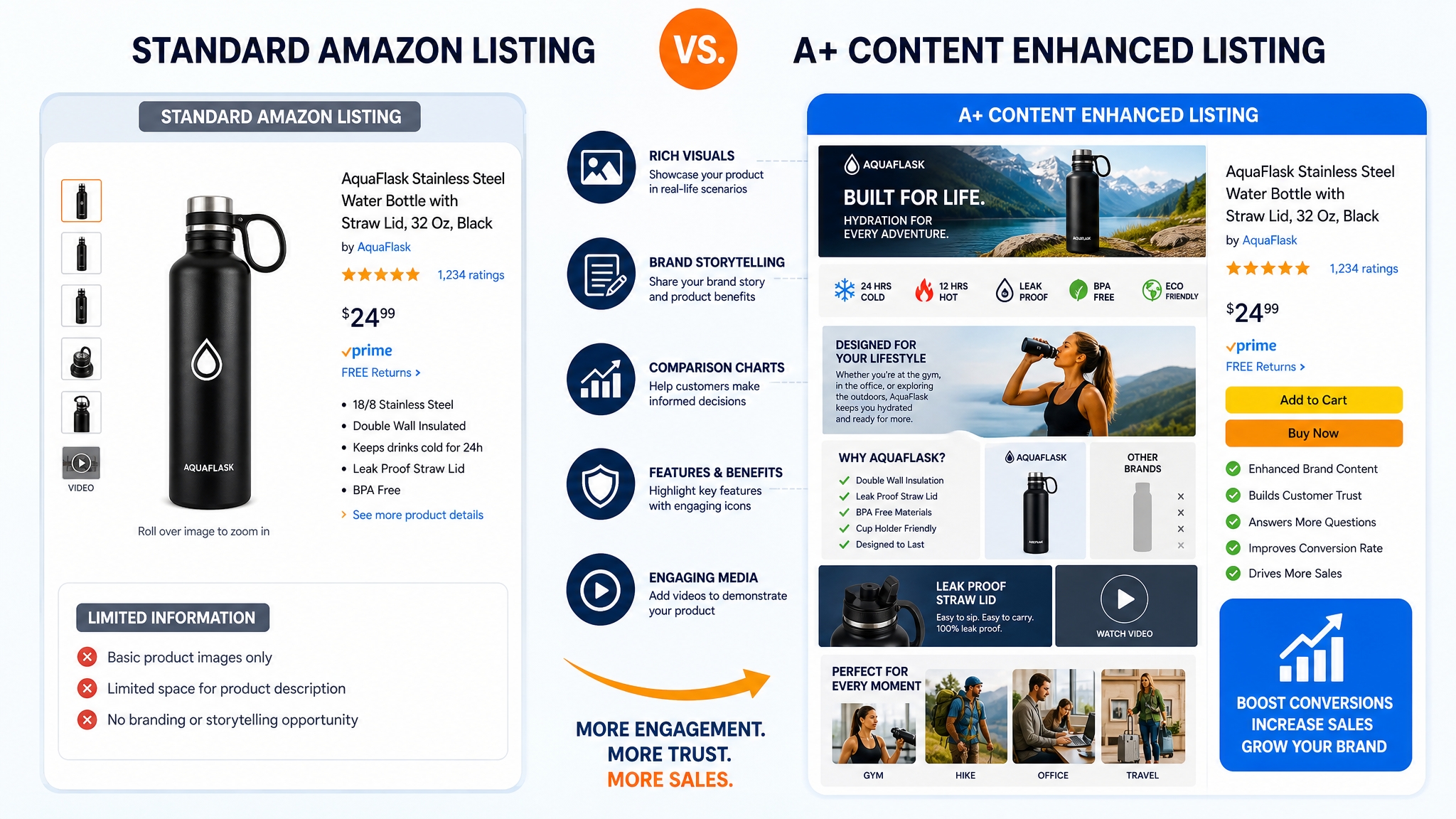
Amazon A+ Content, formerly known as Enhanced Brand Content (EBC), is a powerful feature that allows brand-registered sellers to enrich their product detail pages with professional images, enhanced descriptions, comparison charts, and multimedia elements. Unlike basic product listings limited to bullet points and basic text, A+ Content gives sellers creative control to tell a compelling brand story directly on Amazon.
Understanding Basic vs. Premium A+ Content
Amazon offers two tiers of A+ Content: Basic and Premium.
Basic A+ Content is available to all brands enrolled in Amazon Brand Registry and includes up to five enhanced content modules. It supports image + text layouts, comparison charts, and basic lifestyle imagery. This level is ideal for growing sellers who want to improve conversion without advanced design needs.
Premium A+ Content, formerly "A++", is invite-only and designed for top-tier brands. It unlocks dynamic features such as image carousels, video integration, interactive hotspots, and lifestyle scene modules. According to Amazon, participating brands have seen up to a 30% increase in page engagement when leveraging Premium formats.
How A+ Content Drives Conversions and Sales
A+ Content doesn't just enhance aesthetics; it directly impacts buyer psychology. Shoppers spend more time on listings with rich visuals, which increases trust and reduces perceived risk. A study found that listings using A+ Content experienced an average conversion rate lift of 8–10% compared to non-enhanced pages.
It's especially effective in competitive niches like beauty, electronics, and home goods, where differentiation hinges on subtle value propositions, such as eco-friendly materials or innovative design. With A+ Content, you can visually highlight these unique selling points (USPs) rather than relying solely on text.
Ground Effect on Product Visibility
While A+ Content is not a direct Amazon SEO ranking factor, it influences key engagement metrics that indirectly boost visibility. Higher conversion rates signal relevance to Amazon's A10 algorithm. Additionally, reduced bounce rates and increased session duration contribute to better organic positioning over time.
For example, a kitchen gadget brand using A+ modules with step-by-step usage visuals reported a 15% drop in return rate and a 22% rise in Buy Box ownership within three months, indicating stronger customer confidence driven by clearer product understanding.
Getting Started: Eligibility and Setup Requirements
Before creating A+ Content, you must meet Amazon's brand and technical requirements. These ensure only qualified sellers deliver high-quality, brand-consistent experiences.
Enrolling in Amazon Brand Registry
The first step is enrolling in Amazon Brand Registry. This program protects your intellectual property and grants access to advanced selling tools, including A+ Content. To qualify, you need:
- A registered trademark (text or image-based) in the USPTO database
- Brand logo in digital format (high-res PNG or SVG)
- Product packaging or labels showing the brand name
- An active Professional Selling account
The approval process typically takes 2–5 business days. Once approved, you can access A+ Content via Seller Central or Vendor Central.
Accessing the A+ Content Manager
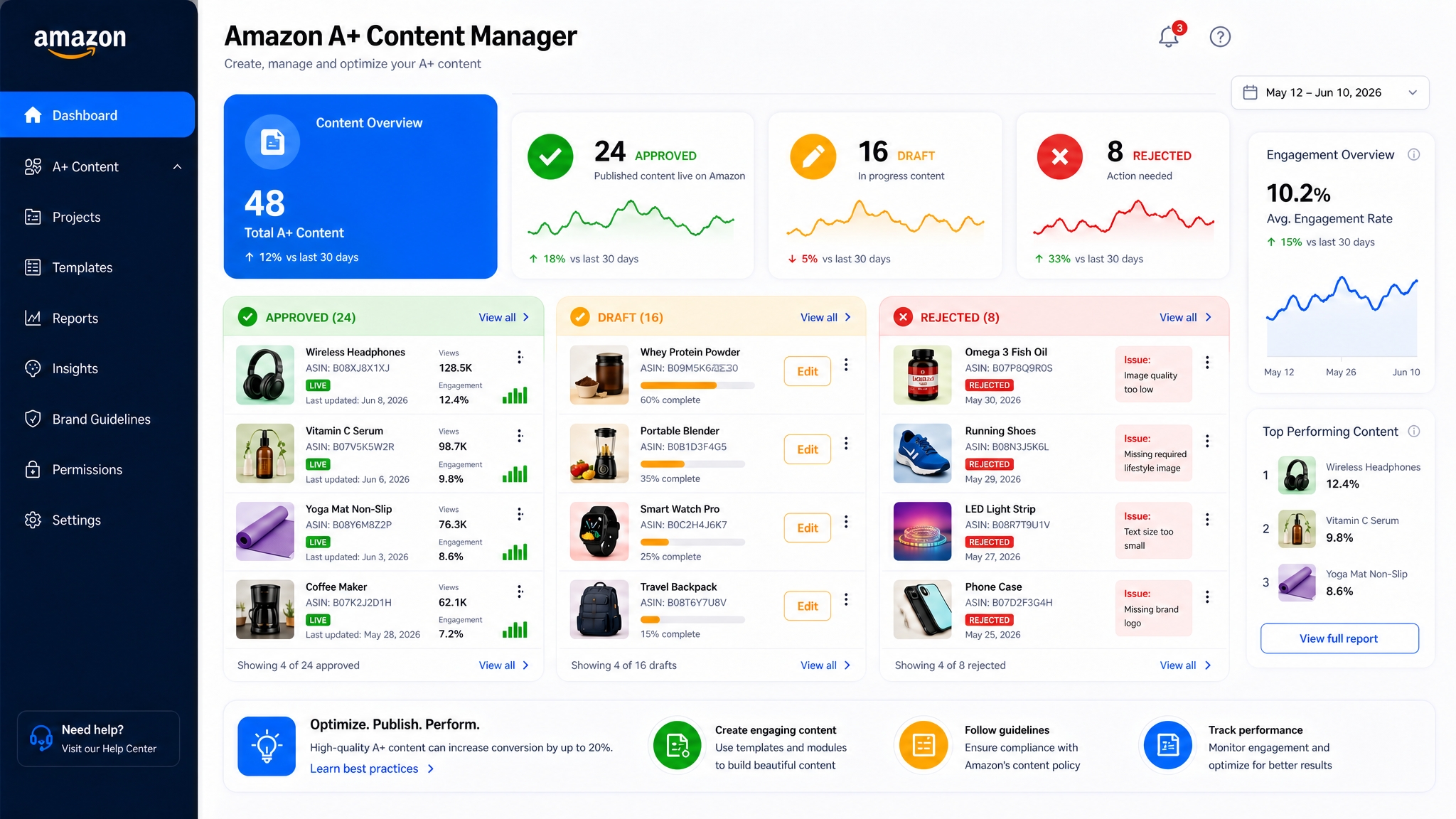
After Brand Registry approval, navigate to Advertising > A+ Content Manager in Amazon Seller Central. Here, you'll see options to create new content, manage drafts, and monitor performance metrics like click-through and conversion impact.
The dashboard also shows which ASINs already have A+ Content applied and which are pending review.
Choosing the Right Content Type for Your Products
Amazon provides multiple A+ Content module templates based on category and audience intent. Common types include:
- Image + Sidebar Text – Ideal for highlighting key features with minimal layout distraction.
- Four-Panel Comparison – Perfect for showcasing product variations or competitive advantages.
- Technical Specifications Table – Great for electronics or tools requiring detailed specs.
- Lifestyle Banner – Best for emotional storytelling and brand immersion.
Select templates that align with your product's complexity and buyer journey stage. For example, skincare brands benefit from before/after visuals, while tech gadgets perform well with feature comparison tables.
How to Create High-Converting A+ Content Step by Step
Creating high-impact A+ Content involves strategic planning, design execution, and iterative testing. Follow these steps to build content that converts.
Step 1: Plan Your Content Strategy and Key Messages
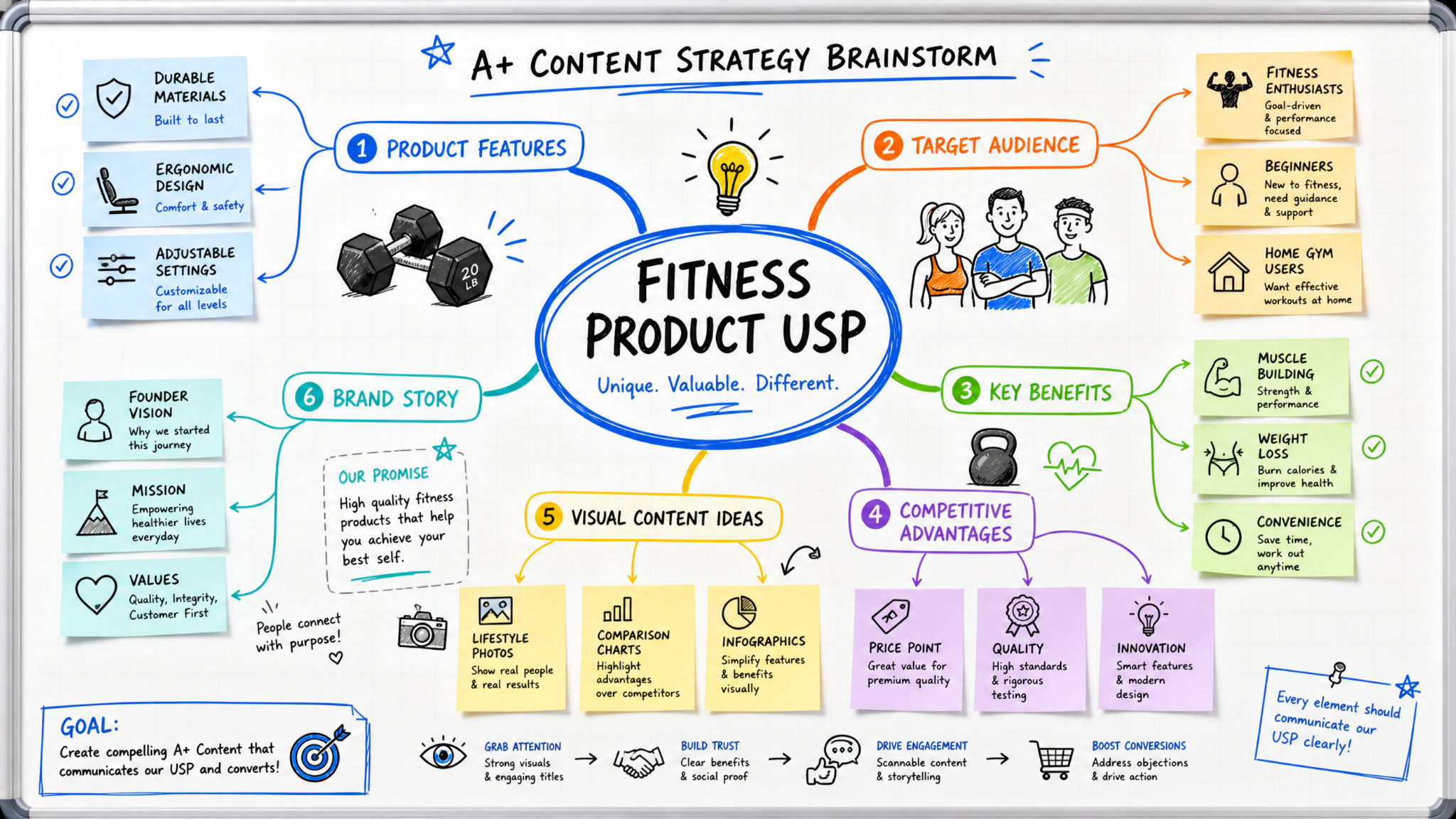
Start by defining your product's USPs. Ask: What problems does it solve? Who is the ideal buyer? What objections might they have?
Map these insights into a content outline. For instance, a portable blender brand might focus on:
• Portability (fits in backpacks)
• Battery life (90 minutes per charge)
• Leak-proof design
• Easy cleanup (one-button disassemble)
Step 2: Select and Customize Your Content Modules
In the A+ Content Manager, choose 3–5 modules that best convey your message. Avoid clutter; Amazon recommends no more than six content blocks per page.
Use Amazon's built-in templates but customize them with your brand colors, fonts, and tone. For example, swap generic icons with custom illustrations that reflect your product's lifestyle use.
Design Compelling Visuals and Write Persuasive Copy
Visuals should be high-resolution (1920x600px recommended), compressed for fast loading, and branded consistently. Lifestyle photos showing real people using your product increase relatability.
Copy should focus on benefits, not just features. Instead of "stainless steel blade," say "stainless steel blade crushes ice in seconds, perfect for smoothies on the go." Pair each image with a headline and short body text (max 500 characters).
Add Comparison Charts and Product Highlights
Comparison charts are among the most effective A+ Content tools. They allow shoppers to see differences between your product and others, or between your models at a glance.
For example, "Why Choose Our Air Purifier?" could compare noise level, filter lifespan, room coverage, and energy efficiency against three competitors. Include your logo in the chart to reinforce brand identity.
Submit for Review and Go Live
After finalizing your content, submit it for Amazon's review. Approval typically takes 3–7 business days. During this time, Amazon checks for policy compliance, image quality, and brand alignment.
Once approved, the content goes live automatically. Monitor performance in the A+ Content Manager dashboard and track metrics like conversion rate, Add-to-Cart rate, and customer reviews.
Best Practices to Maximize Your A+ Content Performance
To get the most from your A+ Content, follow these proven best practices used by top-performing Amazon brands.
Optimize for Mobile and Desktop Viewing
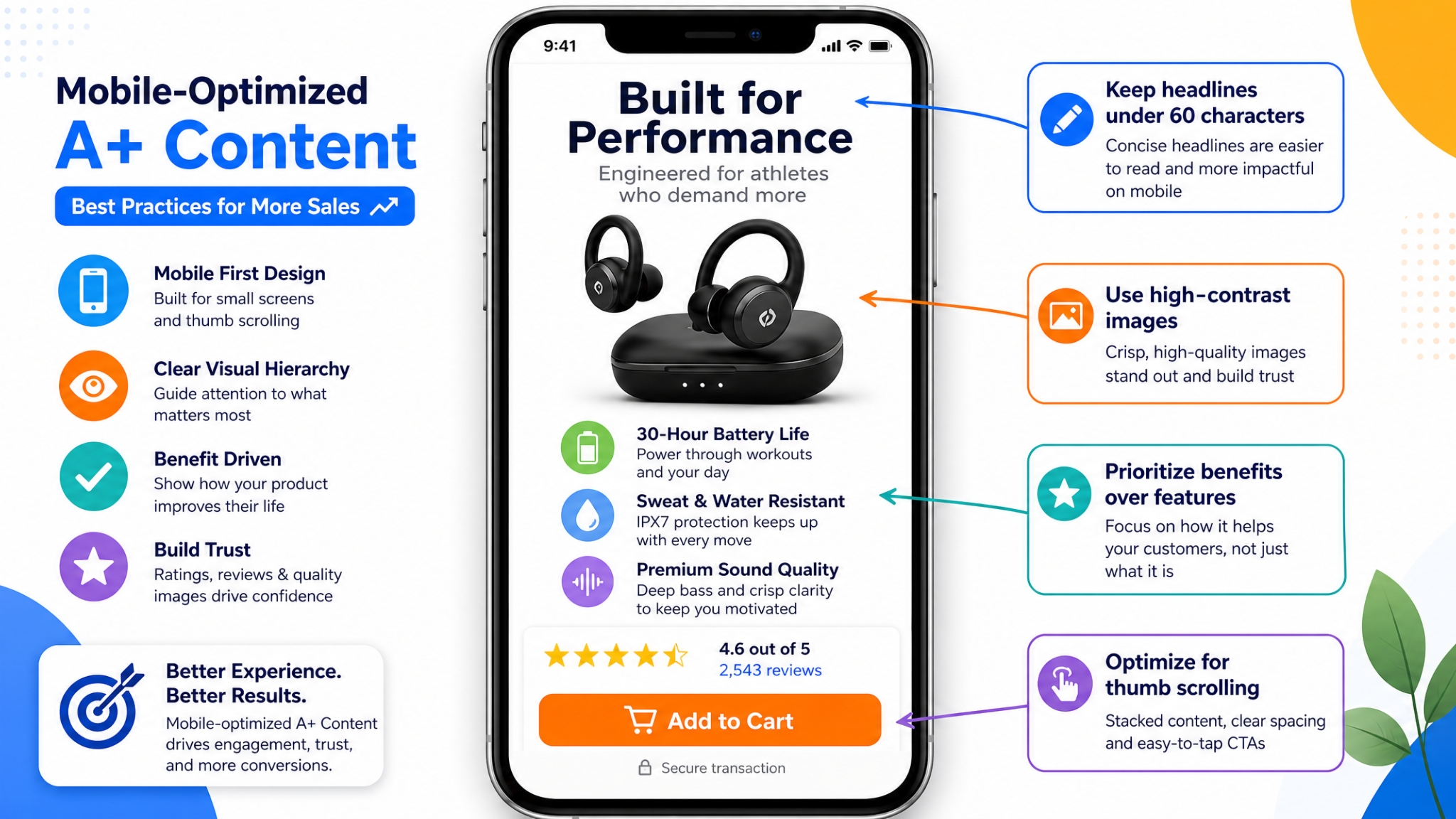
Over 70% of Amazon shoppers browse on mobile devices. Ensure your A+ Content renders clearly on smaller screens by using large fonts, vertical layouts, and stacked modules instead of side-by-side designs.
Use High-Quality Images That Tell Your Brand Story
Avoid stock photos. Use original lifestyle shots that reflect real usage scenarios. Show scale (e.g., person holding product), environment (e.g., kitchen, gym), and emotional payoff (e.g., satisfied customer).

Keep Text Concise and Benefit-Focused
Shoppers scan quickly. Use bold headlines, bullet-like phrasing, and active voice. Limit paragraphs to 2–3 lines. Prioritize clarity over cleverness.
Test and Update Your Content Regularly
Treat A+ Content as a living asset. Run A/B tests (via external tools or split ASIN strategies) to compare different visuals, CTAs, or layouts. Refresh content quarterly to reflect new features, promotions, or seasonal messaging.
Avoid Common Mistakes That Get Content Rejected
Common reasons for rejection include:
- Low-resolution images (< 100 KB or pixelated)
- Watermarks, URLs, or promotional text (e.g., "Limited time offer!")
- Misleading claims ("#1 Selling" without evidence)
- Incorrect use of trademarks or third-party logos
Review Amazon's A+ content style guidelines before submitting.
Conclusion
Amazon A+ Content is no longer a luxury. It's a necessity for serious sellers who want to stand out, build trust, and increase conversions. Whether you're a small brand or a large-scale operator, leveraging A+ Content effectively can result in measurable improvements in sales velocity, lower return rates, and stronger brand equity on Amazon.
By following the steps and best practices outlined in this guide, from Brand Registry enrollment to continuous optimization, you can create high-converting, compliant, and visually striking product pages that resonate with Amazon shoppers.
To go further, combine your A+ Content strategy with data-driven keyword research. Use SellerSprite's Reverse ASIN Tool to analyze top-performing competitors and reverse-engineer their winning content and SEO tactics.
FAQ
What is Amazon A+ Content and how does it benefit my sales?
Amazon A+ Content allows brand-registered sellers to enhance their product listings with rich media such as high-resolution images, detailed descriptions, comparison charts, and branded storytelling elements. It improves customer trust, reduces purchase hesitation, and can increase conversion rates by up to 20%. It also helps differentiate your product in competitive categories and reduces return rates by setting accurate expectations.
How do I create effective A+ Content for my Amazon product listings?
To create effective A+ Content: 1) Enroll in Amazon Brand Registry; 2) Define your product's key benefits and target audience; 3) Choose relevant content modules (e.g., comparison tables, lifestyle banners); 4) Design high-quality visuals and write benefit-focused copy; 5) Submit via A+ Content Manager; 6) Test and update regularly based on performance data. Use tools like SellerSprite to benchmark top competitors.
Can small Amazon sellers improve conversions with A+ Content?
Absolutely. Small sellers often see some of the highest relative gains from A+ Content because it levels the playing field against larger brands. Even basic templates can significantly improve clarity, trust, and perceived value. As long as you follow Amazon's guidelines and focus on authentic storytelling, A+ Content can deliver strong ROI regardless of business size.
How long does it take for Amazon to approve A+ Content?
Amazon typically takes 3–7 business days to review and approve A+ Content submissions. The exact time depends on the complexity of the content, image quality, and current system load. Ensure all elements comply with Amazon's content policies to avoid delays or rejections.
Next Steps
- Sign up for SellerSprite to access competitor keyword intelligence.
- Enroll your brand in Amazon Brand Registry if you haven't already.
- Analyze top-performing A+ Content examples in your niche for inspiration.
References
- Amazon A+ Content Overview View
- SellerSprite Blog: Is A+ Content Worth the Investment? View
- Amazon Brand Registry Enrollment Guide View
- A+ Content Style Guidelines View
By SellerSprite Success Team
The SellerSprite Success Team combines real-world Amazon marketplace expertise with data science and SEO innovation. With thousands of seller hours in listing optimization, keyword research, and A+ Content strategy, we provide actionable, evidence-based guides trusted by over 1.7M+ Amazon sellers globally.