TL;DR: Master Amazon PPC search terms using AI-driven insights to uncover high-performing keywords, eliminate wasted spend, and improve campaign profitability, especially critical for new and growing FBA sellers.
Key Takeaways
- Amazon PPC search terms are actual customer queries that trigger your ads, while keywords are the terms you bid on. Understanding this difference is crucial for optimization.
- The Amazon Search Term Report reveals which customer searches led to clicks and conversions, enabling data-driven decisions for keyword optimization.
- Using AI tools like SellerSprite can automate the analysis of thousands of search terms, helping you scale campaigns efficiently and reduce wasted ad spend.
Table of Contents
Note on marketplaces: This guide is specifically optimized for the US market.
Understanding Amazon PPC Search Terms vs. Keywords
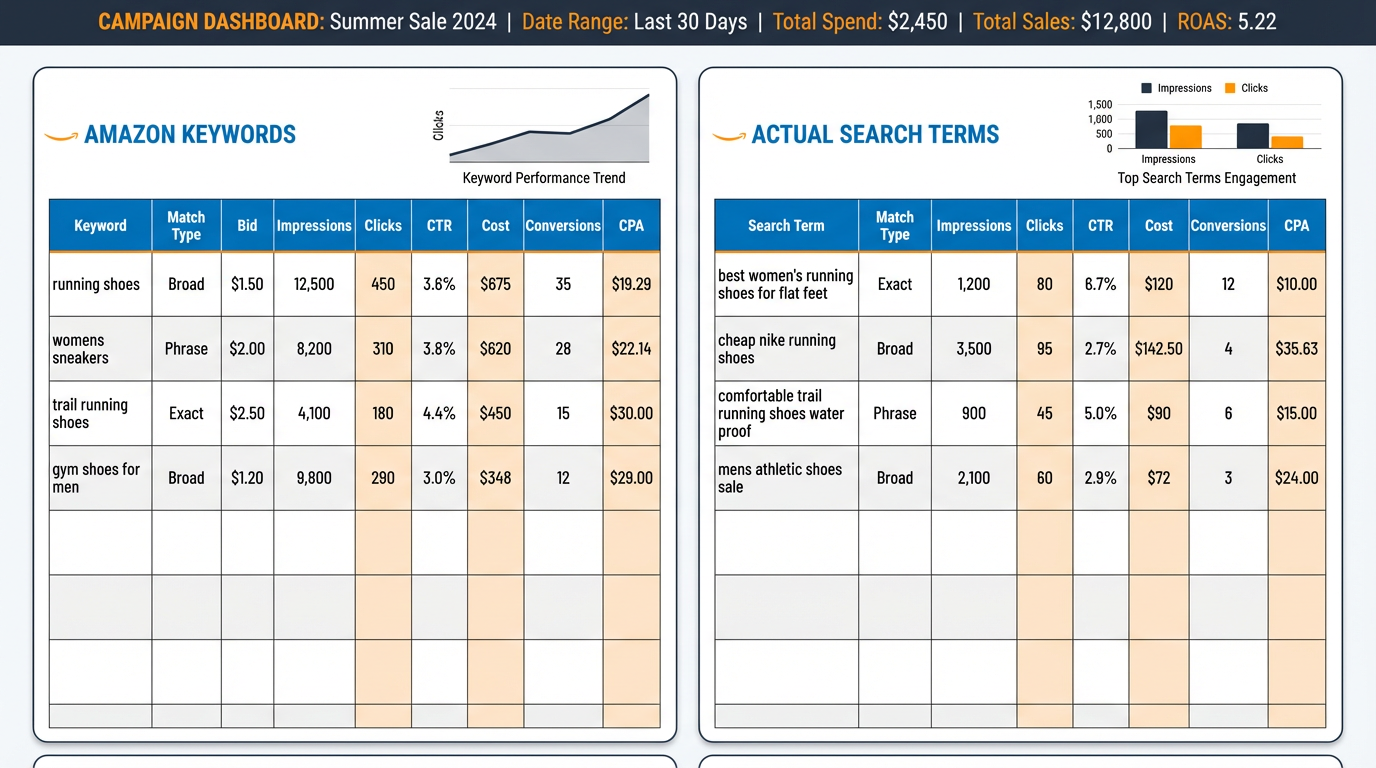
One of the most common points of confusion among Amazon sellers, especially beginners, is the difference between Amazon PPC keywords and search terms. Keywords are the terms you proactively select and bid on in your Sponsored Products, Sponsored Brands, or Sponsored Display campaigns. These include match types like broad, phrase, and exact.
In contrast, search terms are the actual queries typed by shoppers into Amazon's search bar that triggered your ad to appear. For example, if you bid on the keyword "wireless earbuds," your ad might show up when someone searches "best Bluetooth earbuds for gym." That customer query "best Bluetooth earbuds for gym" is a search term.
This distinction is critical because it reveals real customer behavior. While your keyword strategy shapes your campaign setup, analyzing search terms shows you what's actually working, and what's draining your budget.
How to Access & Analyze the Amazon Search Term Report
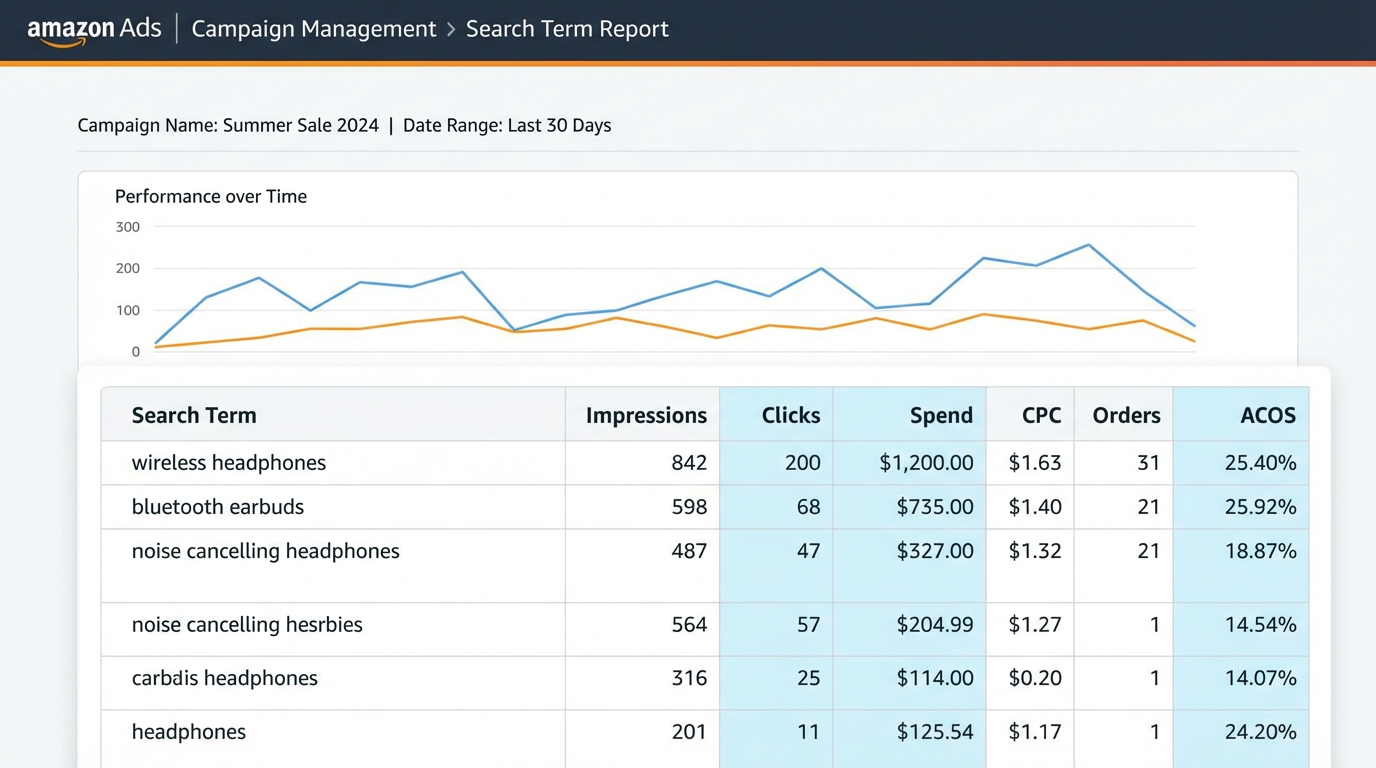
To begin optimizing your campaigns, you need access to the Amazon Search Term Report, also known as the Search Query Performance Report. This report is available in Amazon Advertising Console under "Reports" > "Advertising Reports" > "Custom Reports."
You can generate two types of reports:
- Search Term Report (by keyword): Shows which customer search terms triggered your ads based on the keywords you're targeting.
- Search Term Report (by search term): Reveals performance metrics (impressions, clicks, spend, sales, ACOS) for each actual shopper query.
When analyzing the report, focus on three key metrics:
- ACOS (Advertising Cost of Sale): Lower is better. High ACOS on a search term indicates poor ROI.
- Conversion Rate: How often a search term leads to a sale. High conversion = high intent.
- Spend vs. Sales: Identify terms with high spend but low sales, which may need negative keyword treatment.
Step-by-Step: Optimizing Campaigns Using Search Term Data
Now that you have the data, here's a proven 5-step process to turn search term insights into profitable actions:
Step 1: Identify High-Performing Search Terms
Look for search terms with:
- High conversion rate (≥10%)
- Low ACOS (≤20%)
- Multiple sales with moderate spend
These are golden opportunities. Promote them by adding them as exact or phrase match keywords in dedicated campaigns to gain more control and scale.
Step 2: Flag Underperforming Terms for Negatives
Search terms with high spend, zero sales, and high ACOS are draining your budget. Add these as negative keywords at the campaign or ad group level to prevent future impressions.
For example, if "cheap wireless earbuds" triggers your premium brand ad but converts poorly, add "cheap" as a negative keyword. Learn more in our complete guide to negative keywords.
Step 3: Group Similar Terms into Themed Campaigns
Use search term insights to build tightly themed campaigns. For instance, group all fitness-related queries ("workout earbuds," "sweatproof Bluetooth headphones") into a "Sports & Fitness" campaign with tailored ad copy and bids.
This improves relevance, Quality Score, and conversion rates. For advanced structuring, see our guide on Amazon PPC campaign structure.
Step 4: Adjust Bids Based on Search Term Performance
Increase bids on high-converting search terms to gain more visibility. Decrease or pause bids on low performers. Use dynamic bidding strategies (up and down) cautiously. Manual bids offer more control during optimization.
Step 5: Repeat Weekly
Search term analysis isn't a one-time task. Customer behavior evolves. Set a weekly cadence to review reports, update negatives, and promote winners. Consistency compounds results.
How AI Tools Supercharge Search Term Mining
Manually sifting through thousands of search terms is time-consuming and error-prone, especially for growth-stage brands running multiple campaigns. This is where AI-powered tools like SellerSprite transform efficiency.
SellerSprite's Search Query Performance Dashboard automatically categorizes search terms into:
- Profitable (high conversion, low ACOS)
- Break-even (moderate performance)
- Waste (high spend, no sales)
It also suggests:
- Which terms to add as keywords
- Which to negate
- Optimal bid adjustments
For example, one SellerSprite user scaled their ACOS from 45% to 28% in six weeks by automating search term review across 12 campaigns. Learn how in our deep dive on the Search Query Dashboard.
FAQ
How do I find high-performing search terms for Amazon PPC?
Download the Amazon Search Term Report from the Advertising Console. Filter for search terms with high conversion rates, low ACOS, and consistent sales. Prioritize those with at least 5–10 clicks to ensure statistical significance. Use tools like SellerSprite to automate identification and categorization of top performers.
What is the difference between Amazon PPC keywords and search terms?
Keywords are the terms you bid on in your campaigns (e.g., "noise cancelling headphones"). Search terms are the actual phrases customers type into Amazon that trigger your ads (e.g., "best headphones for airplane travel"). Keywords are planned; search terms reveal real behavior.
How can I optimize my Amazon PPC campaigns using search term reports?
Use the report to identify converting search terms and add them as keywords in new or existing campaigns. Add non-converting terms as negative keywords. Group high-intent terms into themed campaigns and adjust bids accordingly. Repeat weekly for continuous improvement.
Next Steps
- Download your Amazon Search Term Report and identify your top 5 converting search terms.
- Sign up for SellerSprite to automate search term analysis and negative keyword recommendations.
- Explore our AI for Amazon FBA Guide Hub for more advanced strategies on scaling with data-driven advertising.
References
- Amazon Advertising Search Term Report Guide View
- Keyword Research for Amazon PPC View
- How to Build Amazon PPC Exact Match Campaigns View
By SellerSprite Team
The SellerSprite Team combines deep expertise in Amazon marketplace dynamics, AI-driven analytics, and e-commerce growth strategy. With years of hands-on experience helping thousands of FBA sellers optimize PPC, conduct keyword research, and scale profitably, we deliver actionable, data-backed insights you can trust.