TL;DR: Amazon A+ Content, formerly called Enhanced Brand Content (EBC), lets eligible sellers add richer product information to Amazon detail pages through images, text, comparison charts, and other modules. Basic A+ Content is designed for clear product explanations, while eligible brands can use Premium A+ features such as video, interactive hotspots, and carousels. The best A+ Content does not simply repeat the product's title and bullet points. It answers the questions a shopper still has before purchasing. Research those questions, build modules around verified product details, follow Amazon's content guidelines, and use an eligible A/B test to evaluate the result.
Key Takeaways
- Enhanced Brand Content is the former name. Sellers should now work with Amazon A+ Content rather than look for EBC as a separate tool.
- Basic, Brand Story, and Premium A+ serve different purposes. They differ in placement, module options, and eligibility requirements.
- Design around purchase barriers. Sizing, compatibility, included accessories, instructions, and product differences often deserve more attention than broad brand claims.
- A+ is not a substitute for ordinary listing SEO. Relevant text and descriptive image alt text can support discoverability, but adding more keywords does not guarantee higher rankings.
- Measure the finished experience. Use Amazon's testing tools when eligible, and distinguish real conversion evidence from a simple before-and-after sales change.
Table of Contents
- Amazon A+ Content and Enhanced Brand Content Are Not Two Separate Tools
- Basic, Brand Story, or Premium: Which Can You Use?
- Start with the Question the Listing Has Not Answered
- Use Search and Competitor Research to Find the Missing Information
- Make the Modules Work as One Product Explanation
- Design for Small Screens and Readable Product Facts
- Attractive Content Can Still Fail Amazon's Review
- From Draft to Published A+ Content
- Does A+ Content Improve Amazon SEO?
- Test the Content, Not Just the Sales Trend
- Keep A+ Content Accurate After Launch
- A Better Product Explanation Is the Goal
- FAQs
- References
Scope: This guide focuses on Amazon.com product detail pages for US sellers. It discusses Seller Central A+ Content, not the separate Kindle Direct Publishing workflow. Module availability, account eligibility, content rules, and publishing interfaces may change. Use the current requirements in A+ Content Manager for the final submission.
Amazon A+ Content and Enhanced Brand Content Are Not Two Separate Tools
A customer comparing two laptop stands might already know the price, material, color, and advertised dimensions. What they still cannot tell is whether the stand will fit their device, how its adjustment mechanism works, or how much room it occupies when folded.
A+ Content provides a place to answer those questions with a more structured combination of visuals and explanations. That is its strongest practical use, even when the brand also wants a more distinctive product page.
Amazon A+ Content is Amazon's enhanced product-detail-page content system. It allows eligible sellers to create module-based content using images, native text, product comparisons, and other available features. The older term Enhanced Brand Content (EBC) refers to its earlier naming, not a separate modern editor with different objectives.
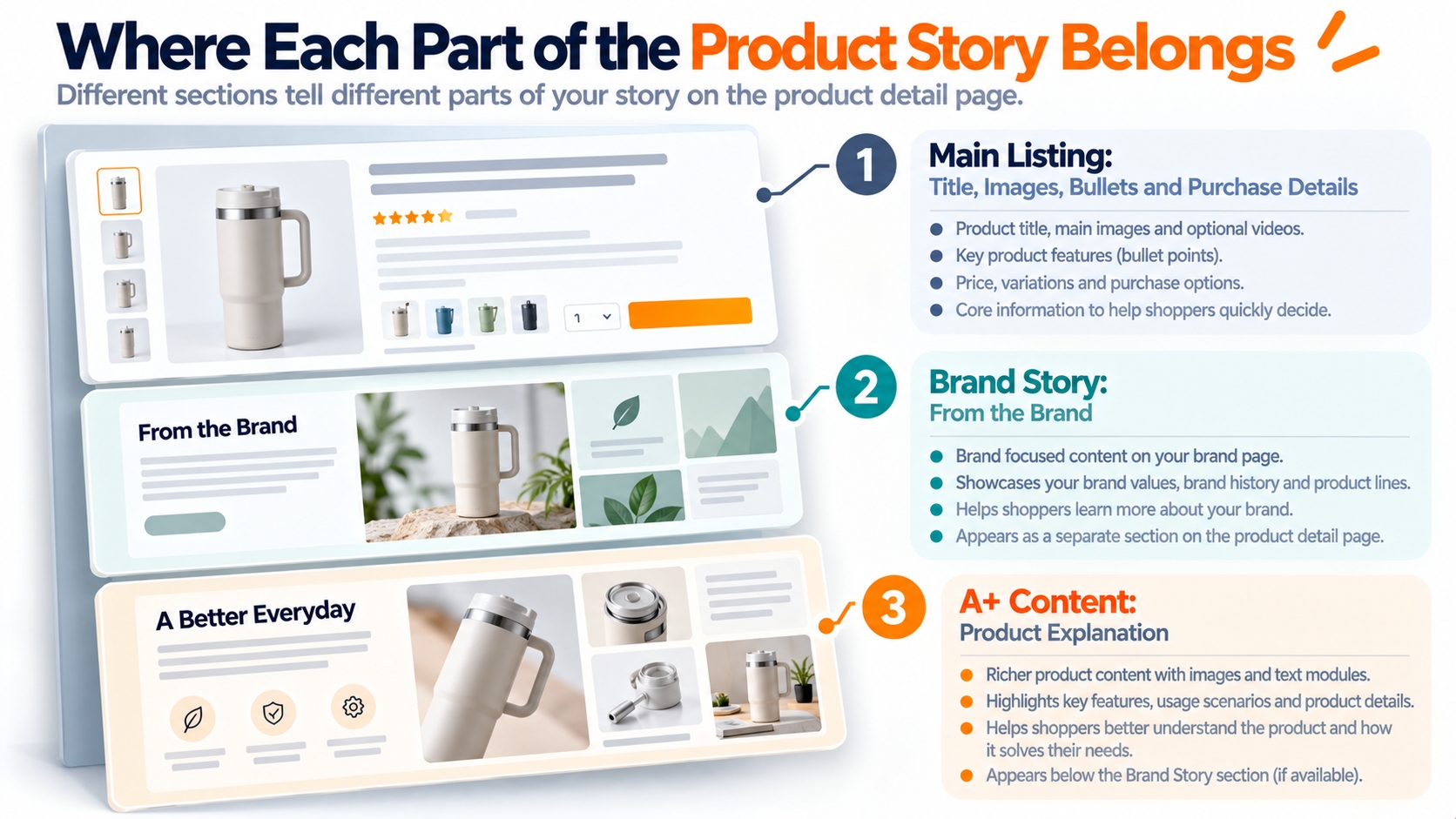
Where A+ Content belongs on the product page
Product titles, the main image gallery, bullet points, prices, and purchase controls carry the essential shopping information. A+ Content appears farther down the product detail page in the product-description area. Brand Story occupies a separate section commonly labeled "From the brand".
That placement should influence your content strategy. Shoppers should not need to scroll through several decorative banners to find the compatibility requirement or limitation that determines whether the product suits them.
Product information and brand storytelling have different jobs
The product-specific area should explain what the item does, how to use it, what is included, and how to choose the right configuration. Brand Story is better suited to the brand's background, its related product lines, and relevant cross-selling.
A compelling brand story can make a page more memorable, but it should not displace factual information the shopper needs to make a confident purchase.
Basic, Brand Story, or Premium: Which Can You Use?
The available module set matters before design begins. A team planning a video carousel cannot assume that every account with A+ access can publish Premium modules.
Amazon currently describes three main content options: Basic A+ Content, Brand Story, and Premium A+ Content. They complement different parts of the shopping experience.
| Content type | Main capabilities | Most useful for |
|---|---|---|
Basic A+ Content Up to 5 modules per ASIN | Images, rich text, product feature explanations, technical specification layouts, and comparison charts. | Size, function, materials, usage, compatibility, and product differences. |
Brand Story Separate brand section | Brand imagery, text, carousels, and supported links to the brand's Amazon Store or products. | Brand background, product families, consistent brand identity, and relevant cross-selling. |
Premium A+ Content Up to 7 modules per ASIN | Larger visual layouts, video, interactive hotspots, image or video carousels, Q&A modules, and enhanced comparisons. | Complex demonstrations, detailed product education, and interactive feature exploration. |
Basic A+ eligibility
Amazon's public guidance identifies a Professional selling account and the appropriate association with a brand enrolled in Amazon Brand Registry as the standard path to A+ Content. It also describes eligibility for Professional sellers with qualifying generic products in their catalog. A brand relationship may require the appropriate Brand Representative or Reseller role.
Do not assume that selling someone else's branded ASIN automatically grants permission to edit its A+ Content. Check the brand association and ASIN eligibility displayed in the actual account.
Premium A+ eligibility
Premium A+ requires additional eligibility. Amazon's public eligibility guidance lists a published Brand Story on all brand-owned products and five published A+ Content projects within the preceding 12 months. Once a brand qualifies, A+ Content Manager displays an eligibility notification.
The requirement concerns published A+ projects, not five modules inside a single product page. Check the currently applicable criteria and status in your own A+ Content Manager rather than relying on an older eligibility checklist.
Cost clarification: Basic A+ Content and Brand Story are free for eligible sellers. Amazon's public Premium A+ guidance describes free access for eligible brands during the current promotional period, with an opt-in opportunity if pricing is introduced later. Asset production, photography, video, translation, and design work can still cost money.
Premium does not automatically mean better
A product requiring a simple size chart and two clear usage images may be easier to understand through Basic A+ than through a long animated or interactive experience. Premium becomes useful when its additional modules genuinely help explain something that ordinary images and text cannot.
Choose the amount of content that fits the decision, rather than filling every available module merely because the account permits it.
Start with the Question the Listing Has Not Answered
A+ Content is easiest to plan when the creative team starts with a specific purchase hesitation. Product photographs and an attractive headline are useful, but a shopper may still be uncertain about fit, material, usage, or what is included in the package.
Those uncertainties should determine the module sequence. The content needs to move a buyer from a question toward a supported answer, not from one repeated advertising slogan to another.
Find the decision barriers before choosing visual modules
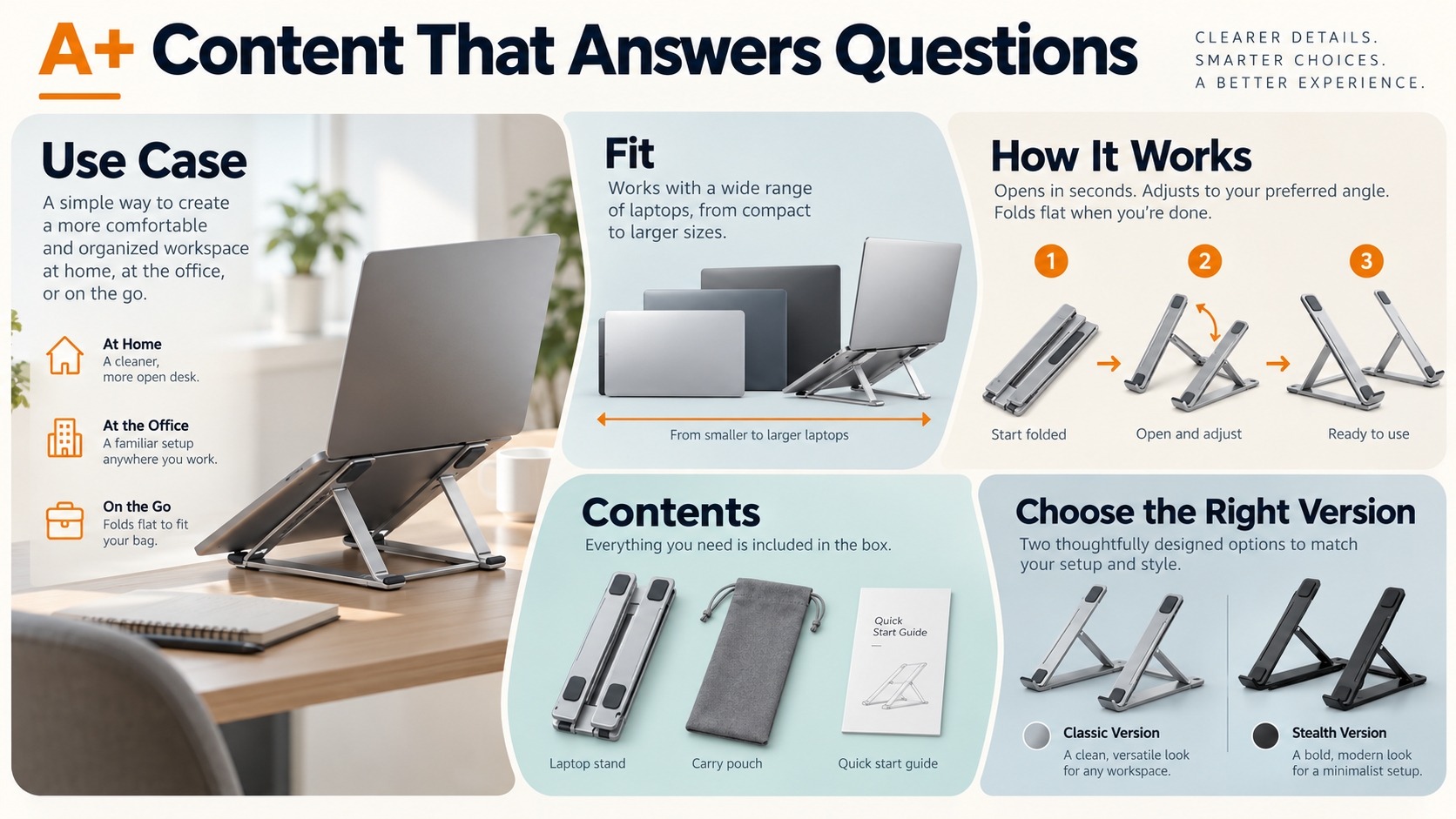
Consider a hypothetical foldable laptop stand. Its main listing already identifies the product category and shows the stand open and folded. The customer may still want to know which device sizes it supports, how it adjusts, whether it is stable on their desk, and how much room it occupies in storage.
Each issue calls for different evidence. Compatibility calls for verified measurements. An adjustment mechanism calls for a sequence of views. Product stability calls for accurate construction details rather than an unsupported promise.
| Buyer question | Useful A+ treatment | Evidence required |
|---|---|---|
| Will it fit my device? | Compatibility chart or labeled dimension illustration. | Verified supported dimensions and model-specific limitations. |
| How do I adjust it? | Sequential images or, when eligible, a video demonstration. | Actual product operation and any necessary usage instructions. |
| What comes in the box? | Included-components photograph and concise native text. | Confirmed package contents for the precise variation. |
| Which version should I choose? | Comparison of relevant products from the same brand. | Accurate specifications, product identifiers, and differences. |
Distinguish a buying question from a marketing message
A headline such as "Elevate Your Workday" may establish a tone, but it does not answer whether the stand supports a particular device. "Compare Your Device Dimensions Before Use" is less decorative and more useful when the page supplies the correct measurements.
Strong A+ modules can combine the two approaches: visual appeal captures attention while verifiable details help the shopper decide.
The editorial test: If removing a module would not remove any useful information, demonstration, or meaningful brand context, that module may not deserve space on the page.
Use Search and Competitor Research to Find the Missing Information
Competitor research can help reveal the language shoppers use and the product attributes they investigate. It should guide the questions you answer, not supply a script to copy.
Start with three to five comparable ASINs in the same product type. Avoid mixing substantially different price tiers, functions, or product configurations merely to increase the keyword count.
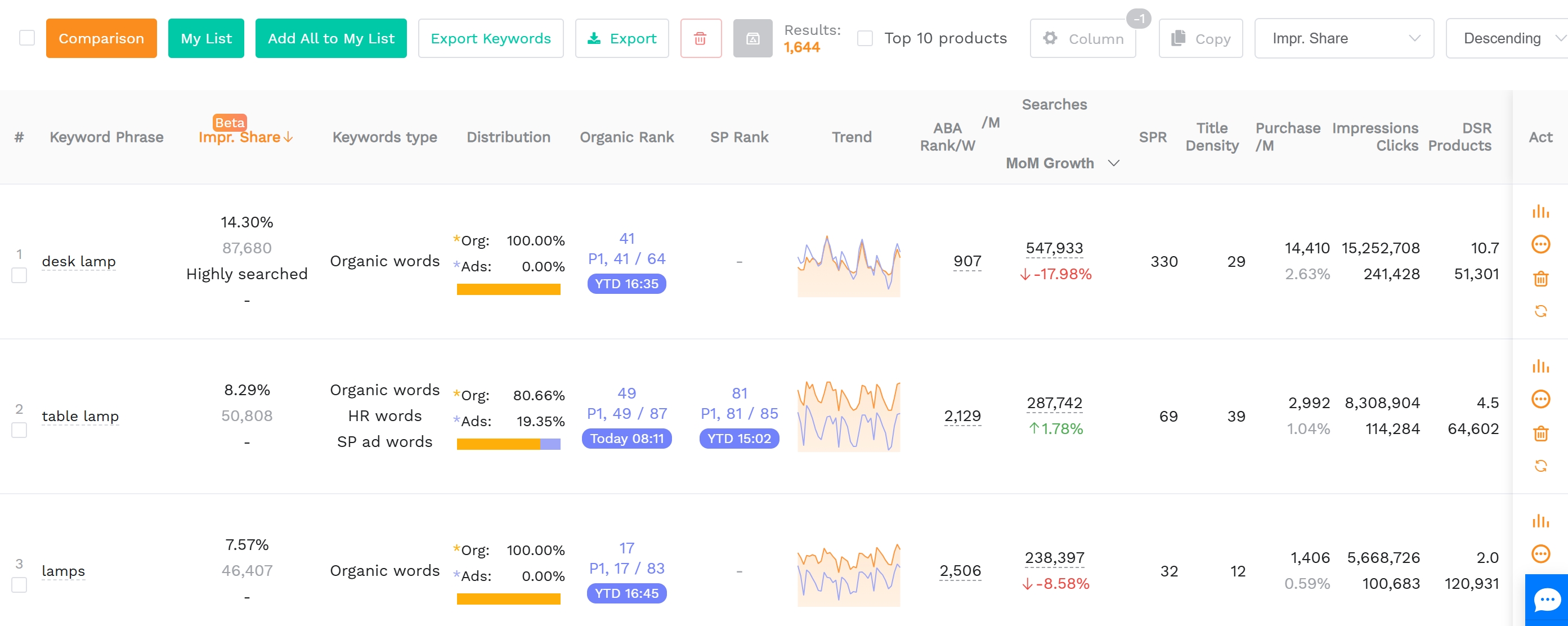
Reverse ASIN keywords reveal relevant search language
SellerSprite's Reverse ASIN research guide explains how sellers can examine search terms associated with competing products, including keyword-level traffic and ranking information. It supports researching the words customers use to discover relevant ASINs.
For a laptop stand, relevant search clusters might concern portability, adjustability, compatible device sizes, desk use, or material. These are hypothetical categories, not verified keyword rankings for a particular product.
Filter out unrelated products, misleading use cases, competitor brand names, and terms that describe features your item does not have. A high search volume does not make a phrase suitable for your product page.
Convert search terms into information requirements
Terms that describe the central product type belong primarily in an appropriate title and other relevant listing fields. A+ modules can explain the related attributes, usage scenarios, and selection criteria through factual copy and visuals.
For example, a cluster around "foldable laptop stand" may call for photographs of the folded configuration. Search interest in adjustable stands may justify demonstrating the real adjustment mechanism. A compatibility-related cluster suggests including the measurements a buyer needs to check before ordering.
The research result identifies a possible content need. The manufacturer specifications, actual product, and verified documentation determine what you are entitled to claim.
Read competitor reviews without copying competitors
Look for recurring questions about setup, size, included parts, packaging, and product limitations. SellerSprite AI Review Analysis can help organize available customer-review themes, although those findings still require checking the underlying comments and relevant product variations.
A complaint about a competing stand's unstable hinge might suggest checking the strength and adjustability of your own product. It does not establish that your item is more stable or justify mentioning the competitor in A+ Content.
Research should end with a prioritized set of buyer questions and verified answers, not a collection of competitor screenshots pasted into a new layout.
Make the Modules Work as One Product Explanation
An effective A+ layout has a sequence. One module introduces the product's value, the next clarifies its design, and the following sections answer the questions that might prevent a purchase.
The structure below illustrates how five editorial sections could work together for a foldable laptop stand. These are planning functions, not mandatory Amazon module names or a claim that every account provides identical templates.
Avoid repeated selling messages
Five visually distinct modules can still be repetitive if each simply says the product is portable, convenient, or high quality. Give each section a different informational responsibility.
Some products may need fewer than five modules. A well-structured compatibility chart and two demonstration sections can be more persuasive than a long page filled with generic lifestyle imagery.
Brand Story should contribute something different
If the product modules already explain the stand's features and use, Brand Story can introduce the brand's design approach, broader product range, or appropriate related items.
Avoid repeating the same specifications in both areas. Where Amazon's supported Brand Story modules allow links to the brand's other Amazon products or Store, use them to help shoppers explore relevant options rather than redirect them away from Amazon.
Design for Small Screens and Readable Product Facts
A design that looks convincing across a large desktop preview can become difficult to read on a phone. Long lines, dense specification tables, and text embedded into image files may be reduced until their practical value disappears.
Before finalizing a module, consider which information a shopper can understand without zooming or navigating through several separate panels.
Use native text fields for important explanations
Where the selected module allows editable text, use it for key product facts rather than placing all copy inside the image artwork. Native text can remain more readable across layouts and provides a clearer structure for product information.
Amazon's 2026 seller-readiness material specifically recommends using text fields instead of embedding important wording into images and describes editable text as useful for Amazon Search discoverability.
Give images descriptive alt text
Amazon's A+ image workflow includes alt text, sometimes called image keywords. Its purpose includes describing the visual content for accessibility. Write a simple, accurate description of what the image shows.
Example of Descriptive A+ Alt Text
Useful: "Foldable laptop stand in an open position on a desk, showing its support arms and adjustable hinge."
Not useful: "Best laptop stand portable ergonomic office laptop holder adjustable laptop stand."
The first version describes a visible product and its position. The second is a keyword list with an unsupported superlative. Descriptive alt text should not be treated as a hidden field for stuffing unrelated search terms.
Check images in both desktop and mobile previews
Use the current A+ Content Manager requirements for image dimensions, file format, and module behavior. Amazon provides a preview function so sellers can inspect how content appears on desktop and mobile before submission.
Confirm that labels remain readable, diagrams are not cropped in misleading ways, and product variations can be distinguished. For an illustration with many technical annotations, consider dividing information between a cleaner image and a native specification text block.
Attractive Content Can Still Fail Amazon's Review
A polished design is not the same as compliant content. Amazon reviews A+ submissions against rules concerning promotional language, images, claims, brand information, and other elements.
The mistakes below are especially costly when a brand has completed photography, layout, and localization before noticing that a module includes information Amazon does not allow.
Prices, promotions, and shipping promises
Do not manually place promotional prices, discount codes, delivery promises, or seasonal sale messages inside ordinary A+ text or artwork. Such information changes frequently and is restricted by Amazon's content guidelines.
External links, QR codes, and contact details
Do not add your website address, phone number, email address, QR code, or directions to external pages. Amazon's supported Brand Story links to its own product and Store destinations are different from manually embedding an external hyperlink in A+ content.
Unsupported rankings and superiority claims
Avoid unsupported wording such as "best-selling", "top-rated", or comparisons claiming a competitor's product is inferior. Product differences should be accurate, relevant, and compliant with the applicable module rules.
Warranty and guarantee language
Amazon's public A+ design guidance prohibits warranty or guarantee information in ordinary A+ text placements. Keep customer-facing product information accurate without using the enhanced content section for restricted service promises.
Unverified certifications, awards, or performance claims
Claims must be supportable. If referencing a qualifying award or endorsement, Amazon's guidance calls for details such as the issuing organization and year. Do not invent test results, environmental benefits, health claims, or technical specifications.
Low-quality or unauthorized visuals
Avoid blurry, low-resolution, or animated images where prohibited. Confirm that the brand has the rights to use every image, logo, illustration, and video. A visually attractive composition cannot compensate for missing rights or misleading product depictions.
AI-generated assets require the same factual checks
Amazon has introduced generative AI assistance within eligible A+ Content modules. These features can help prepare text and visuals, but they do not establish that the generated product specifications, compatibility statements, or images are correct.
Review generated material against the real product and approved documentation. Check whether the visual adds accessories, changes the product shape, misrepresents dimensions, or creates an unsupported use case. The seller remains responsible for the accuracy of what it submits.
Build an evidence register before production
Keep a record of the product specification behind each claim, the source of each image, the approved wording, and the ASIN or variation to which it applies. This makes later changes easier when packaging, components, or product versions are updated.
Confirm the current A+ rules in Seller Central before final submission, particularly for regulated products, product-specific claims, and newly introduced modules. The public guidelines provide a strong starting point but are not a substitute for the live validation requirements.
From Draft to Published A+ Content
A+ production becomes easier when research, asset approval, and publishing are treated as separate stages. The objective is to avoid having the design team build content for an ASIN that is ineligible or a module the account cannot use.
Amazon's public instructions describe a workflow through A+ Content Manager in Seller Central, followed by module selection, ASIN assignment, preview, and submission.
- Confirm the account and ASIN. Check the appropriate brand or product association, Professional selling status, and available A+ content type.
- Open A+ Content Manager. In the currently documented Seller Central workflow, the manager is accessible through the Advertising menu. Confirm the interface shown to your account.
- Choose the appropriate content type. Select Basic, Brand Story, or Premium where eligible. Build the content using the module templates available in that editor.
- Add approved assets and native text. Verify image rights, product claims, alt text, module dimensions, and the factual consistency of each section.
- Apply content to the correct ASINs. Confirm the variations and product family. Reusing content across multiple ASINs should not create incorrect size, material, or included-component claims.
- Preview before submission. Review both desktop and mobile layouts, read every label, and check the information hierarchy.
- Submit and verify the live page. Monitor review status, resolve any rejection, and confirm that approved content displays on the intended product pages and marketplace.
Leave time for content review
Amazon's 2026 seller-readiness guide advises allowing up to seven business days for A+ review and approval when preparing for major selling events. Treat that as a planning reference, not a guaranteed publishing deadline. Validation issues or additional revisions may extend the process.
If the A+ update is tied to an advertising launch or seasonal promotion, publish early enough to inspect the live content before sending significant traffic to the product.
Does A+ Content Improve Amazon SEO?
A+ Content can support discoverability and purchasing decisions, but it should not be described as a guaranteed ranking shortcut. The influence of native module text, image alt text, product relevance, and downstream customer behavior should be considered separately.
Amazon's 2026 guidance recommends using editable text within modules, including relevant keywords naturally, and providing descriptive image alt text. It specifically identifies editable module text as useful for Amazon Search discoverability.
Do not abandon the main listing fields
A+ Content supplements the product detail page. It does not remove the need for a clear title, accurate bullet points, relevant search terms, high-quality main images, and complete catalog attributes.
Keep the product category and critical buying facts represented in their appropriate listing fields. Use A+ to expand on use cases, limitations, and supporting details. Avoid placing the only important compatibility information inside a small image that may be difficult to read.
Search relevance is not the same as keyword repetition
Use keyword research to identify the concepts that matter. Then write readable information for actual shoppers. A paragraph repeating "adjustable laptop stand" in every sentence is unlikely to explain the mechanism or make a compatibility decision easier.
Amazon Brand Analytics provides search and conversion-related data, including Search Query Performance, to help eligible brands understand how shoppers find and evaluate their products. Those reports can inform the broader listing strategy, but they do not prove that a specific A+ phrase caused a ranking change.
What about Google and AI shopping discovery?
Clear product facts, consistent descriptions, and meaningful comparisons make the product easier to understand, whether the reader is a person or an automated system processing available page information.
However, Amazon does not guarantee that every A+ image, text field, or module will be indexed or used in the same way by Google or an AI shopping assistant. Nor does an enhanced content page guarantee inclusion in a generated shopping recommendation.
For that reason, use precise descriptions and verifiable specifications rather than writing speculative copy for a particular algorithm. Consistency between the product title, attributes, images, A+ modules, and actual delivered item remains valuable regardless of the discovery channel.
Test the Content, Not Just the Sales Trend
A+ Content is intended to support better purchasing decisions, but sales can change for reasons unrelated to the content: price, advertising, availability, ratings, seasonality, and competitor activity.
A before-and-after comparison can identify a change worth investigating. It does not, by itself, establish that the A+ update caused the result.
Use Manage Your Experiments when the ASIN qualifies
Amazon's Manage Your Experiments guide explains how eligible brand owners can run controlled tests of different listing elements, including A+ Content. Amazon divides participating shoppers between content versions and reports performance results.
The ASIN must meet the applicable eligibility and traffic requirements. Use the actual experiment setup and reporting interface to evaluate whether sufficient evidence exists before choosing a winner.
Compare two meaningful content approaches
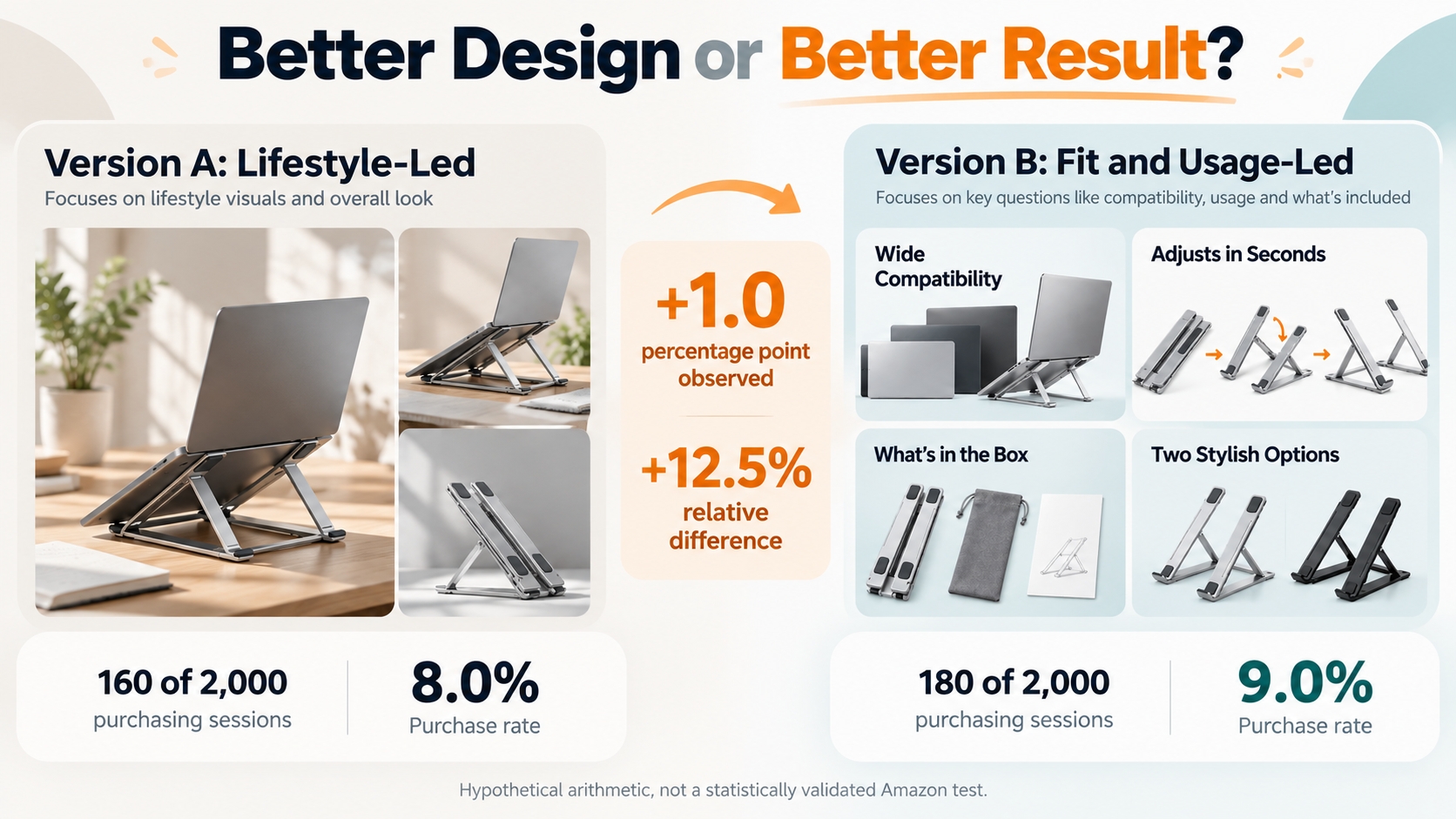
For the hypothetical laptop stand, Version A might lead with broad lifestyle photography and a general portability message. Version B might prioritize a clearly labeled fit guide, an adjustment demonstration, and a component overview.
The test question is whether the buyer-question-led version improves the outcome for that ASIN. It is not whether the more elaborate design looks better to the creative team.
Hypothetical Illustration of an A/B Comparison
VERSION A
8.0%
160 purchasing sessions out of 2,000 hypothetical sessions.
VERSION B
9.0%
180 purchasing sessions out of 2,000 hypothetical sessions.
Absolute difference: 9.0% - 8.0% = 1.0 percentage point.
Relative difference: (9.0% - 8.0%) / 8.0% = 12.5%.
These are invented values demonstrating percentage-point and relative-change calculations. They are not Amazon experiment results, benchmarks, or evidence of statistical significance. Amazon's actual experiment dashboard uses its own defined metrics and evaluation methods.
A higher observed conversion percentage is encouraging, but the decision should follow the experiment's actual sample size, uncertainty, duration, and reported probability that one version performs better. Do not claim a 12.5% guaranteed sales uplift from this illustration.
Evaluate more than one success measure
| Metric | Why it matters | Interpretation caution |
|---|---|---|
| Conversion | Tests whether eligible shoppers are more likely to purchase under the content variant. | Use the experiment's definition and significance assessment, not an arbitrary short-term comparison. |
| Units and sales | Shows the commercial outcome associated with the tested content. | Total sales can also move because of price, advertising, and inventory changes. |
| Search visibility | Provides context for how relevant shoppers discover the ASIN. | Rank changes do not directly prove that the A+ update was responsible. |
| Returns and complaints | Can reveal whether compatibility or expectation problems persist. | Product defects, packaging, and fulfillment issues may be unrelated to A+ Content. |
Treat Amazon's uplift figures as claims about potential, not forecasts
Amazon's public A+ materials state that Basic A+ Content can increase sales by up to 8% and well-implemented Premium A+ Content by up to 20%, based on Amazon internal data.
These figures are not promised results for a new seller, a product category, or a particular A+ design. They should not be inserted into a seller's financial forecast as guaranteed conversion or revenue improvements.
Use your own eligible experiments and account results to determine whether the investment in enhanced content is commercially justified.
Keep A+ Content Accurate After Launch
A published A+ page should not be considered finished indefinitely. Product specifications can change, packaging can be revised, and a comparison chart can become inaccurate when a related model is discontinued.
Maintain the content as part of normal catalog management, with clear responsibility for product accuracy and the assets used across each ASIN.
Recheck A+ when a product changes
Review the content when a manufacturer changes the product dimensions, components, materials, instructions, or other relevant characteristics. Confirm whether the existing ASIN, variation, and images remain accurate.
A minor packaging redesign may require only a visual update. A material product change can require broader catalog and product-detail corrections, not just a new A+ banner.
Revisit unresolved customer questions
Customer reviews, return reasons, and support questions can reveal gaps that remain after publication. If buyers still misunderstand a compatibility requirement, check whether the relevant explanation is accurate, visible, and easy to read.
Do not assume every complaint can be fixed with content. A genuine product defect needs investigation and correction, not a more persuasive image.
Keep a record of what changed and why
Store the ASINs covered, content version, revision date, asset source, relevant product specifications, and reason for each change. Preserve the earlier version when testing a revision.
This record helps prevent conflicting information across product pages and makes later experiments easier to interpret. A consistent, documented process is more useful than redesigning A+ Content whenever a new visual trend appears.
A Better Product Explanation Is the Goal
Amazon A+ Content is most valuable when it makes an important product decision easier. That may mean clarifying dimensions, demonstrating use, identifying differences between variations, or giving a shopper enough context to avoid buying the wrong item.
Basic and Premium modules offer different ways to communicate. Neither removes the need for accurate product facts, clear writing, appropriate imagery, and compliance with Amazon's publishing rules.
Start with the unanswered question. Choose the simplest module that can answer it convincingly. Then test whether the resulting experience helps customers make a more informed purchase.
FAQs
What is the difference between Amazon A+ Content and Enhanced Brand Content?
Enhanced Brand Content, or EBC, is the former name associated with Amazon's enhanced product-description capabilities. Amazon now uses A+ Content as the current framework, including Basic A+ Content, Brand Story, and Premium A+ Content. EBC is not a separate modern tool that sellers need to activate alongside A+.
Who is eligible for Amazon A+ Content?
The standard path is a Professional selling account with an appropriate Brand Registry association and role. Amazon also describes access for Professional sellers with qualifying generic products. A seller cannot assume that merely reselling someone else's brand grants permission to change that brand's A+ Content.
Is Amazon A+ Content free?
Basic A+ Content and Brand Story are free for eligible sellers. Amazon's public guidance describes Premium A+ access as free for eligible brands during its promotional period, with advance notice and opt-in if charges are introduced. Photography, video, creative production, and other associated business costs are separate.
How many modules can I use in Basic and Premium A+ Content?
Amazon's public design guide states that Basic A+ supports up to five modules per ASIN and Premium A+ supports up to seven. The exact module templates available depend on the content type and the current editor. More modules do not necessarily make the product explanation more effective.
How do I unlock Premium A+ Content?
Amazon's published eligibility guidance lists Brand Story coverage across all brand-owned products and five published A+ projects in the previous 12 months. Premium access is not automatic upon Brand Registry enrollment. Check your A+ Content Manager for the current requirements and eligibility notification.
Does A+ Content improve Amazon keyword rankings?
Relevant native text and descriptive image alt text can support product discoverability, according to Amazon's published seller guidance. But adding A+ Content does not guarantee higher keyword rankings or a particular search position. Continue optimizing accurate titles, bullet points, product attributes, and other applicable listing fields.
Can I include a website link, QR code, or promotional price in A+ Content?
Amazon's public A+ guidelines prohibit externally directed links, QR codes, contact information, and promotional or shipping details in ordinary A+ content. Supported links within Amazon's Brand Story modules are a separate feature. Check the applicable rules for the exact module before submission.
Can I use videos in Amazon A+ Content?
Premium A+ Content includes supported video modules for eligible brands. Other Amazon product-video placements have separate eligibility and display rules. The availability of a video in the main product gallery does not establish that the seller can use every Premium A+ video module.
How long does Amazon take to approve A+ Content?
Amazon's 2026 seller-readiness materials recommend allowing up to seven business days for review and approval. This is a planning reference rather than a guaranteed processing time. Submissions may take longer if additional validation or revisions are required.
How can I tell whether my A+ Content is working?
For eligible ASINs, Amazon Manage Your Experiments can compare alternative A+ versions and report conversion and sales-related outcomes. Review the sample size and reported probability that a version performs better. Ordinary before-and-after changes can provide context but do not alone establish causation.
Can AI-generated images and text be used for A+ Content?
Amazon provides generative AI assistance for certain A+ workflows. Sellers still need to review the resulting text and visuals for factual accuracy, compliance, intellectual property rights, and consistency with the physical product. Generated content is not automatically approved or verified.
How can SellerSprite help with A+ Content optimization?
SellerSprite Reverse ASIN can help identify relevant search language and competitor keyword patterns, while AI Review Analysis can help organize available customer concerns. These are research inputs for planning useful product explanations. They do not replace Amazon's A+ Content Manager, publishing approval, or controlled experimentation.
References
- Amazon: How to Create A+ Content, Design Tips, Guidelines, and Examples View
- Amazon: A+ Content Program Overview View
- Amazon: A+ Content Program FAQ, Including Premium Eligibility View
- Amazon: Optimize Product Content and Increase Sales with A/B Testing View
- Amazon Ads: How to Improve Your Product Detail Page View
- Amazon: 2026 Prime Day Readiness Guide, A+ Content Best Practices View
- Amazon: Brand Analytics, Search Query Performance, and Customer Insights View
- SellerSprite: Reverse ASIN for Beginners View
- SellerSprite: Review Analysis Guide View
- Amazon: Brand Registry Requirements View
- Amazon: Product Video Placement and Eligibility View
By SellerSprite Content Team
The SellerSprite Content Team researches Amazon search behavior, competitor positioning, and product-page information quality. Our listing-optimization coverage connects keyword and review analysis with practical questions about product presentation, content accuracy, and customer decision-making. And our editorial process emphasizes verifiable product claims, clearly explained marketplace features, and measurable outcomes rather than treating attractive design or keyword coverage as proof of commercial success.
Last reviewed: October 28, 2026