TL;DR: The best Chrome extensions for Amazon sellers in the US combine free data overlays (Keepa, The Camelizer, Helium 10, Jungle Scout) for fast validation with one paid research suite when you need keyword-level, traffic, and profit data. Start on free tiers, verify every price before you buy, and only install extensions whose permissions you have actually read.
Key Takeaways
- Free extensions cover most daily checks. Price and BSR history (Keepa, The Camelizer), search-result scans, and profit calculators handle the first 70% of product validation at zero cost.
- Paid tools are worth it for one specific reason: keyword-level data, traffic and conversion insights, and bulk exports. Everything else is usually a nicer version of something free.
- Match the tool to your stage. New sellers need one free overlay plus Amazon's own calculators; growing sellers need one paid research suite; brands and agencies need seat-level pricing and brand analytics.
- No extension gives you competitors' private data. Every sales or revenue figure you see in any tool is a model, not a number reported by Amazon — treat it as directional.
- Installation hygiene protects your account. Use a dedicated Chrome profile, never hand over your Seller Central password, and audit permissions after every extension update.
Table of Contents
- Why Amazon Sellers in the US Rely on Chrome Extensions
- How We Evaluated These Extensions
- Free vs Paid: Quick Comparison Table
- Best Free Chrome Extensions for Amazon Sellers
- Best Paid Chrome Extensions for Amazon FBA Sellers
- Which Extensions Fit Your Seller Stage?
- Monthly Cost Breakdown for US Sellers
- How to Install and Use Extensions Safely
- Common Mistakes to Avoid
- Building a Lean Amazon Seller Tool Stack
- FAQ
- Next Steps
- References
Note on marketplaces: This guide is specifically optimized for the US market.
Selling on Amazon.com today is a data race. Millions of sellers compete for the same search results, and the difference between a profitable launch and a slow-motion loss is usually how fast you can answer four questions: Is there real demand? Who else is selling it, and how strong are they? Which keywords actually drive sales? And what is my true profit after US referral fees, FBA fulfillment costs, ads, and returns?
A Chrome extension answers those questions inside the browser tab you already have open. Instead of exporting CSV files into a spreadsheet, an extension reads the page in front of you — Amazon search results, a product detail page, or your own listing draft — and layers extra data on top: estimated monthly sales, Best Sellers Rank (BSR) history, review velocity, keyword search volume, and profit math built on current US fee structures.
This guide separates the free from the paid, explains what each tool actually does, and walks through installation and safe usage — including what a browser extension can and cannot see, which matters a great deal if your livelihood runs through Seller Central.
Why Amazon Sellers in the US Rely on Chrome Extensions
Amazon sellers in the US marketplace generally use Chrome extensions for four jobs. Understanding which job you are hiring a tool for is the fastest way to avoid paying for features you will never open.
- Product research and demand validation. You want estimated monthly sales, revenue ranges, review counts, BSR trends, and seasonality before you commit inventory dollars. Extensions surface this directly on search results and product pages.
- Keyword research and listing optimization. You want search volume, competing product counts, and — critically — the keywords that actually send traffic to a specific ASIN (reverse ASIN lookups), so your title, bullets, and backend search terms are built on evidence rather than guesses.
- Monitoring. Price changes, BSR movement, Buy Box shifts, stock-outs, and new entrants appear as overlays the moment you open a listing, which is far faster than checking manually every morning.
- Profit and sourcing math. FBA fee calculators, ROI estimators, and supplier research make the difference between a 12% and a 32% margin — often the entire profit of a product.
Why vendors give away free tiers. Free extensions are not charity; they are the top of a funnel. That does not make them bad. Many free plans are genuinely enough to validate two or three products, and some (like price-history trackers) stay useful forever. But free tiers are usually capped in predictable ways: a limited number of lookups per day, no bulk export, shallow historical data, no API access, and no team seats.
What you are really buying with a paid plan is not "more data" in the abstract — it is depth (full-rank history, multi-year price charts), breadth (bulk keyword mining, category-wide exports), integration (API access, spreadsheet add-ons, PPC workflows), and collaboration (seats for a team). If you do not need any of those, stay free.
How We Evaluated These Extensions
Every tool below was assessed against the same six criteria, from the perspective of someone selling into the US marketplace — not browsing it casually. Where a figure comes from a vendor's public pricing or documentation page rather than our own hands-on use, we label it that way, because software pricing in this category changes several times a year.
- US marketplace usefulness: does it show data that reflects amazon.com — US sales estimates, US FBA fees, US keyword volumes — rather than blending global marketplaces into one number?
- Honesty of the free tier: what can you realistically accomplish without a credit card, and how quickly do you hit the paywall?
- Paid value per dollar: what specifically unlocks at each tier, and is it something you would use weekly?
- Permissions and privacy: what the extension can read in your browser, whether it requires your Amazon credentials (a red flag), and how transparent the publisher is.
- Workflow fit: does it overlay on search results, product detail pages, or both? Can you export the data, or is it trapped in the panel?
- Maintenance: recent updates, active changelog, and whether the Chrome Web Store listing shows a real publisher behind it.
Our method, in plain terms. This evaluation combines hands-on use of these extensions in an amazon.com selling workflow with vendor-published documentation and pricing pages. We did not run controlled lab benchmarks of estimation accuracy, and no third party can verify another seller's true revenue from the outside — Amazon does not publish per-seller sales data. Any claim that a tool knows exact competitor revenue should be treated as marketing.
Pricing caveat: all prices in this article are approximate and flagged for verification against the vendor's own pricing page at the time you buy. Annual plans, lifetime deals, and regional pricing frequently differ.
Free vs Paid: Quick Comparison Table
Scan this table first, then jump to the detailed entries. Prices marked "verify" should be confirmed on the vendor's pricing page before purchase.
| Extension | Free tier | Paid price (USD, verify) | Best for |
|---|---|---|---|
| SellerSprite Chrome Extension | Yes (daily limits) | Tiered plans, monthly or annual | US keyword + product research |
| Keepa | Yes (charts on any ASIN) | Roughly $19/month for Keepa Data | Price and BSR history |
| Helium 10 Chrome Extension | Yes (capped daily lookups) | Entry suites commonly around $39–$99/month | All-in-one research and operations |
| Jungle Scout Extension | Yes (basic estimates) | Plans commonly start near $49/month | Fast sales validation |
| The Camelizer | Yes (fully free) | None | Price-drop watching |
| AMZ Suggestion Expander | Yes (fully free) | None | Keyword harvesting before you pay |
| AMZScout PRO Extension | Trial only | Commonly around $49.99/month; lifetime options exist | Heavy product hunting + suppliers |
| RevSeller | No | Annual subscription, typically under $200/year | Wholesale and arbitrage ROI math |
| SellerApp Extension | Freemium | Tiered plans | Keywords and PPC analytics |
| SmartScout Extension | Freemium | Subscription required for full data | Brand and seller-level analytics |
Best Free Chrome Extensions for Amazon Sellers
These six extensions all offer a usable free tier on amazon.com. If you are validating your first product or running a tight tool budget, this section alone can carry you for months.
1. SellerSprite Chrome Extension (free plan)
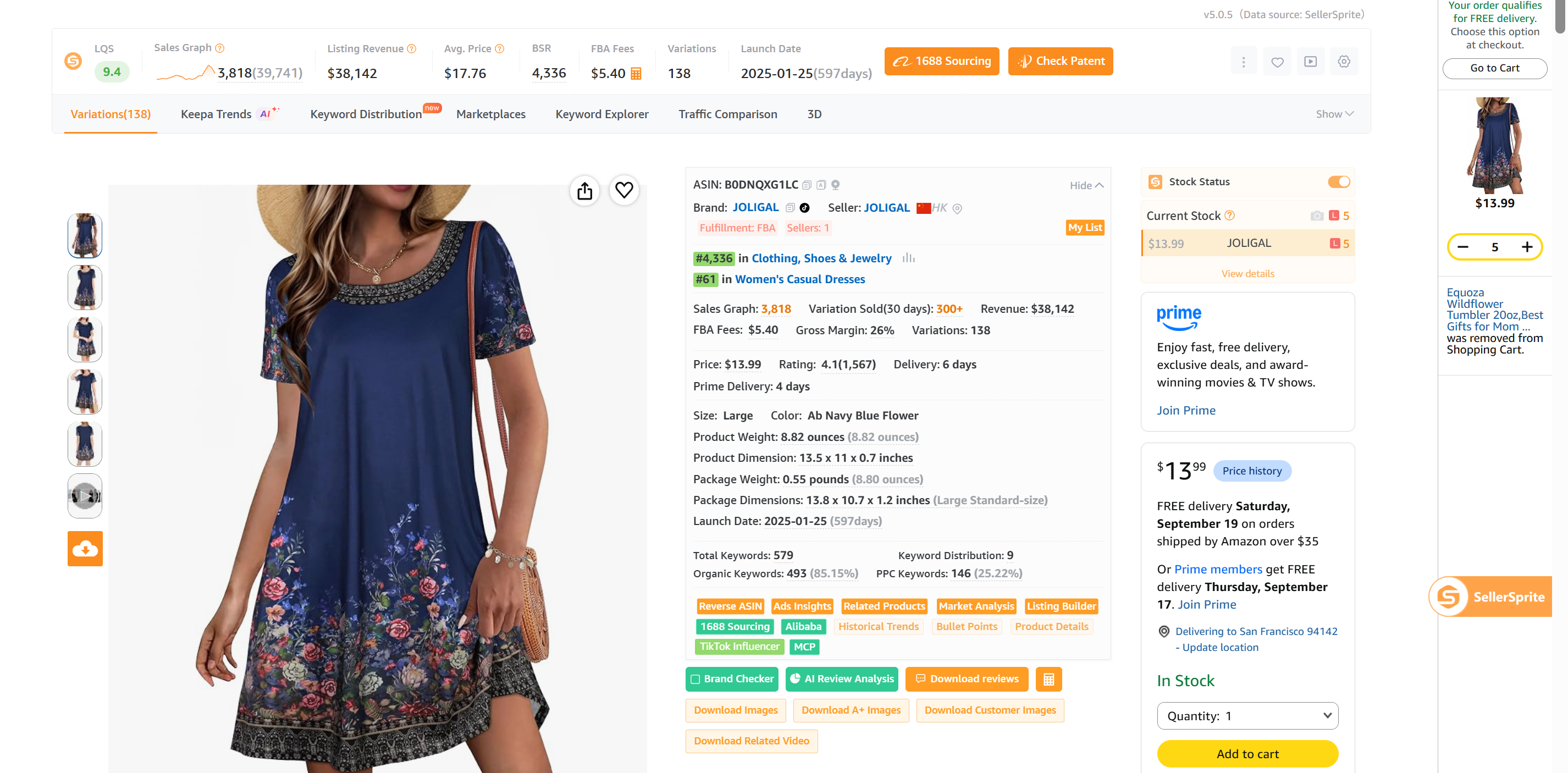
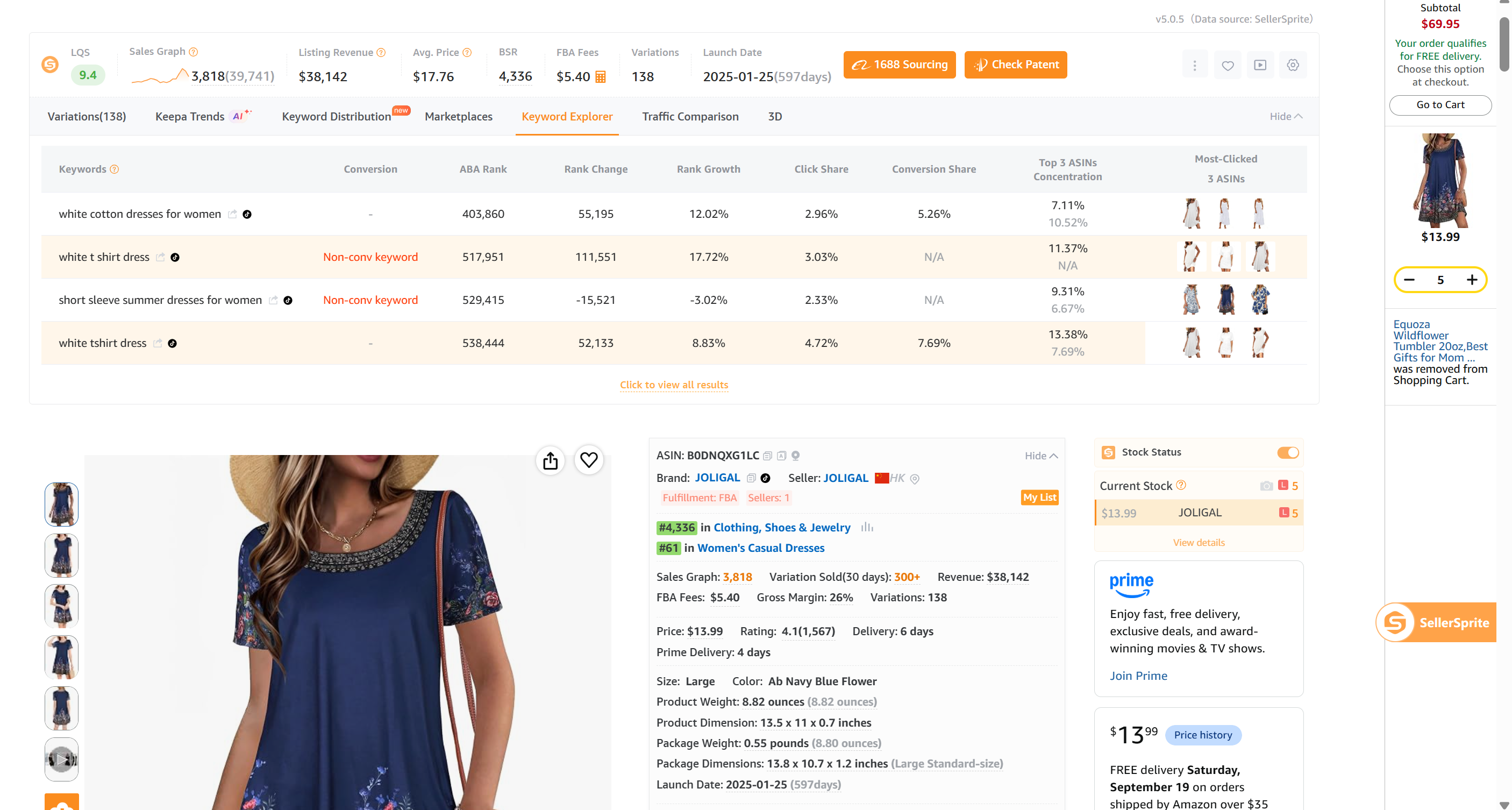
SellerSprite's extension overlays product and keyword data directly onto amazon.com pages, and the free plan is generous enough for early-stage validation. It is one of the few free tiers in this category that gives you a real look at keyword-level data, not just sales estimates.
- Key features: product research overlays on search and detail pages, keyword research and reverse-ASIN lookups, sales and revenue estimates, review analysis, and a profit calculator that accounts for US referral and FBA fees.
- Free tier: daily caps on lookups and keyword searches — enough to research a shortlist of products, not enough for bulk category mining.
- Paid tier: higher limits plus bulk exports, deeper keyword and traffic data, and product database access. Pricing is tiered and changes periodically — confirm current numbers before upgrading.
- Best for: US sellers who want keyword-level insight without committing to a full suite, and anyone who needs reverse-ASIN data to build a listing from scratch.
A practical starting point is to install the extension, open your own product's detail page, and compare the keyword list it returns against the keywords you assumed were driving sales. That single test tells you more about whether you need paid keyword data than any feature list. You can create a free SellerSprite account here, and if you want to understand how it fits alongside other tooling, see our Chrome extension guide below.
2. Keepa
Keepa is the closest thing the Amazon ecosystem has to a public record. Its extension drops a price and BSR history chart onto every product page, including Amazon-direct pricing versus third-party pricing — which is often the single most revealing piece of data about a niche.
- Key features: historical price charts, BSR history, buy-box and offer history, price-drop alerts, and a watchlist.
- Free tier: the extension itself is free and the chart is available on any ASIN, which is why it is installed on nearly every serious US seller's browser.
- Paid tier: the Keepa Data subscription (roughly $19/month at the time of writing — verify) adds the Product Finder, deal alerts, deeper category data, and API access.
- Best for: spotting whether a product's price is stable or collapsing, whether demand is seasonal, and whether Amazon itself competes on the listing. It is not a keyword tool.
Caveat: the charts are dense and take a session or two to read fluently. Start by comparing a product you already sell to one you are considering — the contrast usually makes the pattern obvious.
3. Helium 10 Chrome Extension (free plan)
Helium 10 is the best-known all-in-one suite in the Amazon space, and its extension is the entry point. The free plan gives you a capped number of daily lookups — commonly cited as a small handful of product and keyword queries per day (verify current limits, as they change).
- Key features: X-Ray overlays on search results showing estimated revenue and reviews, quick keyword lookups, a profit calculator, and listing audit prompts.
- Free tier: useful for spot checks; frustrating if you are comparing 30 products in one sitting.
- Paid tier: entry suites are commonly priced in the $39–$99/month range depending on tier and billing period — verify, since Helium 10 restructures plans regularly.
- Best for: sellers who want one vendor for research, keyword tracking, and listing tools, and who prefer learning a single interface.
4. Jungle Scout Chrome Extension (free plan)
Jungle Scout popularized the "estimated monthly sales" overlay, and its free extension remains one of the fastest ways to scan a search results page and see which listings are actually moving units.
- Key features: estimated monthly sales and revenue on search and detail pages, BSR, review counts, and quick niche scoring.
- Free tier: the estimates and overlays, without the full product database or bulk exports.
- Paid tier: plans commonly start near $49/month (verify) and unlock the product database, keyword tools, supplier database, and exports.
- Best for: new US sellers doing their first product hunt who want numbers on screen with zero setup.
5. The Camelizer (CamelCamelCamel)
The Camelizer is a completely free extension from CamelCamelCamel that shows long-range price history and Amazon sales rank history, plus a simple price-drop watch. It overlaps with Keepa, but plenty of sellers run both because the interfaces suit different habits.
- Key features: price history charts, rank history, price-drop alerts, and quick access to historical lows.
- Free tier: everything — there is no paid plan.
- Best for: retail arbitrage and reseller workflows, price monitoring, and checking whether a "deal" price is genuinely low. It does nothing for keyword research.
6. AMZ Suggestion Expander
This small, free utility does exactly one thing: it expands the number of autocomplete suggestions Amazon shows when you type in the search bar. Instead of roughly ten suggestions per seed, you can pull twenty or more.
- Key features: expanded autocomplete lists that you can export and de-duplicate into a long-tail keyword sheet.
- Free tier: the whole tool.
- Best for: harvesting raw keyword ideas before you pay for a research tool. Just remember that autocomplete suggestions are unordered — they are not ranked by search volume, and they tell you nothing about how competitive a keyword is.
One legacy free option worth flagging: DS Amazon Quick View, which inserts BSR and product dimensions into search results, still works for some users. Its development has slowed considerably, so verify compatibility with your current Chrome version before making it part of your workflow.
Best Paid Chrome Extensions for Amazon FBA Sellers
These tools are paid-first — either there is no meaningful free tier, or the free tier is a trial designed to expire. They earn their place when you need data depth, sourcing math, or account-level analytics that free overlays simply do not provide.
7. AMZScout PRO Extension
AMZScout is built for people who hunt products in volume. The PRO extension surfaces demand, competition, and opportunity scores as you browse, and pairs that with a supplier database and product tracker.
- Key features: on-page sales estimates, opportunity scores, keyword search, supplier and sourcing data, and a product tracker for monitoring listings over time.
- Pricing: commonly around $49.99/month, with lifetime license options offered periodically — verify both, as promotional pricing is common.
- Trial: a free trial is typically available; confirm length and card requirements before signing up.
- Best for: sellers running continuous product discovery, plus wholesale and dropshipping workflows where supplier research matters as much as demand.
8. RevSeller
RevSeller is a specialist tool, and it is excellent at its specialty: instant ROI and profit math on any product page, with historical price and rank charts and sales velocity layered in.
- Key features: quick net-profit and ROI calculators, historical charts, sales velocity, and restricted-brand or IP-claim checks — the last one saves wholesale buyers from sourcing products they cannot legally list.
- Pricing: paid only, sold as an annual subscription that typically lands under $200 per year (verify tier details and seat limits).
- Best for: wholesale and online arbitrage sellers who need to decide in seconds whether a sourcing opportunity clears their margin threshold. Brand owners also use it for MAP and pricing enforcement checks.
9. SellerApp Chrome Extension
SellerApp's extension leans toward operators who manage advertising and keyword rankings rather than pure product discovery. It combines keyword data with PPC insights and listing quality checks.
- Key features: keyword and ranking data, PPC campaign diagnostics, listing quality audits, and product-level analytics.
- Pricing: freemium with tiered paid plans — check current tiers directly, as they are restructured periodically.
- Best for: established sellers and marketing managers who need ranking history and ad performance side by side. If you only sell ten ASINs organically, you likely do not need it.
10. SmartScout Chrome Extension
SmartScout approaches the marketplace from the top down: instead of one product, it shows you brands, sellers, and subcategories — including estimated brand-level revenue — which is exactly what brand owners, aggregators, and agencies need for market sizing.
- Key features: brand and seller revenue estimates, seller mapping, subcategory analytics, and brand-tracking screens for competitive monitoring.
- Pricing: freemium — a subscription is required for the full dataset (verify current tiers).
- Best for: brand owners and agencies deciding whether a category is worth entering, and sellers watching an entire brand's ASIN portfolio rather than a single listing.
A note on the paid tiers of "free" tools: Helium 10, Jungle Scout, SellerSprite, and Keepa all sell paid upgrades that compete directly with the four paid-first tools above. If you already pay for one of them, check the upgrade price before adding a second vendor — most sellers end up with redundant subscriptions.
Which Extensions Fit Your Seller Stage?
There is no universal "best" extension, because the data a first-time seller needs is not the data an agency running six brands needs. Here is how to choose based on where you are.
New sellers (first 90 days, pre-launch or first ASIN). Stay free. Install Keepa plus one free research overlay (SellerSprite, Helium 10, or Jungle Scout), learn to read price and BSR history, and use Amazon's own FBA Revenue Calculator for fee math because it is the authoritative source for current US fees. Budget: $0. Your goal is not data volume — it is learning which numbers matter.
Growing sellers (roughly $1K–$20K/month in revenue). Add exactly one paid research suite, chosen for whichever workflow you do most: keyword and listing work points to a keyword-strong tool; constant product hunting points to a database-strong tool. Keep the free price-history tools running alongside it. Budget: roughly $40–$100/month, and cancel anything you have not opened in 30 days.
Operations and marketing managers. You are optimizing, not discovering. Prioritize ranking history, PPC diagnostics, bulk exports for reporting, and seat permissions so your team shares one source of truth. Check seat limits carefully — an extra user seat can add 20–50% to a plan price.
Brands and large sellers. Brand-level and category-level analytics matter more than single-ASIN lookups, so tools like SmartScout and multi-seat suites earn their cost. At this stage, also weigh annual billing (usually cheaper), API access (for your own dashboards), and data export rights — some vendors restrict bulk data use in their terms, so read them.
Monthly Cost Breakdown for US Sellers
The table below summarizes typical US pricing for the paid options covered above. Treat these as planning ranges and verify each on the vendor's pricing page — annual billing, promotions, and per-seat pricing change the math significantly.
| Tool | Typical monthly (verify) | Billing notes |
|---|---|---|
| Free-only stack (Keepa extension + Camelizer + suggestion expander + free research tier) | $0 | Daily lookup caps apply |
| Keepa Data | Roughly $19 | Adds Product Finder, alerts, API |
| Helium 10 entry suites | About $39–$99 | Feature tiers vary widely; annual saves |
| Jungle Scout plans | From about $49 | Feature caps by tier |
| AMZScout PRO | Commonly about $49.99 | Lifetime deals appear periodically |
| RevSeller | Annual only (typically under $200/year) | No free tier |
| SellerApp / SmartScout | Tiered, varies by data volume and seats | Freemium entry; confirm seat costs |
Practical budgeting rule: most US sellers end up spending somewhere between $0 and $150 per month on extensions and research tools, depending on stage — but that range is an editorial observation about typical stacks, not a published industry statistic, so treat it as a planning heuristic rather than a benchmark. The bigger risk is not price; it is paying for three tools that do the same job. Before adding anything, write down the specific decision the tool will help you make this month. If you cannot name it, skip the subscription.
How to Install and Use Amazon Seller Chrome Extensions Safely
Installation takes about two minutes per extension, but doing it in the right order reduces the risk of permission sprawl and browser slowdown. Follow these steps.
- Create a dedicated Chrome profile for your Amazon work. In Chrome, open the profile menu and add a new profile (for example, "Amazon Seller"). This keeps your selling tools isolated from personal browsing extensions — and prevents any other extension from reading Amazon data it has no business seeing.
- Open the Chrome Web Store and search the exact tool name. Install only from the official listing. Beware of look-alike names, because impersonation is a real problem in extension stores.
- Read the permissions before clicking "Add to Chrome." A product-research overlay typically needs to read and change data on Amazon pages. If a tool asks for "read and change all your data on all websites" and it has no obvious reason to, that is a warning sign.
- Scan the reviews for the recent ones, not the average. Sort by newest and read the one-star and three-star reviews. Recurring complaints about data accuracy, browser slowdown, or surprise billing are the signals that matter.
- Check the publisher and the update history. A listing with a real company behind it and recent updates is safer than one that has not changed in a year. Extensions can also change owners, so re-check periodically.
- Click "Add to Chrome" and pin the icon to the toolbar so you can see when it is running.
- Create a tool account with a business email. Never reuse your Amazon Seller Central password. Tools that legitimately connect to your seller account should send you through Amazon's official authorization screens — if an extension asks you to type your Amazon password directly into its own form, stop.
- Set the marketplace to amazon.com. Almost every tool has a country selector. Leaving it on the wrong marketplace produces estimates based on the wrong fees and the wrong demand data — a common and expensive mistake for US sellers.
- Sanity-check on an ASIN you already know. Open your own product's page and compare the tool's estimate to what you actually sell. That calibration tells you more about a tool's reliability than any marketing page.
Safety checklist to revisit every quarter:
- Never share your Seller Central password with an extension or a third-party form. Use official authorization flows only.
- Keep your extension count lean — aim for five to eight total in your seller profile. More extensions means more permission surface and a slower browser.
- Review permissions after every update; extensions occasionally expand their scope.
- Turn on two-factor authentication for both your Amazon account and your tool accounts.
- Remove anything you have not used in 30 days. Dormant extensions are pure risk with zero benefit.
- Avoid tools that promise to automate actions inside Seller Central or manipulate Amazon's interface. Automation of that kind can conflict with Amazon's seller agreements, and the account risk is entirely yours.
- Understand the data boundary: extensions can read what amazon.com shows publicly. They cannot see your competitors' backend numbers, and their "sales estimates" are models built from rank and category data, not reported figures.
Common Mistakes to Avoid
- Treating sales estimates as facts. Every tool models revenue from BSR, category, and price. Two tools will disagree on the same ASIN — sometimes by 40%. Use estimates to rank opportunities, never to write a business plan.
- Installing five overlapping extensions. Three sales-estimate overlays on one search page produce conflicting numbers and a sluggish browser. Pick one research tool as your source of truth.
- Paying before testing the free tier. Run the free plan for two weeks on real decisions. If you never hit the cap, you do not need the upgrade yet.
- Leaving the marketplace set to the wrong country. US sellers reading UK or DE data will misjudge demand and fees completely.
- Chasing high-volume keywords with no conversion data. A keyword with 80,000 monthly searches is worthless if the top ten results are all established brands with thousands of reviews. Competition context matters as much as volume.
- Ignoring the subscription you forgot about. Annual auto-renewals on tools you stopped opening are the most common waste in this category. Calendar a review every quarter.
- Using tools that violate Amazon's terms. Read the seller agreements before installing anything that automates activity in Seller Central. No extension is worth an account suspension.
- Never calibrating on your own data. The most valuable test is comparing a tool's estimate against your actual sales history for a product you already own.
Building a Lean Amazon Seller Tool Stack
Chrome extensions are only one layer of your stack. They are excellent at in-browser research and monitoring; they are poor substitutes for a full research platform when you need bulk data, historical depth, or team collaboration. The smart approach is to treat extensions as the front line and pair them with one deeper tool for the work you do most.
A workable starter stack for a US seller looks like this: Keepa or The Camelizer for price and rank history, a free keyword research tier for keyword and reverse-ASIN checks, Amazon's own FBA calculators for authoritative fee math, and exactly one paid suite once your volume justifies it. If you want a broader view of how these categories fit together — including analytics platforms and PPC tools — start with our hub guide to the best Amazon seller tools.
If keyword-level data is the gap in your current setup, the fastest way to test that hypothesis is to run a real ASIN through a free keyword tool and compare the results with your assumptions. You can start a free SellerSprite account and check an ASIN you already sell, then decide whether an upgrade is worth it. For a deeper walkthrough of how browser extensions fit into a research workflow, read our Chrome extension for Amazon research guide and our roundup of Amazon Chrome extensions.
FAQ
Which free Chrome extensions are best for Amazon sellers in the US?
For US sellers, the strongest free combination is Keepa (price and BSR history on any amazon.com listing), The Camelizer (free price-drop watching and long-range price charts), AMZ Suggestion Expander (extra autocomplete keyword ideas), and one free research tier with keyword data — SellerSprite, Helium 10, or Jungle Scout. Together they cover demand validation, price history, keyword ideation, and basic competition checks at zero cost. The main limitations of free tiers are daily lookup caps, no bulk exports, and shallow historical data, so you will eventually hit a ceiling if you research dozens of products a week. A practical approach is to run this free stack for 30 days and note exactly where you get blocked; that gap tells you which paid tool, if any, is worth buying.
How much do paid Chrome extensions for Amazon FBA sellers cost each month?
Most paid options sit somewhere between roughly $19 and $100 per month, before seat add-ons. Price-history subscriptions like Keepa Data land near $19/month; all-in-one research suites commonly start in the $39–$99/month range; product-discovery extensions such as AMZScout PRO are typically around $49.99/month with periodic lifetime deals; and specialist tools like RevSeller are sold as annual subscriptions, usually under $200 per year. Brand-level analytics platforms often price by data volume and seats, so team plans can cost considerably more. All of these figures are approximate and change frequently — verify current pricing, annual discounts, and seat limits on each vendor's own pricing page before you subscribe, because promotions and tier restructuring are common in this market.
Are Chrome extensions for Amazon sellers safe to use with my seller account?
A well-built research extension that only reads publicly visible amazon.com pages is generally low risk, because it never touches your Seller Central account or credentials. Risk rises sharply when an extension asks for your Amazon login inside its own form, requests permissions far beyond Amazon pages, or promises to automate activity inside Seller Central. To stay safe: use a dedicated Chrome profile for selling, never share your Seller Central password, rely on Amazon's official authorization screens for any tool that connects to your account, review permissions after updates, keep your extension count low, and remove anything you have not used in a month. Also remember that account compliance is ultimately your responsibility — before installing anything that automates actions on Amazon, read the seller agreements and confirm the tool's approach does not conflict with them.
Do I need a paid extension to do Amazon product research?
No. Free tools can validate a shortlist of products, and Amazon's own FBA Revenue Calculator remains the most authoritative source for current US fee math. Paid extensions earn their cost when you need keyword-level data (especially reverse-ASIN lookups that reveal which terms actually send traffic to a listing), bulk exports, deep historical trends, PPC diagnostics, or multiple team seats. A simple test: if you are researching a handful of products a month, stay free; if you are screening dozens of ASINs weekly, running ads at scale, or reporting to a team, one paid suite will almost certainly pay for itself.
Next Steps
- Create a dedicated Chrome profile for selling, install Keepa and one free keyword research tier, and set the marketplace to amazon.com.
- Test the tool on an ASIN you already sell, comparing estimated sales, estimated traffic, and keyword data against what you know is true.
- If keyword gaps are your bottleneck, start a free SellerSprite account and run three of your own ASINs through it before deciding on an upgrade.
- Review your subscriptions quarterly: cancel anything you have not opened in 30 days and confirm every price on the vendor's current pricing page.
References
- Google Chrome Help — Install and manage extensions View
- Chrome Web Store — Extension listings and permissions information View
- Amazon — FBA Revenue Calculator and selling fee overview View
- Keepa — Subscription and feature details View
- Helium 10 — Current plan pricing and feature tiers View
- Jungle Scout — Current plan pricing and feature tiers View
- SellerSprite — Chrome extension research guide (internal resource) View
Verification note: pricing, plan tiers, and feature limits referenced in this article are approximate and change frequently. Confirm every figure on the vendor's official pricing page before purchasing, and treat all third-party sales or revenue estimates as modeled approximations rather than reported data.
By SellerSprite Success Team
Amazon seller tools and marketplace SEO specialist.
Editorial process: AI-assisted draft prepared for human fact-checking, source verification, and brand review before publication.