Backend search terms and Amazon bullet points are where ranking and conversion meet. Your title wins the first click, but your backend keywords expand reach without hurting readability. Then your bullet points turn qualified traffic into buyers. This guide shows a repeatable 2026 workflow using SellerSprite so you can build a clean keyword map, stay inside Amazon limits, and publish a listing that ranks and converts.
Key takeaways
- Treat backend search terms as a keyword allocation problem, not a brainstorming problem.
- Stay under the 250 byte search terms limit or Amazon may ignore the entire field.
- Use backend keywords for special cases: misspellings, abbreviations, and language variants that match real demand.
- Write bullet points for persuasion first, then weave in remaining keywords only where they support a real claim.
- Validate before publishing: byte count, indexing, and brand risk checks inside SellerSprite.
Table of contents
- Keyword placement logic: what goes where
- Amazon backend search terms 2026: rules and limits
- SellerSprite workflow: build and filter a master keyword list
- Backend keyword examples: relevance filters and special cases
- Amazon bullet points that rank and convert
- The five bullet framework: benefit first, proof second
- Market specific notes: US, EU, UK, and multilingual indexing
- Final validation in SellerSprite before publishing
- FAQ
- About the author
- References
Start optimizing with SellerSprite in minutes
Get a FREE 3-Day trial and use Listing Builder, Keyword Mining, Index Checker, and Brand Checker to build a clean keyword map and publish with confidence.
Keyword placement logic: what goes where
The fastest way to improve listing optimization is to stop guessing and start allocating. Build one master keyword list, then distribute by role: title for discovery, backend search terms for coverage, bullet points for persuasion.
Amazon backend search terms 2026: rules and limits
Backend search terms are invisible to shoppers, but Amazon can index them. That makes them one of the most efficient places to expand keyword coverage without turning your title or bullet points into a keyword dump.
Non negotiable limit
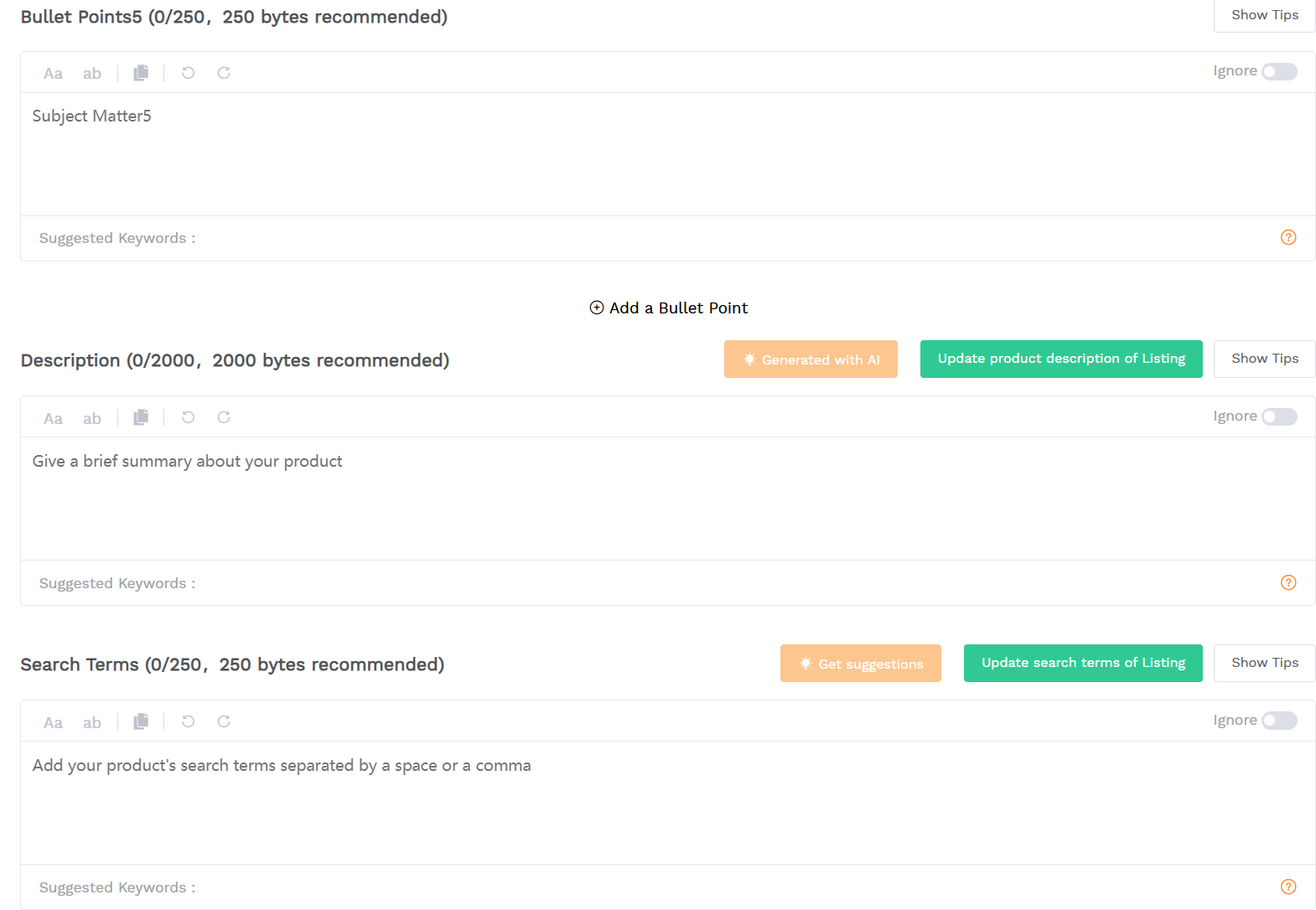
Amazon limits Search Terms to less than 250 bytes. If you exceed the limit, Amazon may ignore the entire attribute. Use a byte counter, not a character guess.
Practical rules that keep you safe and efficient:
- Use spaces to separate words. Avoid punctuation and special symbols.
- Do not repeat the same word in the Search Terms field.
- Do not add brand names, competitor brands, or ASINs.
- Skip stop words like "a", "and", "the" to save bytes.
SellerSprite workflow: build and filter a master keyword list
The best backend keyword strategy starts before you write anything. Build one master list, rank it, and then allocate.
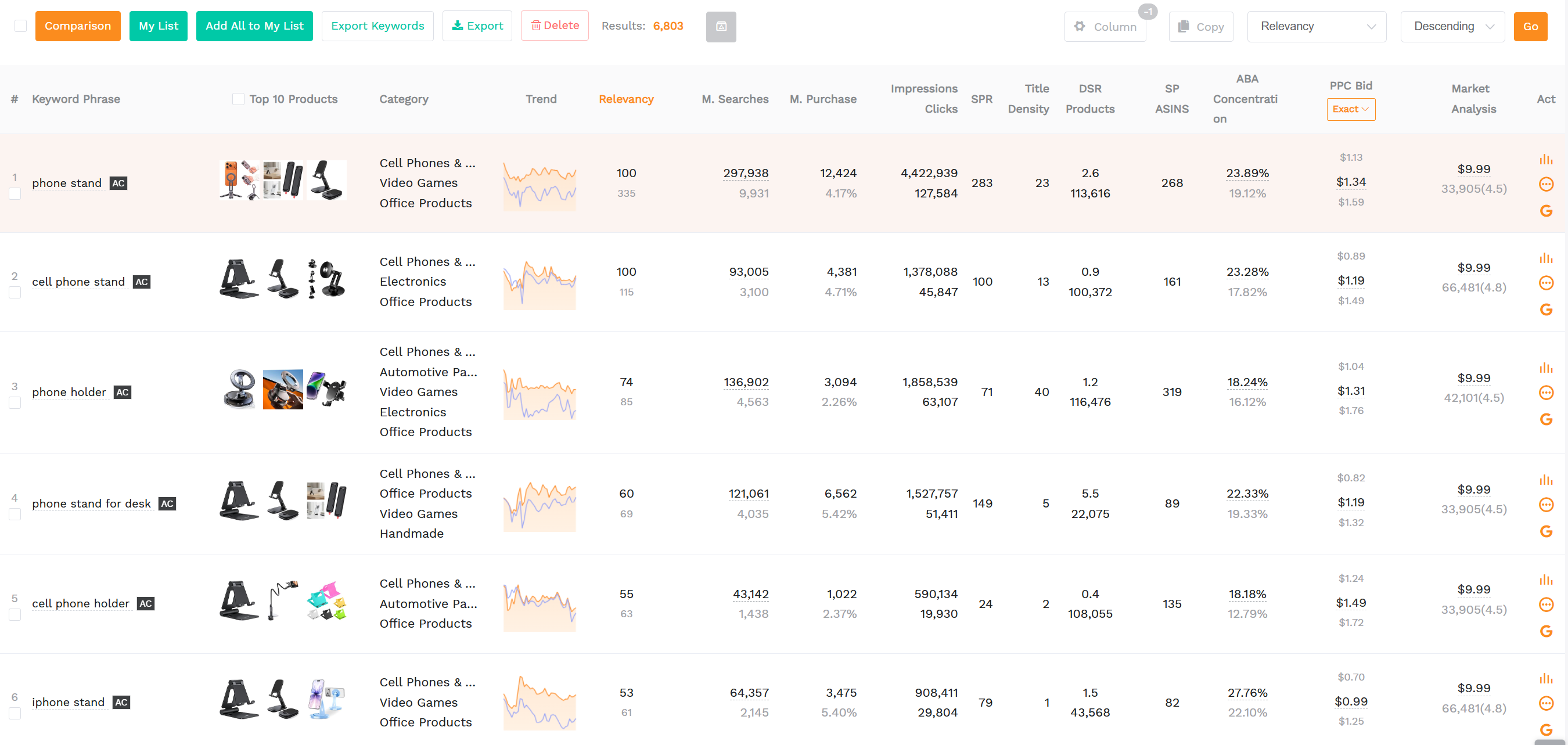
Step 1: Expand from buyer language, not your assumptions
Use SellerSprite to collect keywords from three angles so you do not miss real demand:
- Keyword Mining to expand from seed terms and find long tail variations.
- Reverse ASIN to pull the keywords that top competitors already rank for.
- Keyword Explorer to review search volume and prioritize winners.
Step 2: Rank and tag keywords for placement
Inside your keyword list, tag each term by intent and placement priority. A simple tagging system works:
- Core: best buyer intent, best volume, must compete for title space.
- Secondary: strong relevance, goes to backend search terms or bullets.
- Special: misspellings, abbreviations, language variants, only if backed by demand.
Pro Tip
Treat backend search terms as "leftovers plus special cases". If your team debates what to add, you probably skipped ranking and tagging.
Step 3: Filter for relevance, not vanity
Ask one question for every keyword you keep:
If a shopper searches this term, are they likely to buy my exact product?
Remove anything that fails the test:
- Wrong product type keywords (example: "cork" when you sell a rigid glass stopper and buyers want traditional cork).
- Wrong purchase mode keywords (example: "bulk" when you sell single premium units).
- Price bait terms that attract the wrong expectations (example: "cheap", "free").
Backend keyword examples: relevance filters and special cases
Once you have a ranked master list, backend search terms become a disciplined packing exercise. Your goal is maximum relevant coverage under 250 bytes.
Step 1: Move only the leftovers into Search Terms
Put core keywords into the title first. Then copy only the remaining high value, high relevance terms into backend search terms. You are allocating from a ranked list, not guessing.
Step 2: Add special cases that belong in the backend
Backend search terms are the best home for keywords that are valuable but awkward, risky, or distracting in customer facing copy:
- Misspellings that show up in your keyword data.
- Abbreviations and short forms that shoppers actually type.
- Language variants that match real buying behavior in your target marketplace.
Illustrative example: wine stopper keyword allocation
This is an example to show the process. Replace with your own product terms.
Common mistake
Using backend search terms as a dumping ground for unrelated high volume keywords. More impressions do not help if they bring the wrong buyers and hurt conversion signals.
Amazon bullet points that rank and convert
Bullet points are where keyword work becomes sales psychology. Yes, bullet points can help indexing, but their primary job is to persuade. If your bullets read like a keyword list, you may index, but you will lose buyers.
Your bullet point workflow
Step 1: Write for persuasion first
Draft five bullets with zero keyword pressure. Focus on what makes the product worth buying: outcomes, differentiators, and risk reduction.
Step 2: Use real buyer language from reviews
To find language that converts, pull themes from competitor reviews:
- Top complaints that your product can fix
- Top praised benefits you must match or beat
Step 3: Weave in remaining keywords second
After bullets sound strong, weave in leftover keywords only where they fit naturally.
- Never sacrifice readability for a keyword.
- Only insert a keyword where it supports a real claim.
- Repetition is fine if it happens naturally. Do not force it.
The five bullet framework: benefit first, proof second
Each bullet should follow the same internal structure: benefit headline first, then feature proof. Emotion leads, logic confirms.
Pro Tip
If you want more keywords in bullets without hurting readability, write shorter sentences and add one concrete proof detail per bullet. Specificity increases trust and often increases conversion.
Market specific notes: US, EU, UK, and multilingual indexing
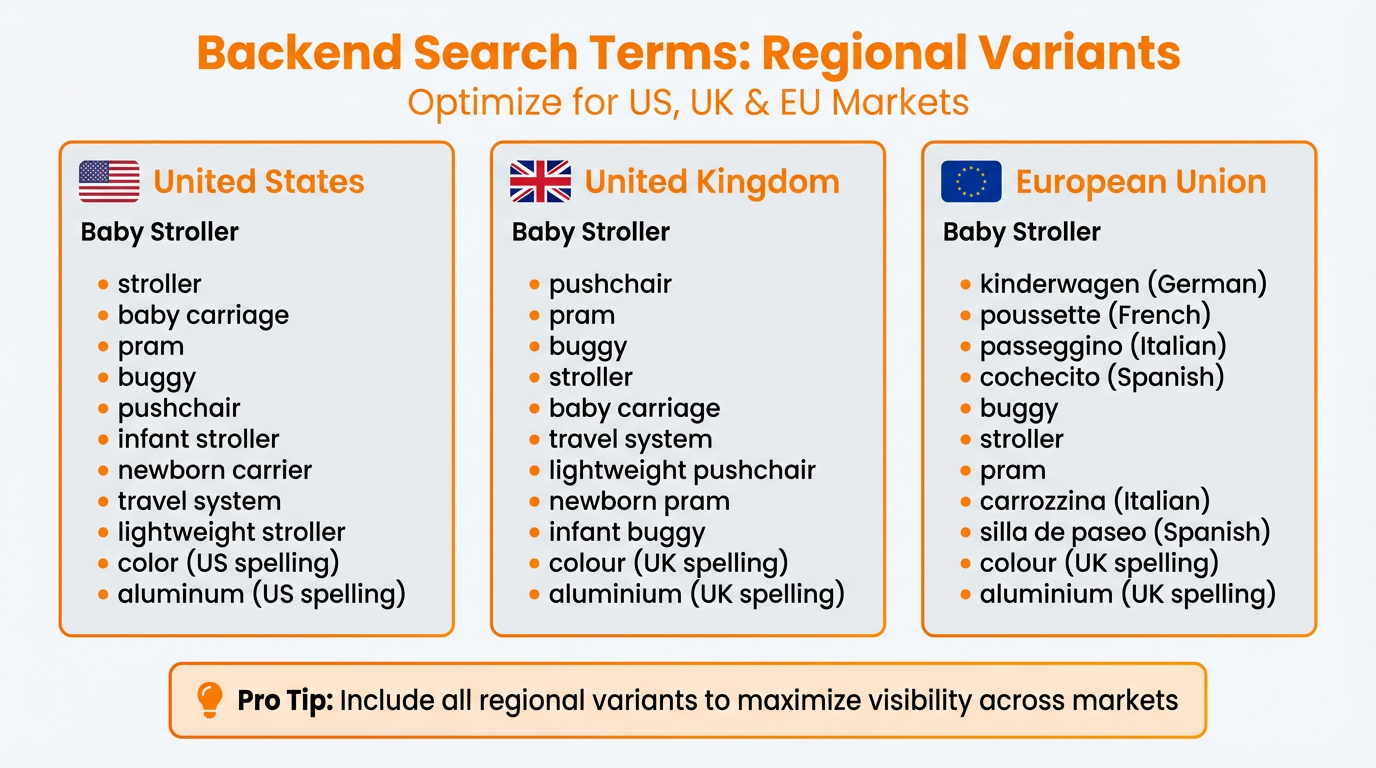
GEO signals matter when your listings serve multiple marketplaces. Backend search terms are a clean place to support regional spelling, language variations, and compliance driven intent without cluttering customer facing copy.
US
- Prioritize high intent US phrasing and common abbreviations.
- Avoid compliance claims unless you can prove them. If you reference certifications, keep wording factual and consistent across bullets and images.
EU
- If you sell in EU marketplaces, consider language variants shoppers actually use (example: German, French, Spanish), but only if your keyword data supports demand.
- For B2B or cross border intent, terms like "VAT invoice" can matter for certain categories and buyer segments. Use them only if your offer truly supports the requirement.
- If your product requires documents in EU markets, treat that as a listing system: images, A plus, and bullets should match your backend keyword intent.
UK
- Include UK spelling variants where relevant (example: colour vs color) to improve coverage.
- If your buyer language differs from US phrasing, prioritize the term that matches the UK marketplace search behavior.
Final validation in SellerSprite before publishing
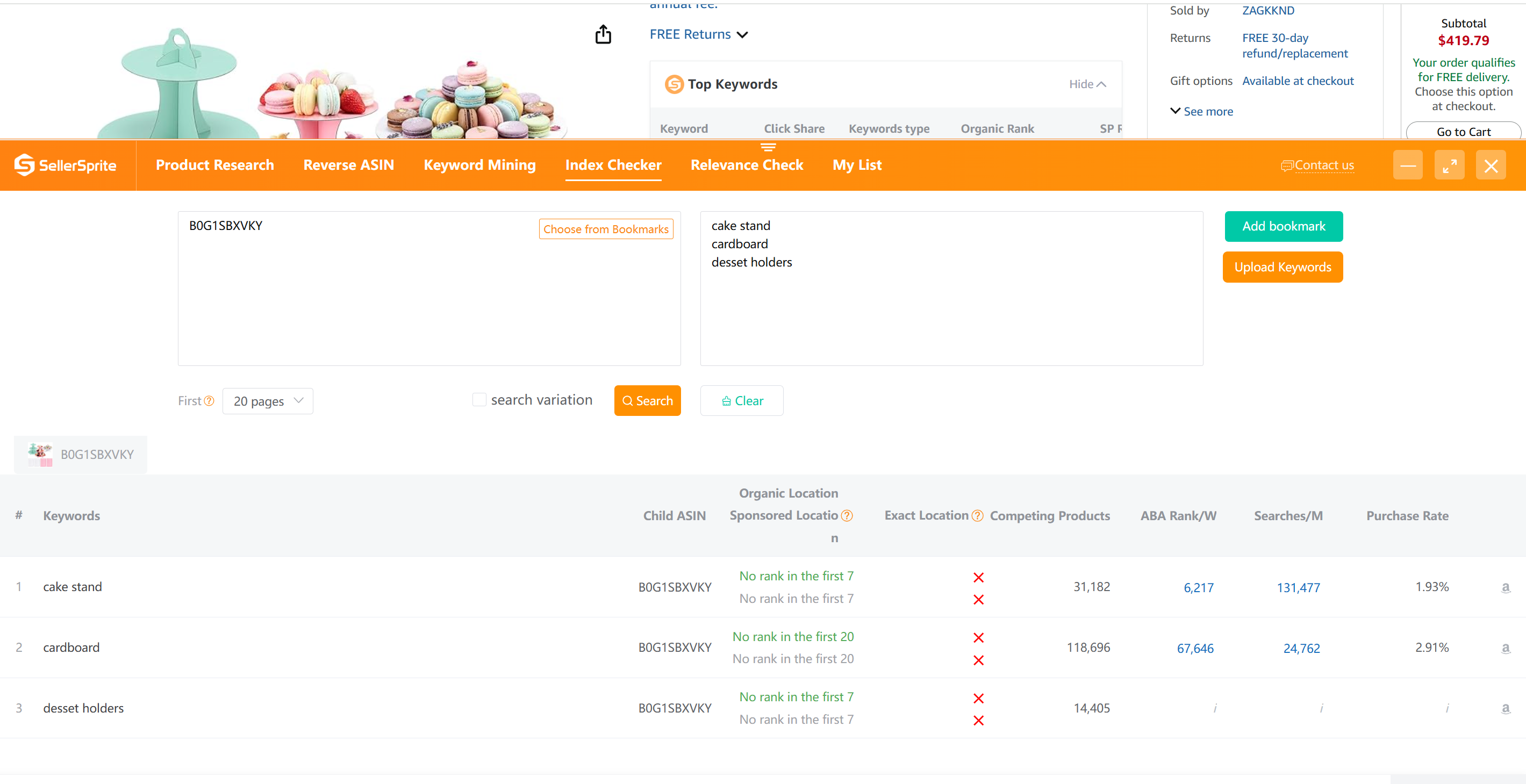
Before you publish, run three checks so your listing is measurable and safer:
- Listing Builder: confirm your backend search terms stay under 250 bytes while keeping relevance tight.
- Index Checker: confirm Amazon is indexing the keywords you care about.
- Brand Checker: catch risky brand terms before they become a compliance problem.
View The SellerSprite Course Directory
Ready for the next step? Open the SellerSprite Academy course directory to continue building your Amazon FBA skills chapter by chapter.
FAQ
What is the Amazon backend search terms limit?
Amazon limits Search Terms to less than 250 bytes. If you exceed the limit, the attribute may be ignored. Use a byte counter in your drafting workflow.
Should I repeat keywords from my title in backend search terms?
In most cases, no. Save bytes for additional relevant coverage. Focus on leftover high value terms and special cases like misspellings or language variants backed by demand.
Do Amazon bullet points help SEO or only conversion?
Bullet points can support indexing, but their primary job is conversion. Write for persuasion first, then weave in keywords only where they support a real benefit and proof.
Where should misspellings go, title or backend keywords?
Put misspellings in backend search terms when your keyword research shows real demand. Do not damage readability in your title or bullets for spelling variants.
Share Your Sourcing Journey With SellerSprite Community
Join the SellerSprite community on the Facebook Group to share your sourcing journey, ask questions, and get support from fellow Amazon sellers.
About the author
SellerSpriteTeam
The SellerSprite Team creates practical Amazon listing optimization playbooks based on day to day seller workflows. We focus on repeatable systems: keyword research, keyword allocation, byte safe backend search terms, and conversion focused bullet points.
Helpful links: Try SellerSprite | Help Center